
Participating Frequently
June 20, 2026

P: Lightroom Denoise suddenly stopped working

  • June 20, 2026
  • 122 replies
  • 1801 views

Hi everyone,

I'm having an issue with the latest version of Lightroom CC on a MacBook M5 Pro running macOS Tahoe 26.5.1. (I was experiencing the same problem on 26.5 and decided to update hoping it would fix it, but unfortunately it didn't.)

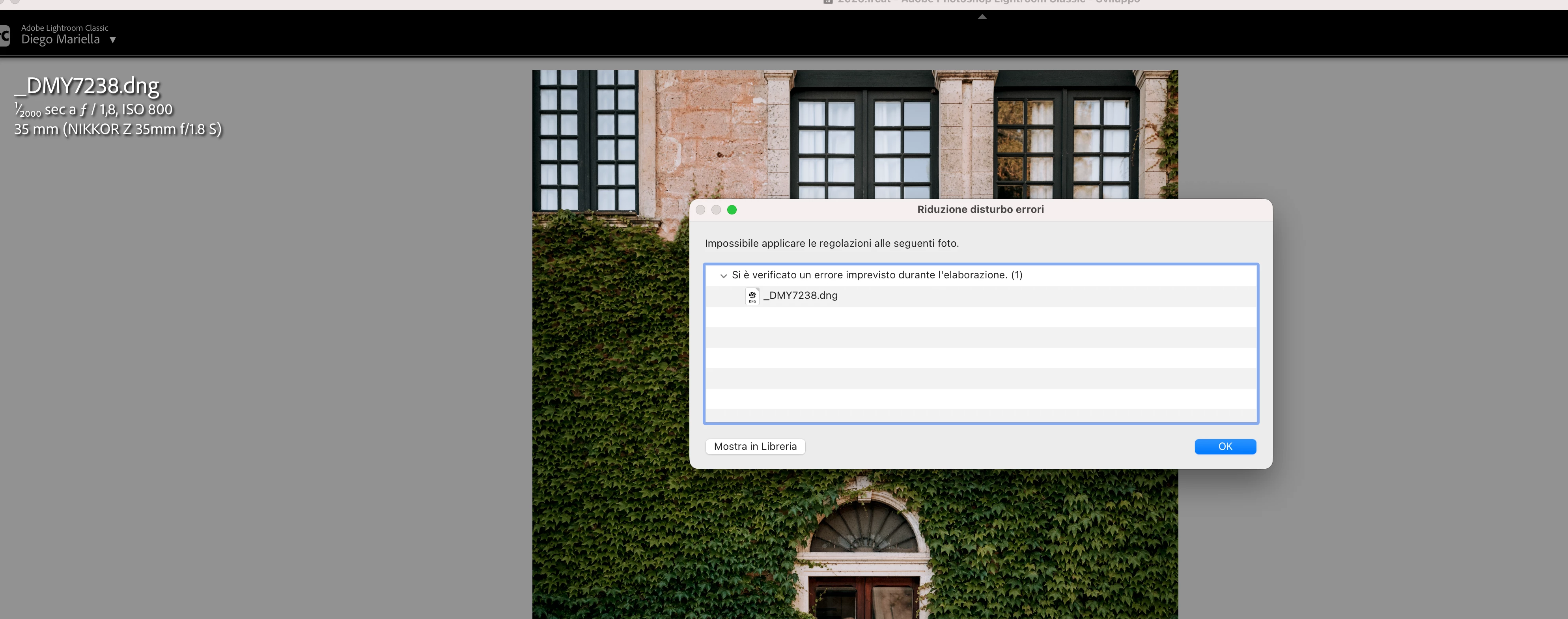
Since this morning, it's been impossible to to use Noise Reduction, even though my internet connection is working perfectly. I've already updated both Lightroom CC and macOS, cleared the cache, and optimized the catalog, but I keep getting this error screen whenever I try to use Noise Reduction.

Has anyone experienced the same issue or knows how to fix it? Any help would be greatly appreciated. Thanks! 🙏
 

    Pinned Reply By Sameer K

    Hi All! Lightroom Classic v15.4.1 is now available for downlaod via the Creative Cloud desktop app with the following critical bug fiixes for the issue reported in this thread and the other: 


    Thanks!
    Sameer K

    122 replies

    Joel24961805vbco
    Participant
    June 20, 2026

    I am having the same issue after doing an update.  How do we correct this issue.

    Joel24961805vbco
    Participant
    June 20, 2026

    Having the same issue after doing  the upgrade.  None of the recommendations are working.

    sevca
    Participant
    June 20, 2026

    Hello,

    I have been experiencing the same issue all day. I have installed two previous versions of Lightroom Classic, but I still get the same error.

    I have tested RAW files stored locally on my computer as well as RAW files located on a LaCie external hard drive, and the problem persists in both cases.

    My system is:

    • Mac M3 Pro
    • 36 GB RAM
    • macOS Tahoe 26.5.1

    Could you please help me resolve this issue?

    Thank you.


    James+Morton+Photography
    Participant
    June 20, 2026

    Similar to what I see many other users reporting.  

    James+Morton+Photography
    Participant
    June 20, 2026

    Hello Srishti.  I too am having this problem in LR Classic after the updates to LR and Camera Raw.  I’ve tried everything and it still doesn't work.  Is this a new issue due to the updates?

    Peter_zana
    Participant
    June 20, 2026

    Ciao

    sto cercando di utilizzare la funzione di riduzione disturbo AI in Lightroom Classic ma una volta che provo mi compare questo errore come allegato, inibendo la funzione

    Fino a poco fa funzionava, di punto in bianco ha iniziato a darmi questo errore per tutte le foto della libreria, altre funzioni come Super Resolution funzionano normalmente…

    Qualcuno ha idea come poter risolvere?

    Sto utilizzando ultima versione di MacOS Tahoe Versione 26.5.1 (25F80)

    Lightroom classic è aggiornato all’ultima versione 15.3.1

    Grazie

    Hi,

    I’m trying to use the AI Denoise feature in Lightroom Classic, but every time I attempt it I get the error shown in the attached screenshot, which prevents the function from running.

    Until recently it was working fine, but it suddenly stopped working out of nowhere and now I get the same error on every photo in my library. Other AI features, such as Super Resolution, are still working normally.

    Has anyone experienced this issue or found a way to fix it?

    I’m currently using the latest version of macOS Tahoe (26.5.1, build 25F80) and Lightroom Classic is fully up to date (15.3.1).

    Thanks in advance.

    Participating Frequently
    June 20, 2026

    Thank you very much. I just reinstalled version 18.3 of ACR and now both computers work properly. But why would Adobe published version 18.4 of ACR without version 15.4 of LR-Classic? This makes no sense! Or only some users have no access to LR-Classic 15.4? If so, why?

    The other interesting issue is that I have the three applications marked for manual upgrades in Adobe creative cloud. See the screenshot in attach. For some reason, PS and LR do not automatically upgrade but ACR does it! Now I uncheck the Autoupdate button, at the top!

    Thank you for your kindly help.

    Regards,

    Gil

    GilSantos
    rhilaw
    Participant
    June 20, 2026

    I’m having the same issue so keen to hear how others are resolving.

    JElkins62
    Participant
    June 20, 2026

    It won’t let me upload a screenshot 


    JElkins62
    Participant
    June 20, 2026

    I start editing my RAW file and when I click on denoise it fails.