
Participating Frequently
June 20, 2026

P: Lightroom Denoise suddenly stopped working

  • June 20, 2026
  • 122 replies
  • 1803 views

Hi everyone,

I'm having an issue with the latest version of Lightroom CC on a MacBook M5 Pro running macOS Tahoe 26.5.1. (I was experiencing the same problem on 26.5 and decided to update hoping it would fix it, but unfortunately it didn't.)

Since this morning, it's been impossible to to use Noise Reduction, even though my internet connection is working perfectly. I've already updated both Lightroom CC and macOS, cleared the cache, and optimized the catalog, but I keep getting this error screen whenever I try to use Noise Reduction.

Has anyone experienced the same issue or knows how to fix it? Any help would be greatly appreciated. Thanks! 🙏
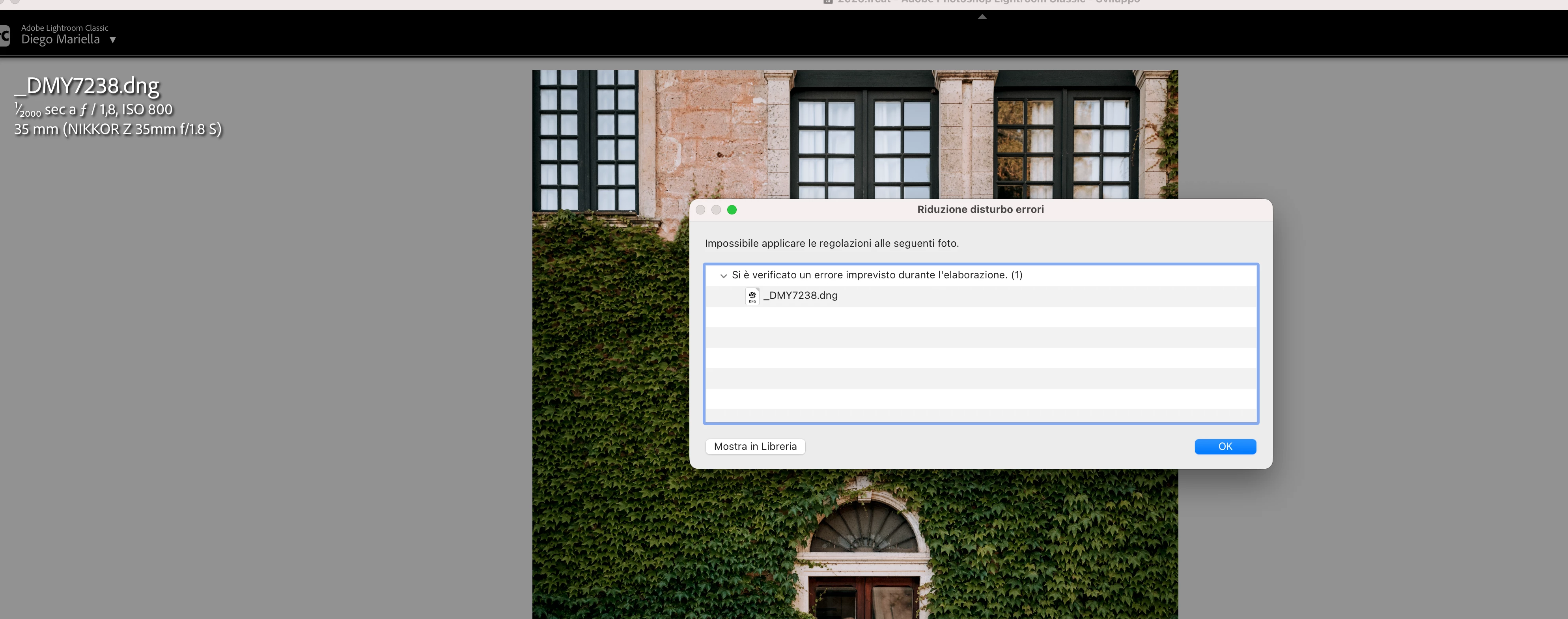
 

    Pinned Reply By Sameer K

    Hi All! Lightroom Classic v15.4.1 is now available for downlaod via the Creative Cloud desktop app with the following critical bug fiixes for the issue reported in this thread and the other: 


    Thanks!
    Sameer K

    122 replies

    Participating Frequently
    June 20, 2026

    Indeed, I am using version 18.4 of ACR and version 15.3.1 of Lightroom Classic. At the moment I cant’t upgrade to version 15.4 because it is not available in my Creative Cloud window.

    GilSantos
    Breeze2121
    Participant
    June 22, 2026

    I’m in the same boat….

    Into+The+Wild+Imagery
    Participant
    June 22, 2026

    Me too.  I’m LRC 15.3.1 and CR 18.4 and cannot denoise…


    Andthewy
    Participant
    June 20, 2026

    If you download Camera Raw 18.3 from here (Mac) - https://download.adobe.com/pub/adobe/photoshop/cameraraw/mac/18.x/CameraRaw_18_3.dmg

    Run the installer and DO NOT update in Creative Cloud - make sure auto updates are turned off before you start - until Lightroom Classic 15.4 is released.

    Lightroom Classic 15.4 update has been pulled by Adobe due to a serious bug.

    Participant
    June 20, 2026

    this worked for me, thank you

    Participant
    June 20, 2026

    nel modulo di develop, clicco su Denoise e compare l’errore segnalato, per qualsiasi foto

    Community Expert
    June 20, 2026

     Please see here: 


    Moderators, ​@Rikk Flohr_Photography, please lock or merge with the duplicate post:

    lightroom cc denoise issue | Adobe DME


    My System: Intel i7-8700K - 64GB RAM - NVidia Geforce RTX 3060 - Windows 11 Pro 25H2 -- LR-Classic 15 - Photoshop 27 - Nik Collection 9 - PureRAW 6 - Topaz Photo AI
    Community Expert
    June 20, 2026

    Please see here: 


    Moderators, ​@Rikk Flohr_Photography, please lock or merge with the duplicate post:

    lightroom cc denoise issue | Adobe DME


    My System: Intel i7-8700K - 64GB RAM - NVidia Geforce RTX 3060 - Windows 11 Pro 25H2 -- LR-Classic 15 - Photoshop 27 - Nik Collection 9 - PureRAW 6 - Topaz Photo AI
    Participant
    June 21, 2026

    I tried his folder trick and it did not work. I am not downloading a random link from an account created just this month either. Need verification first.

    Andthewy
    Participant
    June 20, 2026

    The issue appears to relate to Camera Raw updating to the latest version (18.3) but Lightroom Classic’s update (15.4) seems to be unavailable for some users. 15.4 needs 18.3 Raw to apply denoise for some reason.

    Participant
    June 20, 2026

    How do we get the 15.4 version? It just says only the 15.3.1 is available which is the last update I got.

    andrea_3533
    Participant
    June 20, 2026

    I have the identical prblem from today

    Participant
    June 20, 2026

    When I copied and pasted settings the denoise will not update when i try to adjust noise settings. I then removed the denoise feature by unchecking the box and now it will not reapply denoise and gives a failure error. I have made sure that I have plenty of memory, all updates are current, closed and restarted lightroom, even restarted my macbook.

    Participating Frequently
    June 20, 2026

    A A few days ago I used Lightroom classic in my Mac Studio M1 Ultra and everything went perfect. Today, without changing anything in the operative system or in the application, Lightroom gives an error when I try to use Denoise.

    I already did all suggestion I found in the net, but nothing works. I realised that I have the same issue in an older Mac, with and Intel processor

    If I open the same file directly in photoshop, using camera raw, I can apply Denoise.

    I also ran Lightroom from the Command Shell and I generated the log file that I send in attachment.

    Any help would be appreciated.

    Gil

    GilSantos
    yamato713108855
    Community Expert
    Community Expert
    June 20, 2026

    グローバルのスレッドにMac OSのユーザープロファイルの破損が原因でこのような症状が出る事があるようです。
    別のユーザーを作って正常に動作するようならユーザープロファイルの破損が考えられます。

    ponta0222
    Participant
    June 20, 2026

    アドバイスありがとうございます

    ユーザープロファイルの修正と別のユーザーを作ったのですが改善されませんでした

    yamato713108855
    Community Expert
    Community Expert
    June 20, 2026

    では、リンク先のスレッドでそのように記載して頂いて、さらなる調査をお願いしてください。
    何か他の要因が有るのかもしれません。