
Participating Frequently
June 20, 2026

P: Lightroom Denoise suddenly stopped working

  • June 20, 2026
  • 122 replies
  • 1805 views

Hi everyone,

I'm having an issue with the latest version of Lightroom CC on a MacBook M5 Pro running macOS Tahoe 26.5.1. (I was experiencing the same problem on 26.5 and decided to update hoping it would fix it, but unfortunately it didn't.)

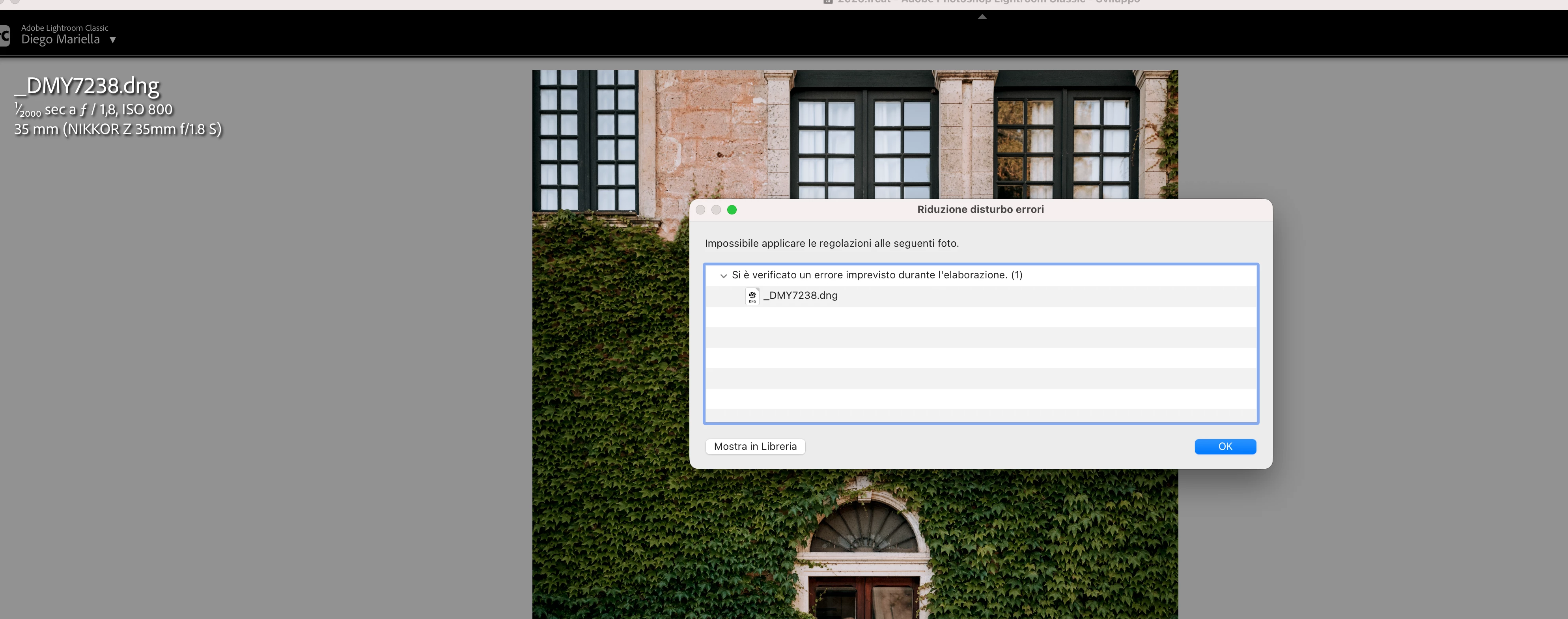
Since this morning, it's been impossible to to use Noise Reduction, even though my internet connection is working perfectly. I've already updated both Lightroom CC and macOS, cleared the cache, and optimized the catalog, but I keep getting this error screen whenever I try to use Noise Reduction.

Has anyone experienced the same issue or knows how to fix it? Any help would be greatly appreciated. Thanks! 🙏
 

    Pinned Reply By Sameer K

    Hi All! Lightroom Classic v15.4.1 is now available for downlaod via the Creative Cloud desktop app with the following critical bug fiixes for the issue reported in this thread and the other: 


    Thanks!
    Sameer K

    122 replies

    ponta0222
    Participant
    June 20, 2026

    同じくMacBook Air で同じ症状です

    同じ確認事項を試しましたが改善しません

    Galdypr
    Participating Frequently
    June 20, 2026

    Hello!

    It happens the same message to me too. I use in a MacBook M4 with 24 GB of memory 

    Galdypr
    Participating Frequently
    June 20, 2026

    And it was for the moment, it was working very well, and when I started a new project yesterday I got the error:" Failed to apply adjustments to the following photos.

    An unexpected error occurred while processing. (1)" 


    juventini80
    Participant
    June 20, 2026

    moving RAW files folder from External HDD to local drive solved my issue, just make sure to update, folder location, let me know if that solved your issue


    Galdypr
    Participating Frequently
    June 20, 2026

    I did it with you told me, and the same problem follows::" Failed to apply adjustments to the following photos. An unexpected error occurred while processing" 

    Hawkeyeho
    Participant
    June 20, 2026
    I keep getting this error message. It was fine yesterday until I upgraded to Camera raw 18.4. Denoise seems to work in photoshop after todays upgrade


    tgweber
    Inspiring
    June 20, 2026

    In trying to fix the same issue, I notice there was a CameraRaw folder in my ...
    /Library/Application Support/Adobe
    ... folder, so I pull it out onto my Desktop and restarted LrC.
     
    Denoise was started working again!

    Hope this might be of some help.


    https://community.adobe.com/questions-675/ai-denoise-fails-with-unexpected-error-occurred-while-processing-1-1628732?postid=7688353#post7688353

    Participating Frequently
    June 20, 2026

    Hi, now it works! What should I do with this folder now?

    tgweber
    Inspiring
    June 20, 2026

    I glad it worked for you too.


    As for the folder, I am keeping around until the updated version of LrC comes out. Then, before updating LrC to whatever version it is (15.4.1?), I am going to put the folder back where I found it and do the update.


    From there I plan to see how LrC responds. If everything works well and the folder has not disappeared, I may or may not delete it.


    Hope this helps. 

    marcB836
    Participant
    June 20, 2026

    Adobe Lightroom Classic

    Version 15.3.1 Camera Raw 18.3

    Version [202605261338-e36f8566]

    dj_paige
    Legend
    June 20, 2026

    What software are you using? What version NUMBER of that software? (we need the version NUMBER and not words like “latest” or “up-to-date”)

    marcB836
    Participant
    June 20, 2026

    Adobe Lightroom Classique

    Version 15.3.1 Camera Raw 18.3

    Version [202605261338-e36f8566]


    marcB836
    Participant
    June 20, 2026

    bonjour depuis hier la fonction Réduire le bruit ne fonction plus 
    je suis sur un MacBoock 16” 2024
    puce : Apple M4 Max
    memoire : 64 Go 
    SSD : 2 To
    MacOS : 26.5.1

    dj_paige
    Legend
    June 20, 2026

    Please clarify … there is no software named Lightroom CC. You are either using Lightroom (Lr icon) or Lightroom Classic (LrC icon). Which are you using? Also please tell us the version NUMBER (we need the version NUMBER and not words like “latest” or “up-to-date”)

    Participating Frequently
    June 20, 2026

    Hi, you are right, it’s lightroom Classic version 15.3.1 and camera raw 18.3

    Participant
    June 20, 2026

    when trying to denoise an image I get “an unexpected error occurred while processing” This happens every time no matter where the images are stored. They are on multiple external drives