
Participating Frequently
June 20, 2026
Question

lightroom cc denoise issue

  • June 20, 2026
  • 8 replies
  • 126 views

Hi everyone,

I'm having an issue with the latest version of Lightroom CC on a MacBook M5 Pro running macOS Tahoe 26.5.1. (I was experiencing the same problem on 26.5 and decided to update hoping it would fix it, but unfortunately it didn't.)

Since this morning, it's been impossible to to use Noise Reduction, even though my internet connection is working perfectly. I've already updated both Lightroom CC and macOS, cleared the cache, and optimized the catalog, but I keep getting this error screen whenever I try to use Noise Reduction.

Has anyone experienced the same issue or knows how to fix it? Any help would be greatly appreciated. Thanks! 🙏
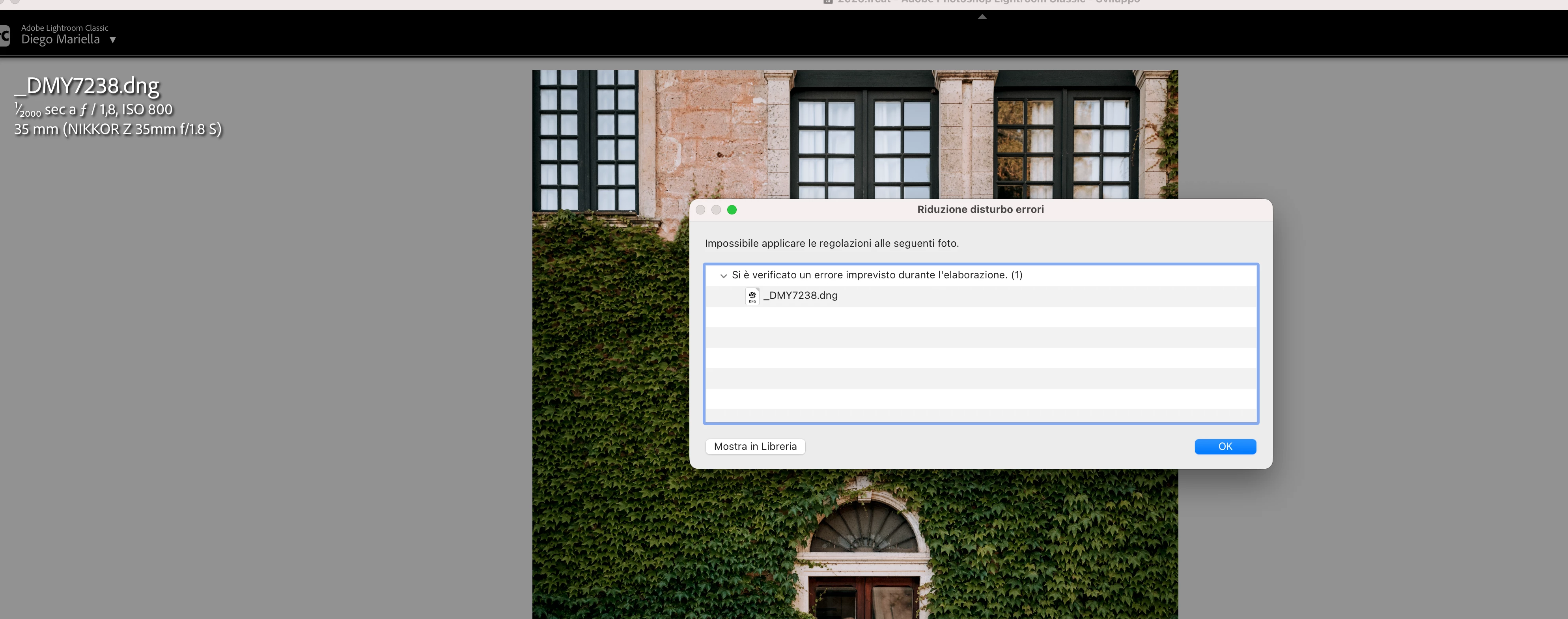
 

    8 replies

    bildkonsulterna
    Participant
    June 20, 2026

    It's the same for me. Just did the upgrade on the programs that had new versions in Creative Cloud, and just completely lost the denoise function in Lightroom Classic. I´m not interested in any special solutions like searching in folders and so on. I just want to know if there will be a quick update from Adobe addressing the issue. Seems there are more people than me having this issue...

    Participant
    June 20, 2026

    Thank you very much. I just reinstalled version 18.3 of ACR and now both computers work properly. But why would Adobe published version 18.4 of ACR without version 15.4 of LR-Classic? This makes no sense! Or only some users have no access to LR-Classic 15.4? If so, why?

    The other interesting issue is that I have the three applications marked for manual upgrades in Adobe creative cloud. See the screenshot in attach. For some reason, PS and LR do not automatically upgrade but ACR does it! Now I uncheck the Autoupdate button, at the top!

    Thank you for your kindly help.

    Regards,

    Gil

    GilSantos
    rhilaw
    Participant
    June 20, 2026

    I’m having the same issue so keen to hear how others are resolving.

    Participant
    June 20, 2026

    Indeed, I am using version 18.4 of ACR and version 15.3.1 of Lightroom Classic. At the moment I cant’t upgrade to version 15.4 because it is not available in my Creative Cloud window.

    GilSantos
    Andthewy
    Participant
    June 20, 2026

    If you download Camera Raw 18.3 from here (Mac) - https://download.adobe.com/pub/adobe/photoshop/cameraraw/mac/18.x/CameraRaw_18_3.dmg

    Run the installer and DO NOT update in Creative Cloud - make sure auto updates are turned off before you start - until Lightroom Classic 15.4 is released.

    Lightroom Classic 15.4 update has been pulled by Adobe due to a serious bug.

    Participant
    June 20, 2026

    this worked for me, thank you

    Andthewy
    Participant
    June 20, 2026

    The issue appears to relate to Camera Raw updating to the latest version (18.3) but Lightroom Classic’s update (15.4) seems to be unavailable for some users. 15.4 needs 18.3 Raw to apply denoise for some reason.

    Participant
    June 20, 2026

    How do we get the 15.4 version? It just says only the 15.3.1 is available which is the last update I got.

    tgweber
    Known Participant
    June 20, 2026

    In trying to fix the same issue, I notice there was a CameraRaw folder in my ...
    /Library/Application Support/Adobe
    ... folder, so I pull it out onto my Desktop and restarted LrC.
     
    Denoise was started working again!

    Hope this might be of some help.


    https://community.adobe.com/questions-675/ai-denoise-fails-with-unexpected-error-occurred-while-processing-1-1628732?postid=7688353#post7688353

    Participating Frequently
    June 20, 2026

    Hi, now it works! What should I do with this folder now?

    tgweber
    Known Participant
    June 20, 2026

    I glad it worked for you too.


    As for the folder, I am keeping around until the updated version of LrC comes out. Then, before updating LrC to whatever version it is (15.4.1?), I am going to put the folder back where I found it and do the update.


    From there I plan to see how LrC responds. If everything works well and the folder has not disappeared, I may or may not delete it.


    Hope this helps. 

    dj_paige
    Legend
    June 20, 2026

    Please clarify … there is no software named Lightroom CC. You are either using Lightroom (Lr icon) or Lightroom Classic (LrC icon). Which are you using? Also please tell us the version NUMBER (we need the version NUMBER and not words like “latest” or “up-to-date”)

    Participating Frequently
    June 20, 2026

    Hi, you are right, it’s lightroom Classic version 15.3.1 and camera raw 18.3