
Participating Frequently
June 20, 2026

P: Lightroom Denoise suddenly stopped working

  • June 20, 2026
  • 223 replies
  • 3837 views

Hi everyone,

I'm having an issue with the latest version of Lightroom CC on a MacBook M5 Pro running macOS Tahoe 26.5.1. (I was experiencing the same problem on 26.5 and decided to update hoping it would fix it, but unfortunately it didn't.)

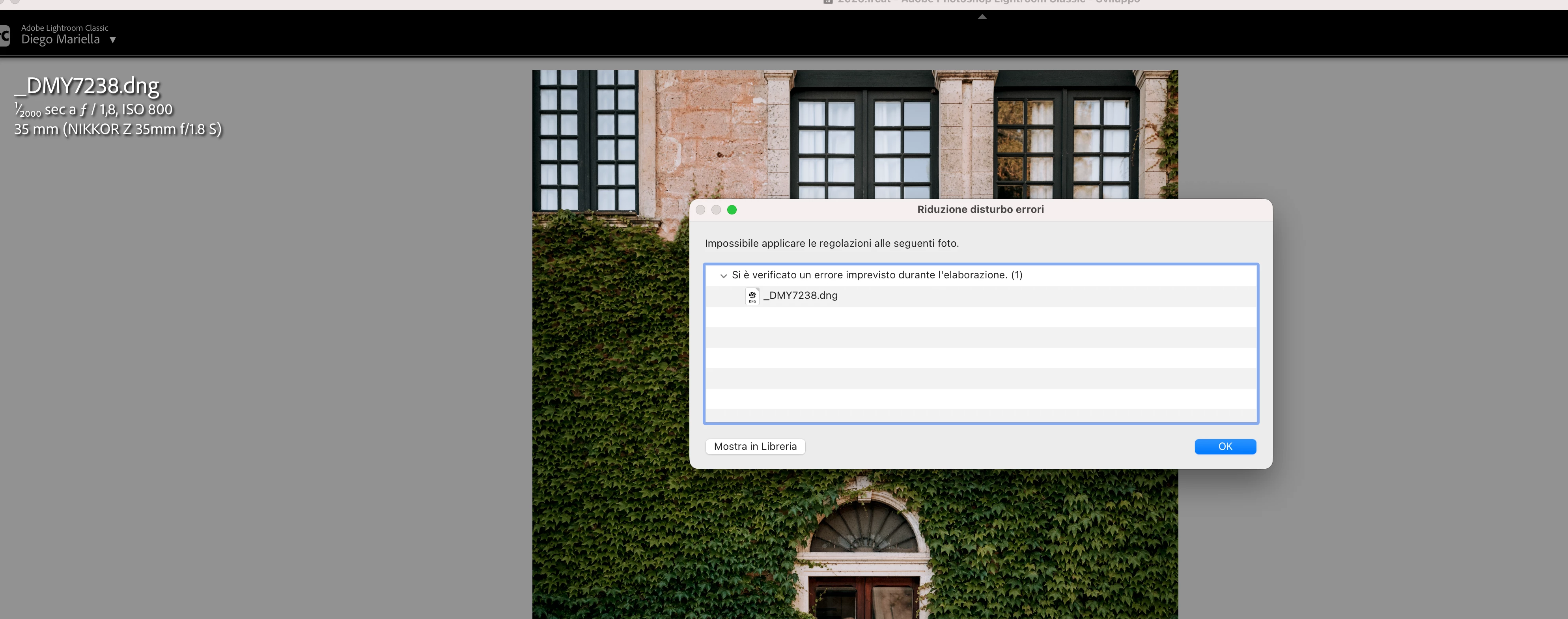
Since this morning, it's been impossible to to use Noise Reduction, even though my internet connection is working perfectly. I've already updated both Lightroom CC and macOS, cleared the cache, and optimized the catalog, but I keep getting this error screen whenever I try to use Noise Reduction.

Has anyone experienced the same issue or knows how to fix it? Any help would be greatly appreciated. Thanks! 🙏
 

    Pinned Reply By Sameer K

    Hi All! Lightroom Classic v15.4.1 is now available for downlaod via the Creative Cloud desktop app with the following critical bug fiixes for the issue reported in this thread and the other: 


    Thanks!
    Sameer K

    223 replies

    Hawkeyeho
    Participant
    June 20, 2026
    I keep getting this error message. It was fine yesterday until I upgraded to Camera raw 18.4. Denoise seems to work in photoshop after todays upgrade


    tgweber
    Inspiring
    June 20, 2026

    In trying to fix the same issue, I notice there was a CameraRaw folder in my ...
    /Library/Application Support/Adobe
    ... folder, so I pull it out onto my Desktop and restarted LrC.
     
    Denoise was started working again!

    Hope this might be of some help.


    https://community.adobe.com/questions-675/ai-denoise-fails-with-unexpected-error-occurred-while-processing-1-1628732?postid=7688353#post7688353

    Participating Frequently
    June 20, 2026

    Hi, now it works! What should I do with this folder now?

    tgweber
    Inspiring
    June 20, 2026

    I glad it worked for you too.


    As for the folder, I am keeping around until the updated version of LrC comes out. Then, before updating LrC to whatever version it is (15.4.1?), I am going to put the folder back where I found it and do the update.


    From there I plan to see how LrC responds. If everything works well and the folder has not disappeared, I may or may not delete it.


    Hope this helps. 

    marcB836
    Participant
    June 20, 2026

    Adobe Lightroom Classic

    Version 15.3.1 Camera Raw 18.3

    Version [202605261338-e36f8566]

    dj_paige
    Legend
    June 20, 2026

    What software are you using? What version NUMBER of that software? (we need the version NUMBER and not words like “latest” or “up-to-date”)

    marcB836
    Participant
    June 20, 2026

    Adobe Lightroom Classique

    Version 15.3.1 Camera Raw 18.3

    Version [202605261338-e36f8566]


    marcB836
    Participant
    June 20, 2026

    bonjour depuis hier la fonction Réduire le bruit ne fonction plus 
    je suis sur un MacBoock 16” 2024
    puce : Apple M4 Max
    memoire : 64 Go 
    SSD : 2 To
    MacOS : 26.5.1

    dj_paige
    Legend
    June 20, 2026

    Please clarify … there is no software named Lightroom CC. You are either using Lightroom (Lr icon) or Lightroom Classic (LrC icon). Which are you using? Also please tell us the version NUMBER (we need the version NUMBER and not words like “latest” or “up-to-date”)

    Participating Frequently
    June 20, 2026

    Hi, you are right, it’s lightroom Classic version 15.3.1 and camera raw 18.3

    Participant
    June 20, 2026

    when trying to denoise an image I get “an unexpected error occurred while processing” This happens every time no matter where the images are stored. They are on multiple external drives

    tgweber
    Inspiring
    June 20, 2026

    Perhaps this might be a workaround.

    I am on a M4 Mac mini, running OS 26.5. I unfortunately updated PS and CameraRaw today, but could not find LrC 15.4. So, I went back to editing in LrC 15.3.1, and Denoise stopped working.

    In trying to fix the issue, I notice there was a CameraRaw folder in my ...

    /Library/Application Support/Adobe

    ... folder, so I pull it out onto my Desktop and restarted LrC.


    Denoise was started working again!

    Hope this might be of some help.

    AndrewZander
    Participant
    June 22, 2026

    Unfortunately, this solution did not work for me.

    Adobe Employee
    June 20, 2026

    Updating to latest LrC version 15.4 would most likely solve the issue.

    はまぐち
    Participant
    June 20, 2026

    Thank you.

    I am currently using Lightroom Classic 15.3.1 and Camera Raw 18.4.0.2608.

    However, Lightroom Classic 15.4 is not yet available in my Creative Cloud app.

    Is there any way to access 15.4 now, or should I wait for the rollout?

    (ありがとうございます。
    現在 Lightroom Classic 15.3.1 と Camera Raw 18.4.0.2608 を使用しています。
    ただし Creative Cloud にはまだ Lightroom Classic 15.4 が表示されません。
    15.4を今入手する方法はありますか?それとも配信を待つ必要がありますか?)

    Adobe Employee
    June 20, 2026
    SPBaldwin
    Participant
    June 21, 2026

    Not really helpful - would appreciate the HOW as opposed to the WHAT I need to do. 

    JohanElzenga
    Community Expert
    Community Expert
    June 21, 2026

    The link in some another answer here is not correct, you need camera raw 18.3, not 18.5 (which does not exist yet). Try this: download Camera Raw 18.3 from here (Mac) - https://download.adobe.com/pub/adobe/photoshop/cameraraw/mac/18.x/CameraRaw_18_3.dmg

    Run the installer and DO NOT update in Creative Cloud - make sure auto updates are turned off before you start.

    -- Johan W. Elzenga