


Participant
January 29, 2017

P: Limit of 52 reorderings in custom-ordered collections and folders

  • January 29, 2017
  • 89 replies
  • 5182 views

[I've verified this bug still exists in LR 10.0. See this post. -- John Ellis] 

After a while of custom sorting the order of photos and stacks within a collection (using Grid View), Lightroom starts to unpredictably refuse to sort photos. Some will get positioned where I drop them, others won't move at all and yet others will get positioned somewhere close by (eg. 4 or 5 photos before or after).

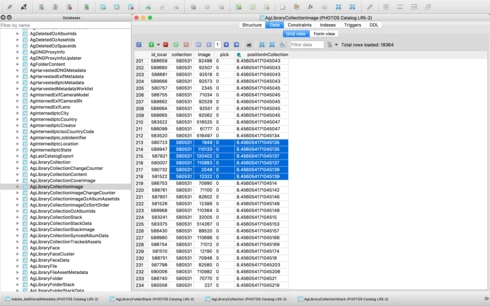
After digging into the catalog file I've come across what I think is the problem, but don't know how to fix it. In the attached file you'll see a screenshot of the database table for the collection, you'll see I've hilited the images that are part of the same collection, but their positionId is identical (which should never happen I'm assuming), probably due to the field size reaching it's maximum length. This is what I believe is causing the problem. Tested this on both Lightroom 5.7 and CC 2015.8.

This is a major bug and effectively stops user sorting from being functional, as well as now having potentially lost weeks of work. Any suggestions?


Thanks,

Adrian

This topic has been closed for replies.

89 replies

Sunil_Bhaskaran
Community Manager
Community Manager
August 11, 2020
Thanks for lettings us know.
We will investigate.
Could you please let us know the number of images in the folder?

Thanks,
Sunil
PhilBurton
Inspiring
August 10, 2020
Rikk,

Any response yet from the product manager?
Known Participant
August 10, 2020
I experience a variant of this problem: if I am in a folder with custom order, after I edit the image in Photoshop the psd+raw file stack goes to the end of the filmstrip. The remaining photos maintain the previous order. This issue too depends on the number of images in the folder and the number of changes in the folder.
Participating Frequently
March 10, 2020

When trying to rearrange photos in a collection the ability to drag photos just stops. The collection size is about 500 photos.  

Sometimes I get a message "Reorder photos by dragging from within the grid view, not by dragging from another source". I am dragging from within the grid view, again with that message dragging stops.

In both cases I have to exit and restart LR to get it working again.

Inspiring
March 10, 2020
That is a problem that has been around for a good while. I put it down to LR just getting tired and needed a reboot
Rikk Flohr_Photography
Community Manager
February 24, 2020
I have added the new notes to our existing bug and brought it to the Product Manager's attention for prioritization. Thanks @188115 Ellis for the new repro instructions and analysis. 
Rikk Flohr: Adobe Photography Org
Bob Somrak
Legend
February 23, 2020
StormyTheCat said

"Is there any way to flag this to the powers to be at Adobe? "


Adobe is well aware of the ongoing issue as they have acknowledged it several times.  They have more than enough info provided in this thread, especially the detailed info provided by John Ellis, to address the issue.  Unfortunately they have chosen not to do so.  I agree that if you do a lot of custom sorts this would be very irritating issue.
M4 Pro Mac Mini. 48GB
Participating Frequently
February 23, 2020
Have you been able to confirm the sort order for your suggestion of moving the contents of a folder to a new folder as a workaround?
Participating Frequently
February 23, 2020
John, thank you for the investigation. 

Is there any way to flag this to the powers to be at Adobe?  It's been affecting me since LR8 so I haven't been able to upgrade.  I've opened tickets in the past but they just sit with no action.  Even after I get feedback from Adobe that the issue is reproducible.
Inspiring
February 23, 2020
I will be amazed if Adobe isn't able to solve this puzzle for the next bug fix update. Critical problem.
johnrellis
Legend
February 22, 2020
I retested more thoroughly in LR 9.2, and it fails with collections as small as 3. To reproduce:

1. Make a new catalog with photos.
2. Create a collection with all n photos.
3. Select the collection and do View > Sort > Custom Order.
4. Select all n photos and deselect the first and second, leaving the last n - 2 selected.
5. Drag the n - 2 selected photos between the first and second photos.
6. Repeat steps 4 and 5 for m - 1 more times.
7. Note that what was the first photo is no longer first (incorrect).

Here's a table of and m values that provoke the bug:


In general, for - 1 a power of 2, m = 1 + floor (52 / log2 (n - 1)). (Intuitively, each insertion reduces the number of bits available in the 53-bit floating-point mantissa for representing the different positions.)

The values in the table column AgLibraryCollectionImage.positionInCollection specify the positions of the photos within the collection, and they should all be unique (since each photo has a different position). But after step 6, most of the values in the column are identical:


That means LR has lost track of the custom ordering.