


Participant
January 29, 2017

P: Limit of 52 reorderings in custom-ordered collections and folders

  • January 29, 2017
  • 89 replies
  • 5182 views

[I've verified this bug still exists in LR 10.0. See this post. -- John Ellis] 

After a while of custom sorting the order of photos and stacks within a collection (using Grid View), Lightroom starts to unpredictably refuse to sort photos. Some will get positioned where I drop them, others won't move at all and yet others will get positioned somewhere close by (eg. 4 or 5 photos before or after).

After digging into the catalog file I've come across what I think is the problem, but don't know how to fix it. In the attached file you'll see a screenshot of the database table for the collection, you'll see I've hilited the images that are part of the same collection, but their positionId is identical (which should never happen I'm assuming), probably due to the field size reaching it's maximum length. This is what I believe is causing the problem. Tested this on both Lightroom 5.7 and CC 2015.8.

This is a major bug and effectively stops user sorting from being functional, as well as now having potentially lost weeks of work. Any suggestions?
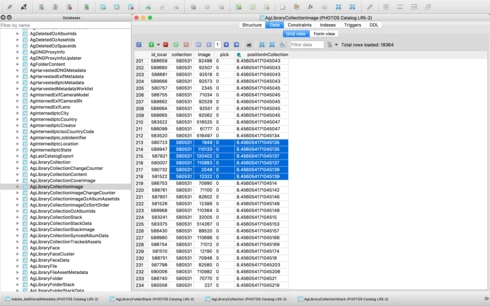


Thanks,

Adrian

This topic has been closed for replies.

89 replies

Inspiring
February 22, 2020
Has this been fixed in LR Classic 9.2? I think I've run into this issue but haven't understood that there's a bug with Custom Order. I use Shared Collections a lot and adjust what's in them occasionally so this is worrisome. I'm on LR Classic 8.4.1 still as I've learnt that every new version of Lightroom makes new bugs for old issues and better move slow.
johnrellis
Legend
February 21, 2020
It appears to be (I haven't done extensive testing).
Participating Frequently
February 21, 2020
What is the sort order after this set of steps?  Is the custom order retained?

Thank you
johnrellis
Legend
February 21, 2020
In the case of custom order for a folder, I just tested a similar workaround, which appears to work:

1. Select all of the photos in the folder.
2. Right-click the parent folder and do Create Folder Inside.
3. Select "Include selected photos".
4. Delete the original folder.
5. Rename the new folder to have the original's name.
Participating Frequently
February 21, 2020
What about the case where the original problem is not part of a collection?
johnrellis
Legend
February 12, 2020
"Since it doesn't look we will get a fix for this, please post a workaround.  i.e.  Will something like closing down and restarting work - I don't think it will."

Restarting won't fix the problem of too many insertions into a collection. But it may be that some other users here are experiencing another bug for which restarting helps.

 
A workaround for too many insertions into a collection was posted above:

1. Select all of the photos in the collection.
2. Do Library > Create Collection.
3. Select "Include selected photos".
4. Delete the original collection.
5. Rename the new collection to have the original's name.

Unfortunately, this workaround won't preserve any stacking in the original collection.
Participating Frequently
February 11, 2020
Ram doesn't matter. They store order indexes as floating point and renumbering enough gets to where the precision isn't enough.
PhilBurton
Inspiring
February 11, 2020
@StormyTheCat,

I solved this problem by trial and error.  At the time I encountered the problem, I didn't know that it was a long-standing issue.  If it matters, my system has 16 GB of memory.
Participating Frequently
February 11, 2020
I did see your post.  I didn't work in the past for me.
PhilBurton
Inspiring
February 11, 2020
@StormyTheCat

Please see my post from a month ago.  Shutting down and restarting Lightroom does work, but it's a huge timewaster.