


Participant
January 29, 2017

P: Limit of 52 reorderings in custom-ordered collections and folders

  • January 29, 2017
  • 89 replies
  • 5182 views

[I've verified this bug still exists in LR 10.0. See this post. -- John Ellis] 

After a while of custom sorting the order of photos and stacks within a collection (using Grid View), Lightroom starts to unpredictably refuse to sort photos. Some will get positioned where I drop them, others won't move at all and yet others will get positioned somewhere close by (eg. 4 or 5 photos before or after).

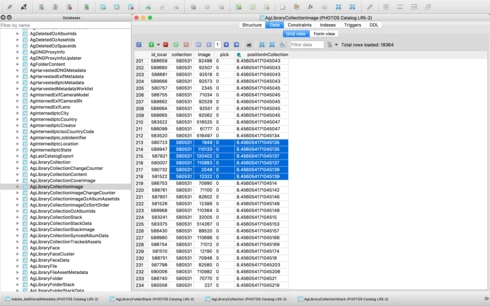
After digging into the catalog file I've come across what I think is the problem, but don't know how to fix it. In the attached file you'll see a screenshot of the database table for the collection, you'll see I've hilited the images that are part of the same collection, but their positionId is identical (which should never happen I'm assuming), probably due to the field size reaching it's maximum length. This is what I believe is causing the problem. Tested this on both Lightroom 5.7 and CC 2015.8.

This is a major bug and effectively stops user sorting from being functional, as well as now having potentially lost weeks of work. Any suggestions?


Thanks,

Adrian

This topic has been closed for replies.

89 replies

Participating Frequently
February 11, 2020
Since it doesn't look we will get a fix for this, please post a workaround.  i.e.  Will something like closing down and restarting work - I don't think it will.  How about exporting the catalog and importing into a new catalog?  Will that fix the broken decimal indexes?

This has become much more critical now that Adobe has discontinued access to older version of the product that did not have this problem.  

Thanks you,
Steve
PhilBurton
Inspiring
January 10, 2020
I can tell you that I first encountered this bug in LR 9.1 (not 8.x !!).  My collection is about 290 photos, and I could no longer rearrange photos after about ONLY 10 operations.

My effective workaround is to shut down and restart LR.  That works, but it's a huge timewaster, considering the time to back up the catalog and then restart LR.

To the dev team:  How about a fix that works for a collection of say 50K images, larger than anyone is likely to have, instead of these band-aid (plaster, for our UK friends) solutions.
Sunil_Bhaskaran
Community Manager
Community Manager
October 18, 2019
@StormyTheCat,
Thanks for the reproducible steps. (The issue is reproducible.)
We are currently investigating.

Thanks,
Sunil
Participating Frequently
October 17, 2019

I previously posted this in another Adobe forum and received no official response.

Win10 Laptop

All actions are performed on a brand new catalog with 100 images (0.jpg-99.jpg) copied from the same original image.

(same creation date)

I selected all images except the first 2. (So 2-99) I then dragged them to be between 0 and 1.

Next deselected only the first of my selected images (2) and dragged the rest between the first 2 images.
I repeated this until all images were moved. (0, 100, 99, 98, .....)

Next I repeated the above, selected all images but the first 2 and moved them between the first 2, deselected 1 image from my group each time.

Eventually I got to a gallery view of 0, 73, 72, 71, 70, ....... 1 74, 75, ..... 100 which 72->1 selected.
When I moved the group of 72->1 between 0 and 73 the ordered was invalid.

I ended up with 0, 1, 10, 11, 12, 13, ...... not what I expected (0, 72, ......)


johnrellis
Legend
October 17, 2019
The same ordering algorithm is used for both folders and collections, in LR 8.4 and in all previous versions.  So reverting back to LR 6 won't in general avoid the bug.  If anything, the version of the algorithm in LR 6 may trigger the bug with fewer custom reorderings than in LR 8.4.

LR 8.3 changed the ordering algorithm in an attempt to fix the bug, changing the observed behavior, but it's still buggy for both collections and folders.  That you observed the bug in 8.3 but not in 8.0 is unsurprising -- the bug's behavior isn't completely understood (it's a bug after all).  

If you have a precise step-by-step recipe for reproducing the bug that's substantially different than this one:
https://feedback.photoshop.com/photoshop_family/topics/lightroom-major-bug-with-custom-sort-order?to...

then please post it here. The posted recipe requires moving large blocks of photos within a collection or folder, repeatedly, which doesn't represent typical user behavior and thus might be prone to de-prioritization by Adobe product managers when deciding on which bugs to fix.
Participating Frequently
October 17, 2019
I'm not even talking about ordering collections.  I could order my regular photo sets in 8.0 but not 8.3.  I've reproduced the ordering problem on every release since.  I don't suppose there is a way to revert a catalog back to LR 6......
johnrellis
Legend
October 17, 2019
"...any of the older releases where ordering was not broken!"

Unfortunately, the collection ordering has been broken at least back to LR 5.7.
Participating Frequently
October 17, 2019
And now Adobe has removed the ability to load any of the older releases where ordering was not broken!
Participant
October 14, 2019
Chiming in to say that a 3 year old bug of this magnitude needs to be addressed.  As a professional wedding photographer, my final collections for every project are near 1,000 images - I can't begin to tell you the frustration when I reach the end of a project, go to export, and find that LR has moved files around within the custom sort here and there.  It can take hours to go through, find them all, and rectify the problem.  Basically once a week I am dealing with this problem on a grand scale - which adds up to many lost hours per month.  C'mon Adobe - lets have a fix already!

PS - I have noticed that this random re-sorting primarily targets images I have color labeled Red - but not ALL images labeled Red, just some of them.  Occasionally a non-color labeled image will move but I would say that 95% of the time its a Red that's moved.  This seems somehow baked into the algorithm.  I generally don't use other color labels, so I can't confirm or deny that it affects Reds as opposed to certain other colors.
johnrellis
Legend
September 14, 2019
I retested the recipe I tested in LR 8.3 with 1025 photos:
https://feedback.photoshop.com/photoshop_family/topics/lightroom-major-bug-with-custom-sort-order?to...

and it still fails the same way. I tried with significantly fewer photos and couldn't observe any problems. But this test surely points at some problems with the current renumbering algorithm.