


Participant
January 29, 2017

P: Limit of 52 reorderings in custom-ordered collections and folders

  • January 29, 2017
  • 89 replies
  • 5249 views

[I've verified this bug still exists in LR 10.0. See this post. -- John Ellis] 

After a while of custom sorting the order of photos and stacks within a collection (using Grid View), Lightroom starts to unpredictably refuse to sort photos. Some will get positioned where I drop them, others won't move at all and yet others will get positioned somewhere close by (eg. 4 or 5 photos before or after).

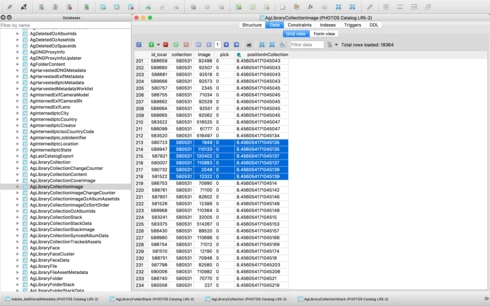
After digging into the catalog file I've come across what I think is the problem, but don't know how to fix it. In the attached file you'll see a screenshot of the database table for the collection, you'll see I've hilited the images that are part of the same collection, but their positionId is identical (which should never happen I'm assuming), probably due to the field size reaching it's maximum length. This is what I believe is causing the problem. Tested this on both Lightroom 5.7 and CC 2015.8.

This is a major bug and effectively stops user sorting from being functional, as well as now having potentially lost weeks of work. Any suggestions?


Thanks,

Adrian

This topic has been closed for replies.

89 replies

Bob Somrak
Legend
September 13, 2019
Rikk,

Sorry Rikk, I don't know.  I don't have this issue as I never have reordered more than 52 images and use custom reorder rarely.  I was just replying to Sunil that John Ellis has submitted some detailed info about the number in an above post.  According to John it seems to be a LARGE number in 8.4.  
M4 Pro Mac Mini. 48GB
Rikk Flohr_Photography
Community Manager
September 13, 2019
Greetings all,

The Lightroom Classic team marked this issue as fixed in 8.3 based upon the confirmation of the original reporter of the issue. It appears now that the issue was fixed with regard to the 52 image threshold but is still encountered at higher numbers of images. 

I've reopened the bug and am looking for more information regarding how many images it takes to break the reordering. Can you provide me with solid numbers of how many images it takes to break?
Rikk Flohr: Adobe Photography Org
Rikk Flohr_Photography
Community Manager
September 13, 2019
Bob, how many images does it take to break this after the 8.3 fix?
Rikk Flohr: Adobe Photography Org
Inspiring
September 13, 2019
Just chiming in that I'm fully updated and having this bullshit problem. This is SO frustrating. It's getting easier and easier to consider leaving behind the Adobe programs...
JBedfordPhoto
Inspiring
August 26, 2019
What's going on with this bug?? It still persists over THREE years after being first brought to the attention of this forum. Honestly, do you guys have no clue how to fix this? It's really annoying that it appears to be a back-burner issue when your users are demanding it to be resolved. Please update us as to what is being done to resolve this major bug.

As to what Ryan (above) mentioned, the virtual copies getting scrambled, this has to be the most frustrating part of this experience. Even after exiting LR, reopening, and going back to my collection, I still can't move around the pictures that are now out of order. Thanks a lot.
ryanc32235336
Participant
August 12, 2019
Sunil the images are rearranging themselves! I’ll be done with arranging an entire batch of photos on the timeline and if I make one false move with a virtual copy, most images get scrambled.
Bob Somrak
Legend
August 12, 2019
I think John Ellis and a couple others have provided enough info for Adobe to be able to fix this. They have apparently "partially" fixed it so they should be able to finish the fix.
M4 Pro Mac Mini. 48GB
JBedfordPhoto
Inspiring
August 12, 2019
Sunil, how much more info do you need? Everything has been described at nauseam in this thread (dating back over 3 years).

Has your team even started work on this issue yet?
Sunil_Bhaskaran
Inspiring
August 9, 2019
Ryan & Chris,
What exactly the issue you face?
Not able to move the images in a folder after repeating a certain amount of time? Does this persist after a system restart? 

Thanks,
Sunil
ryanc32235336
Participant
August 8, 2019
I just thought I was going crazy. I can’t believe this isn’t fixed yet.