


Participant
January 29, 2017

P: Limit of 52 reorderings in custom-ordered collections and folders

  • January 29, 2017
  • 89 replies
  • 5249 views

[I've verified this bug still exists in LR 10.0. See this post. -- John Ellis] 

After a while of custom sorting the order of photos and stacks within a collection (using Grid View), Lightroom starts to unpredictably refuse to sort photos. Some will get positioned where I drop them, others won't move at all and yet others will get positioned somewhere close by (eg. 4 or 5 photos before or after).

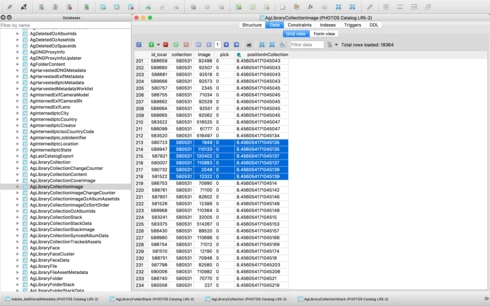
After digging into the catalog file I've come across what I think is the problem, but don't know how to fix it. In the attached file you'll see a screenshot of the database table for the collection, you'll see I've hilited the images that are part of the same collection, but their positionId is identical (which should never happen I'm assuming), probably due to the field size reaching it's maximum length. This is what I believe is causing the problem. Tested this on both Lightroom 5.7 and CC 2015.8.

This is a major bug and effectively stops user sorting from being functional, as well as now having potentially lost weeks of work. Any suggestions?


Thanks,

Adrian

This topic has been closed for replies.

89 replies

ryanc32235336
Participant
August 8, 2019
I too am considering jumping platforms. This is my exact issue as well. Editing batches of photos is time consuming enough without having to deal with a simple bug fix like this. So frustrated.
Known Participant
July 21, 2019
Ditto.  This has happened to me repeatedly over the last few days and I blamed my computer until I searched in this forum today.  Extremely frustrating.
Sunil_Bhaskaran
Inspiring
May 28, 2019
Eric,
I am sending you an e-mail off-list to get some more details.

Thanks,
Sunil
Known Participant
May 27, 2019
In response to an e-mail just circulated by Rikk Flohr - who appears neither to have read nor understood the accumulated e-correspondence - I further confirm that from my standpoint this bug is definitely still active in a fully updated Win 10 installation.

Known Participant
May 24, 2019
Unhappily, the problem is not - repeat NOT - properly resolved. I am in Classic 8.3 on a Windows 10 PC, fully updated. I still find I can make no more than a around 40 - 50 image moves in 'Custom Order' before the process hangs.
johnrellis
Legend
May 14, 2019
LR 8.3 improves the situation -- the recipe above now works correctly. 

Unfortunately, I don't think LR's numbering algorithm is completely correct, and it could fail when inserting larger number of photos into a collection.  Here's a recipe:

1. Make a new catalog with 1025 photos.
2. Create a collection with all 1025 photos.
3. Select the collection and do View > Sort > Custom Order.
4. Select all 1025 photos and deselect the first and second, leaving the last 1023 selected.
5. Drag the 1023 selected photos between the first and second photos.
6. Repeat steps 4 and 5 six more times.

The values in the table column AgLibraryCollectionImage.positionInCollection specify the positions of the photos within the collection, and they should all be unique (since each photo has a different position). But after step 6, most of the values in the column are identical:


That means LR has lost track of the custom ordering.

Known Participant
May 14, 2019
Rikk, dear man, with due gratitude and without wishing to be excessively combative, but given the (decades?) duration of this bug - repeatedly reported - about b****y time too!

Rikk Flohr_Photography
Community Manager
May 14, 2019
Lightroom Classic 8.3 was released today and contained a fix for this issue. Please update to 8.3 and verify that you are no longer seeing the issue. Thank you!
Rikk Flohr: Adobe Photography Org
Inspiring
March 21, 2019


Firstly this is a massive problem for me and I'm wasting hours fixing what really should be the most simple of fixes.

Basically soon after introducing virtual copies into a collection the virtual copy will randomly jump to a different spot in the order, usually between 5-15 places away. This will happen with every virtual copy. Often I provide a lot of images with a black and white alternative, so my order will often be Photo1, Photo1B&W, Photo2, Photo2B&W etc. No however they are all over the place and I'll have Photo32, Photo17B&W, Photo33, Photo24B&W etc. So far it appears to only be happening in collections with 100+ images but seriously 100 is not a lot of images to try to keep ordered, and I'm not sure if that is simply coincidence or if there is a common theme.

Not only does it slow down the workflow when going through images, it means before I export I'm re-ordering 100s of photos, and sometimes it makes adjustments before I re-order them all and so it's just becoming impossible to maintain a custom order.

It is a similar issue to what is occurring here https://feedback.photoshop.com/photoshop_family/topics/lightroom-major-bug-with-custom-sort-order

Unfortunately this issue is big enough that I would actually genuinely consider jumping platforms and for Adobe to not fix such a basic task is unbelievable.
Known Participant
March 8, 2019


When (oh-when-oh-when-oh-when!) are Adobe going to sort the old, old bug where after manually re-ordering (drag & drop) perhaps 20-30 photos in a folder or a collection this stops working, delivers an error message and the program has to be closed / re-opened in order to continue. I thought I'd seen the last of this when I upgraded from v6. No such luck!