


Participant
January 29, 2017

P: Limit of 52 reorderings in custom-ordered collections and folders

  • January 29, 2017
  • 89 replies
  • 5249 views

[I've verified this bug still exists in LR 10.0. See this post. -- John Ellis] 

After a while of custom sorting the order of photos and stacks within a collection (using Grid View), Lightroom starts to unpredictably refuse to sort photos. Some will get positioned where I drop them, others won't move at all and yet others will get positioned somewhere close by (eg. 4 or 5 photos before or after).

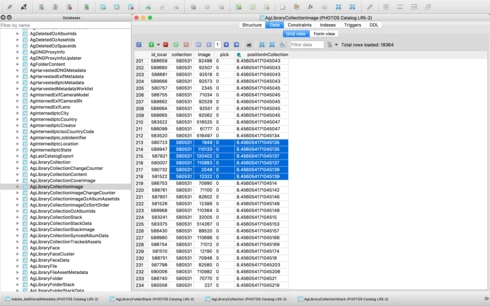
After digging into the catalog file I've come across what I think is the problem, but don't know how to fix it. In the attached file you'll see a screenshot of the database table for the collection, you'll see I've hilited the images that are part of the same collection, but their positionId is identical (which should never happen I'm assuming), probably due to the field size reaching it's maximum length. This is what I believe is causing the problem. Tested this on both Lightroom 5.7 and CC 2015.8.

This is a major bug and effectively stops user sorting from being functional, as well as now having potentially lost weeks of work. Any suggestions?


Thanks,

Adrian

This topic has been closed for replies.

89 replies

Participating Frequently
February 13, 2019
I can't pin down a specific set of repeatable circumstances but I'm currently back on version 8.0 and I see images moving from the location where I put them.
Sunil_Bhaskaran
Inspiring
February 13, 2019
That's right, John.
We are investigating the same.

Thanks,
Sunil
johnrellis
Legend
February 12, 2019
Unfortunately, as you've observed, this issue isn't in the fixed-bug list for 8.2. I just verified that the bug still exists in 8.2.
Participating Frequently
February 12, 2019
Trying to confirm, from the bug fix list, it appears this issue is NOT fixed in the 8.2 2/12/2019 update?
Participating Frequently
January 16, 2019
I am using a Folder, not a collection when seeing this problem.  I have not tried to reproduce this problem on a collection.

johnrellis
Legend
January 16, 2019
The issue occurs in both collections and folders.  The same recipe works in folders as well as collections: https://feedback.photoshop.com/photoshop_family/topics/lightroom-major-bug-with-custom-sort-order?to...

Thanks.
Sunil_Bhaskaran
Inspiring
January 16, 2019
John, 
Do you see this issue in collection or folder?

We will investigate further on the catalog where the issue persists. I am sending an e-mail off-list.

Thanks,
Sunil
johnrellis
Legend
January 16, 2019
I verified that the limit of 52 reorderings applies to folders as well.  Internally, LR 8.1 is using the same buggy algorithm as when the bug was first reported.  I don't know if 7.1 actually fixed this temporarily or my verification was faulty.
Participating Frequently
January 16, 2019


Using the latest (12/12/2018) Lightroom CC classic 8.1, I am having problems with custom photo sort order.  I have a folder that contains a number of JPG and RAW images from both my phone (Galaxy S7) and my SLR (Nikon D610).  The images were sorted into a custom order with only the SLR photos in the folder prior to the 8.1 update.

Today I merged the camera photos into the folder which lead to the problem.  (Also today I updated to the latest 8.1).

I cannot sort the JPG photos (by dragging them to a new location - they do not move).  Also, if a SLR photo is between the JPG photos, I cannot move it either.  The JPGs are all at the front of the album.  I can move the SLR photos that are after all the JPG photos.
johnrellis
Legend
January 16, 2019
This bug has resurfaced in LR 8.1 (or earlier).  You can once again do no more than 52 reorderings at a given point in a custom-ordered collection or folder.  See the original recipe for reproducing the bug: https://feedback.photoshop.com/photoshop_family/topics/lightroom-major-bug-with-custom-sort-order?to...

This was reported fixed in 7.1, and I supposedly verified the fix (see above), so either the bug has resurfaced or my verification was mistaken.

* * *

Here's a dump of AgLibraryCollectionImage.positionInCollection after the 52nd insertion and then after the 53rd insertion.  Notice that the positions of the 2nd and 3rd photo become identical after the 53rd insertion: