


Participant
January 29, 2017

P: Limit of 52 reorderings in custom-ordered collections and folders

  • January 29, 2017
  • 89 replies
  • 5249 views

[I've verified this bug still exists in LR 10.0. See this post. -- John Ellis] 

After a while of custom sorting the order of photos and stacks within a collection (using Grid View), Lightroom starts to unpredictably refuse to sort photos. Some will get positioned where I drop them, others won't move at all and yet others will get positioned somewhere close by (eg. 4 or 5 photos before or after).

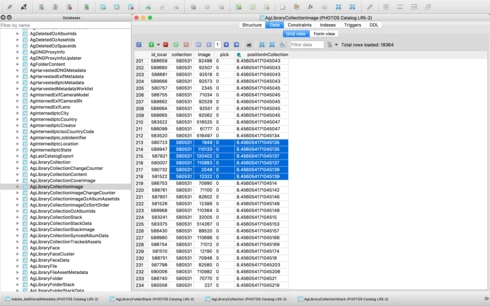
After digging into the catalog file I've come across what I think is the problem, but don't know how to fix it. In the attached file you'll see a screenshot of the database table for the collection, you'll see I've hilited the images that are part of the same collection, but their positionId is identical (which should never happen I'm assuming), probably due to the field size reaching it's maximum length. This is what I believe is causing the problem. Tested this on both Lightroom 5.7 and CC 2015.8.

This is a major bug and effectively stops user sorting from being functional, as well as now having potentially lost weeks of work. Any suggestions?


Thanks,

Adrian

This topic has been closed for replies.

89 replies

Sunil_Bhaskaran
Inspiring
August 8, 2018
Matt,
Could you please let us know what exactly the issue you are facing?

Thanks,
Sunil
Inspiring
August 6, 2018
I'm running into this issue in Lightroom Classic 7.4
Sunil_Bhaskaran
Inspiring
December 15, 2017
Thanks, John.
Let us check again.

Thanks,
Sunil
johnrellis
Legend
December 14, 2017
LR 7.1 appears better but still has a bug.  When testing with my recipe above:

https://feedback.photoshop.com/photoshop_family/topics/lightroom-major-bug-with-custom-sort-order?to...

the first 52 insertions (drag of the third photo between the first and second) work correctly, but the 53rd insertion fails.  But then subsequent insertions work correctly.  
Sunil_Bhaskaran
Inspiring
December 12, 2017
We have a fix in Lightroom Classic 7.1.
Could you please have a look and let us know?

Thanks,
Sunil
johnrellis
Legend
May 26, 2017
"When I finished the entire group of files was completely scrambled!"

Ensure you're sorting the folder by custom order by giving the menu command View > Sort > Custom Order.
Participating Frequently
May 26, 2017
Wow this just made things worse! I moved all the files to a temp folder and moved them back. I was still having the insertion bug and almost immediately. So I created a fresh temp folder, moved the files to it, deleted the original folder, created a fresh folder with the same name, and copied the files to it. When I started the files were in the correct order. When I finished the entire group of files was completely scrambled! Not in any kind of discernible order.

This is serious for me--an extremely bad bug that is killing my workflow. I guess I'll have to try exporting these pics, maybe to Bridge, and see if I can sort them there. I hope I don't lose the metadata I've already applied!

Going forward I guess I'll work in another app to reorganize the files and rename them to keep them in order. Then maybe I'll try Lightroom for just the metadata. Very discouraging.
johnrellis
Legend
May 26, 2017
"I'm wondering if the bogus error message I get is also related to this problem."

I don't think so.  With this multiple-insertion bug, you can drag a pic and drop it, but LR just fails to reorder the photos and doesn't issue any error message.  I just verified that's the case by dragging the last photo in a folder right after the first photo.  After the 53rd drag, LR stopped reordering but didn't issue any error message.
johnrellis
Legend
May 26, 2017
It was just my surmise that the bug wouldn't be fixed soon, based on other similar bugs.  I don't work for Adobe and don't have any inside information about it.
Participating Frequently
May 26, 2017
Thank you John. Since I have to do a lot of reordering, I may just delete the I tagged folders from the catalog, reorder them in Windows explorer, and reimport them into the catalog. Then I shouldn't hit the bug. What a pain!!