
Participating Frequently
March 7, 2012

P: LR4 doesn't show effects preview of presets on 2nd Monitor

  • March 7, 2012
  • 23 replies
  • 421 views

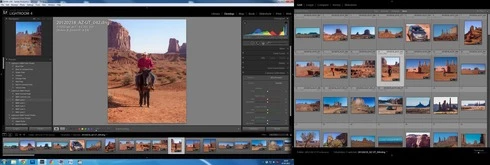
Lightroom 4 doesn't show effects preview of presets at Navigator tab on mouse roll-over over presets. It's only when working with second monitor (F11)! When the second display turned off, the feature works as it should.
And, when working with the second display, primary display usually doesn't even show correct preview in Navigator (Develop Module)
This topic has been closed for replies.

23 replies

DmMc1Author
Participating Frequently
March 14, 2012
Checked: imported my 30000 pix to brand new catalog 🙂 Unfortunately, it doesn't work - situation didn't change. Previews om Main display still wrong when secondary display in Grid mode.
Inspiring
March 13, 2012
Why is it impossible to create a new catalogue and import thousands of your photos?
Create a new catalogue and then use the import from catalogue option and all your changes to the photos should be imported too, it may take a while but it's all automated.
I realise it's not ideal but worth a try.
DmMc1Author
Participating Frequently
March 13, 2012
Yes, it's possible: I have my catalog upgraded from LR 3.6 format.
But it's impossible to create a new one and import thousand of my old photos there,
so hope Adobe will solve this problem.
Inspiring
March 12, 2012
I've just created a new catalogue in LR4 and don't get the Dual Monitor problem.
I think the problem must be with updated catalogues
Inspiring
March 11, 2012
It's not video related. I have ATI 5670 under Win7 64bit and suffer this problem big time.
Inspiring
March 11, 2012
Some additional info:
The issues above are with the secondary monitor in Loupe. If I put it in Grid, no problem, but as soon as I try something else, eg survey, LR goes into its endless loop. Turn secondary monitor off, and the problem goes away.
I converted a set of 522 older DNGs (DNG converter 6.3) to development process 2012, and they did work ok. So it doesn't seem to be the 2012 process. But it could be the DNGs created with DNG converter 6.6?
Bildratte
Participating Frequently
March 11, 2012
I do not have this problem. ATI graphics card under Win7 64 bit.
Inspiring
March 11, 2012
I'm having same problem, I hope it gets fixed soon!
Inspiring
March 11, 2012
I have another issue with my second monitor:
Work in library module: ok
work in develop module with a small sample of 6 DNGs, reimported from the set of 600 DNGs below: Ok
Work in Develop module with a new import of 600 DNGs: LR4 will go into an endless loop. Processor use is at 100%; every few secs it will drop to 80% or so, but then goes right back up to 100%.
Switching back to library after this happens: no luck. Library module comes up (after a while) but Develop remains highlighted in the top menu, and LR stays in the 100% processor use loop.
I have purged my RAW cache (and increased size to 10GB)
I have write changes to XMP and save development to JPG/TIFF/PSD UNchecked.

I let the computer run all night to see if LR was trying to finish a process, but no luck.

I never had this issue in LR 3.6. Seeing the issues others are having with secondary monitors, and the fact that I had no issues in 3.6 leads me to believe there is a bug in LR4.
Participant
March 8, 2012
I also discovered this bug during the Beta Phase and noticed that it had been reported and documented (http://forums.adobe.com/thread/948447). I feel that this is a serious error and should have been fixed before the final release.

I was also surprised how quickly Adobe released the full upgrade on this occasion - in fact there was very little time for Beta testing and I have my doubts as to whether it was ready!!!