Participating Frequently
April 28, 2012

P: LR4 RC2 Differences in rendering in Library and Develop modules

  • April 28, 2012
  • 33 replies
  • 714 views

The rendering of a photo in develop is sometimes less saturated than it is in library.

To reproduce:

Select a CR2 file in library with loupe view on a second monitor.
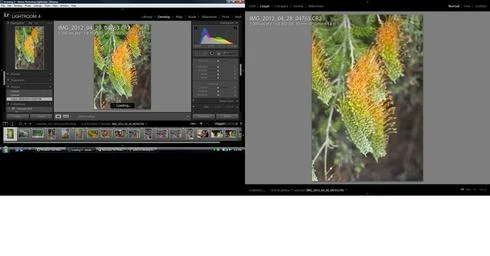
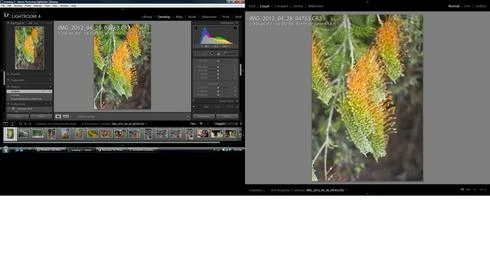
Switch to develop, the saturation decreases slightly.
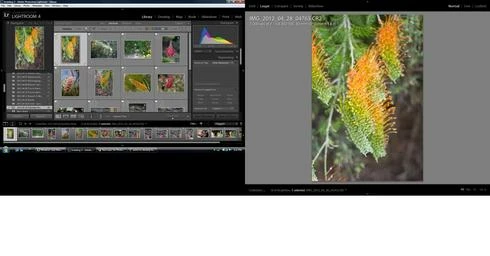
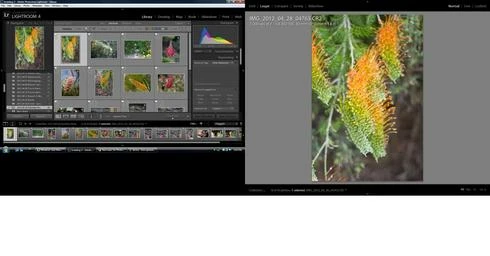
Switch to library and the saturation increases slightly.
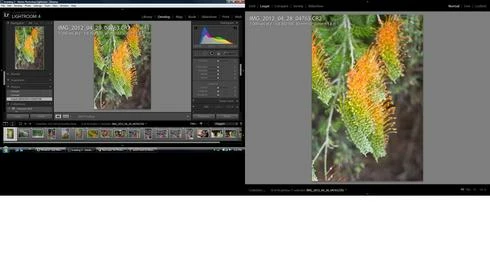
Switch back to develop and the saturation remains the same
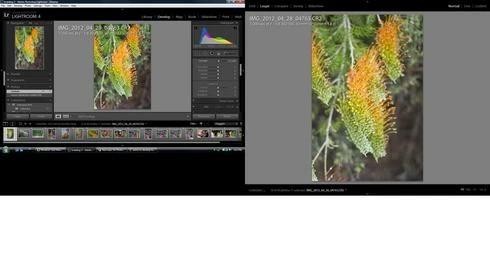
Move the contrast to 10 and then back to 0 and the saturation decreases.

A sequence of screen shots shows the effect.
This topic has been closed for replies.

33 replies

Known Participant
May 1, 2012
Quote from help: "Note: Lightroom does not color-manage the view of the Library module on the second monitor."

Seriously, that can't be true. An application aimed also (mainly?) at the professional market deliberately has no color management in some windows?

Also very strange: Why is the same remark in the manual of Lightroom 3, which apparently *does* color-manage the second monitor as Frank Werner already mentioned? And why is it color-managed in LR4 when the library module is active? Also, the remark applies only to the secondary display, and not to filmstrip or navigator.

Note: I did my tests only on a single monitor, with the main LR window and the secondary display window open on the same single monitor, and nevertheless the secondary window had no color management.
Inspiring
May 1, 2012
I have the same problem here as I use my iPad (calibrated) with LR and my Mac Book Pro as a second monitor.

This problem was not there in Lightroom 3. But what I found in the help sections of Adobe was: http://help.adobe.com/en_US/lightroom...

Did Adobe stopped supporting Color Management for the Second Monitor - or is this only for the library and it should work in the Loupe of the Develop module?

And I can reproduce the color shifts not only with the Contrast Slider but with all sliders (White, Fill, Black ... ) I tested so far.

Frank
Known Participant
April 30, 2012
Just to make this complete: Disabled monitor-side color management seems also to be the cause for the wrong display of the secondary display in loupe mode. A fourth screenshot using the color-cycling profile illustrates that (just switched to development module here, navigator is not shown):


And it is consistent with the original description: Switching to library and back to develop will restore the color management temporarily for the secondary display. But any slider change in the develop module will disable it again.

Edit: The behaviour is also consistent when in other modes of the secondary display. For instance, in grid mode, it behaves the same as the filmstrip, i.e. all photos are correct except the one currently loaded in the develop module.
Known Participant
April 30, 2012
This seems to be a color management problem: For testing, I set my single monitor to a "cycling" color profile that switches all colors, so you can identify non-color-managed applications (they show correct colors instead of the false switched colors).

I can see that when LR displays the thumbnail and navigator wrong, it seems to disable monitor-side color management alltogether because in my setup, the colors are correct (!) then, indicating that LR is sending the preview colors directly to the monitor without converting it into the monitor profile first.

That also means that with the normal monitor profile in place, you will hardly see the effect on a wide gamut monitor because the previews are in AdobeRGB, which is similar to the profile of the monitor. However, you see it quite clearly on a standard gamut monitor because of the difference between AdobeRGB and the sRGB-like monitor profile (saturation decreases because of the smaller AdobeRGB channel values, as described in the original post).

**EDIT**
Ok, here are three screenshots from my test just like mspler described. The monitor profile I used makes blue appear as red. The original picture I used to test shows blue in the upper half (blue sky). Note that screenshots are made without any color management, so you see in the screenshots the same basic colors as I see with my eyes on my monitor, however with different saturations depending on your individual color management setup (but saturation does not matter in this experiment).

First screenshot: A single image filtered for and selected in the library module with filmstrip shown, everything looks OK:


Second screenshot: Now entering development module. You can see that monitor-side color management is suddenly no longer used for the filmstrip thumbnail:


Third screenshot: Hovering over the filmsttip thumbnail: Monitor-side color managament is no longer used in the navigator, too:

Participating Frequently
April 30, 2012
not good...I wonder when the final version will be released with this fixed?...
Participant
April 30, 2012
IT seems that this is not only a problem of dual monitor view.

It happens on thumbnails and the navigator window too.

1. In Library mode all is fine
2. When selecting a new image and switch to develop mode
the thubmnail below changes color and contrast.
3. When moving the mouse over the thumbnail the preview image in the navigator window also shows wrong colors.


View differences:
Participating Frequently
April 29, 2012
Morris,
Thats what I saw too, but if I touch the contrast slider the colours fade (last step in the sequence to reproduce above).

Greg
Participating Frequently
April 29, 2012
this morning i played around a bit and found a temporary solution, if you click back to Library from Develop the original color comes back and then if you click Develop again the colors won't fade...a pain in the butt, but it works for the meantime...
April 29, 2012
reproduced here and just to add the difference in saturation is seen in second monitor view while develop mode is open
Participating Frequently
April 28, 2012
me too Greg, hope this gets sorted quickly...