Participating Frequently
April 28, 2012

P: LR4 RC2 Differences in rendering in Library and Develop modules

  • April 28, 2012
  • 33 replies
  • 714 views

The rendering of a photo in develop is sometimes less saturated than it is in library.

To reproduce:

Select a CR2 file in library with loupe view on a second monitor.
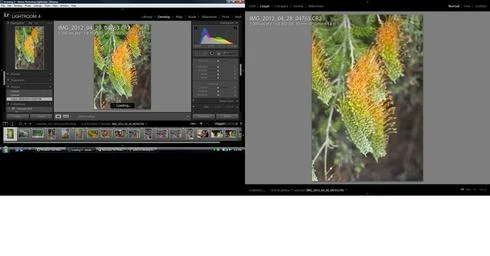
Switch to develop, the saturation decreases slightly.
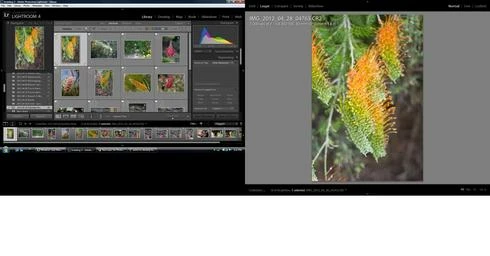
Switch to library and the saturation increases slightly.
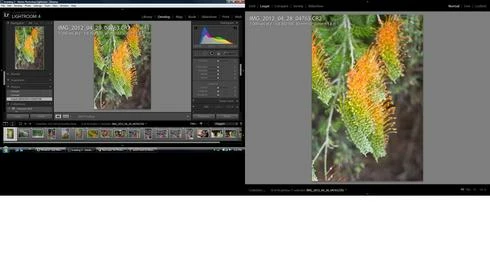
Switch back to develop and the saturation remains the same
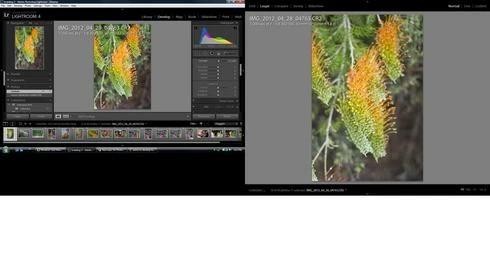
Move the contrast to 10 and then back to 0 and the saturation decreases.

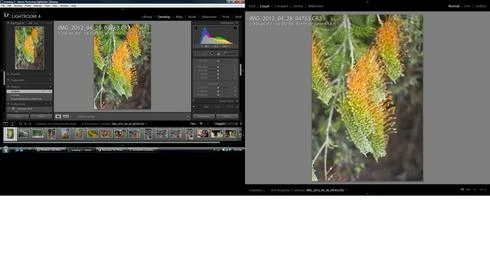
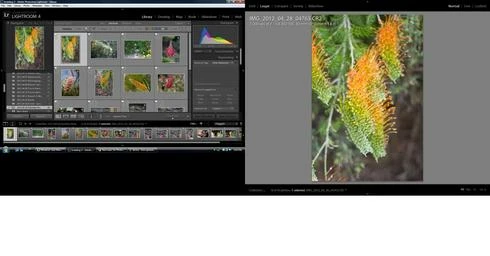
A sequence of screen shots shows the effect.
This topic has been closed for replies.

33 replies

Participating Frequently
May 10, 2012
Within the Develop module and when looking at the filmstrip, the image in the selected thumbnail seems to have the exposure decreased by 1/3 stop. When unselected, the image returns to its normal exposure. This is most readily seen with blue skies taking on a darker/purplish hue. This occurs with RAW files as well as TIFFs saved from CS5
Using LR 4.1 RC 2 and files from a Canon 50D.

Inspiring
May 10, 2012
When in develop mode, there are 3 "versions" of the currently edited image:
Big one, Navigator version, filmstrip version
The big one and the navigator version are always in sync but the one in the filmstrip appears to have pale colors.
Whenever I select another one from the filmstrip, the previously selected one then shows correct colors but now the newly selected one gets a little pale.

Will try to add an image that should show the effect well enough: The saturated blue sky, green grass and red roof of the big & navigator versions seem to be pale in the filmstrip version.

Images are RAWs from Nikon D60. I played around with the various on/off switches of the develop module to find out if there ́s some group of controls that get ignored for the filmstrip version but couldn ́t find one. Also killed the preview cache and started from scratch. None of both changed anything.
Running 4.1 RC2 on Win7 64bit

This does *not* happen in the Library module.
Bought Lr4 but haven ́t bothered installing it and went straight to 4.1RC2, so this has (so far) not been reproduced in another version.


Participant
May 10, 2012
4.1 rc2 5d (DNG, Raw, Jpg) When I had the second monitor on I noticed picture looked slightly washed or maybe a .25 up on the exposure in second display in Develop ONLY. (with 2 monitors) Thought it was the monitor but no way. Switch to Library and it looks fine. Here is the strange thing. Go back to Develop and it does NOT change back to washed out...matched the main view. It also seems to change in the small preview monitor. I went back and reset all the defaults...nothing.

Participating Frequently
May 10, 2012
Just realized something else about black and white not showing correctly.

CR2 edited in PS CS5 using Silver Efex to convert to b/w
Saved and shows up as tiff in LR 4.1 rc 2
In Develop module: shows as black and white in filmstrip when selected; color when select other image
In Library module: only shows as color (grid/filmstrip and loupe views)
Switch back to Develop and shows in b/w in full view and same behavior as above in filmstrip

Only way to fix this is to render a 1:1 preview (tried rendering a standard first but said that it could not as the standard preview was up to date)
Participating Frequently
May 10, 2012
Does this bug also explain why images converted to black and white in CS5 then saved back to LR show as black and white in filmstrip in Develop module only when selected and then revert back to color when selecting a different image?
Participant
May 2, 2012
I'm glad I've found this thread that confirms my findings: Color Management is disabled on Monitor 2 on the Dev. module. Simple, there's nothing else, no saturation levels or anything else.
It has worked until 4.0 and I believe LR4.1 RC1, but I need to reinstall it to check.
I hope it gets fixed soon as it is making working impossible with RC2.
Adobe Employee
May 1, 2012
That might be an out-dated help content from previous versions of LR. Anyway I was able to reproduce the findings on this thread and forwarded it to my colleague who fixed it. The bug is a most recent breakage in 4.1 RC2.

-Simon
Known Participant
May 1, 2012
Great!

Which leaves the question: Is the above mentioned remark in the LR manual ("Note: Lightroom does not color-manage the view of the Library module on the second monitor.") a mistake and should be deleted?

As I said, I cannot imagine that an Adobe product for serious image processing has no color management for some windows...
Adobe Employee
May 1, 2012
Nice find. Bug verified. And fixed!
Participating Frequently
May 1, 2012
LR 4.1 RC2 for Mac

On a secondary monitor the color of an image shifts to a greenish tint in Loupe.

After selecting an image from the library, the image loads, color looks good and looks the same as the primary display. A second later the image changes color. You can toggle between develop and library on the primary display and the problem corrects until you toggle modes again. This behavior does not exist in 4.0.