



DClark064
September 26, 2026

P: LrC v15.5.1 will not rename video files

  • September 26, 2026
  • 10 replies
  • 71 views

I have many video files imported into LrC that I want to modify the filename.  The video files were taken with the iPhone 17 Pro.  My usual method to edit the filename is to edit the filename entry in the metadata panel.  When I use the method I get an error message that the filename cannot be edited.  
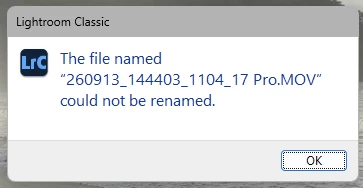
If I use the alternate method of using the F2 key, I get the same error message.  

I have submitted another bug report about not being able to import video files into LrC 15.5.  That bug report has been “Acknowledged”.  In that case reverting to v15.4 allows imports. Unfortunately reverting to v15.4 does not fix this issue.


10 replies

johnrellis
Legend
September 26, 2026

Moderators, ​@Sameer K, please move to Bugs. See my previous reply for a precise bug recipe to reproduce the problem reported by ​@DClark064:

https://community.adobe.com/questions-675/lrc-v15-5-1-will-not-rename-video-files-1643925?postid=7769395#post7769395


Sameer K
Community Manager
Community Manager
September 28, 2026

Thanks for the report, @DClark064 and @johnrellis, for helping speed this up. I've shared this with the team for review.


Thanks!
Sameer K
(Type '@' and type my name to mention me when you reply)

johnrellis
Legend
September 26, 2026

[View this post in your web browser. It contains formatting and images that don't appear in email.]

It was that when in grid view it would rename the file, but in loupe view it would not. 


I see the same behavior in LR 15.5.1 and also 15.4.1, on Windows 11 and Mac OS 26.6.2 (which indicates it’s likely not related to the video bug introduced in Windows 15.5).


Steps to reproduce:


1. In Library, select a video and go to Loupe view.


2. In the Metadata panel’s File Name field, try to rename the video by adding an extra character to the file name and typing return. Observe the error message “The file named XXX could not be renamed” (incorrect).  Observe that File Name has the modified file name, not the original file name (incorrect).


3. Go to Grid view and observe that the Metadata > File Name field shows the original file name (correct).

johnrellis
Legend
September 26, 2026

Hmm, my Windows 11 LR 15.5.1 can rename .mov files, so there must be more specific conditions causing the problem.  If you exit LR, right-click the LrC icon, and do Run As Administrator, does the error still occur?

DClark064
DClark064Author
September 26, 2026

When I run as administrator it changes the filename.  

johnrellis
Legend
September 26, 2026

Then that strongly points at some kind of permissions issue.  I’m not intimately familiar with the subtleties of Windows permissions, perhaps someone else can help you dig in.

johnrellis
Legend
September 26, 2026

That error can arise when LR doesn’t have file-system permission to rename the file. As a first troubleshooting step, in LR right-click the video and do Show In Explorer. In File Explorer, can you successfully rename the video?

DClark064
DClark064Author
September 26, 2026

Yes.