
Inspiring
July 29, 2016

P: Most Import Dialog Settings have disappeared (Sierra Mac OS 10.12)

  • July 29, 2016
  • 14 replies
  • 704 views

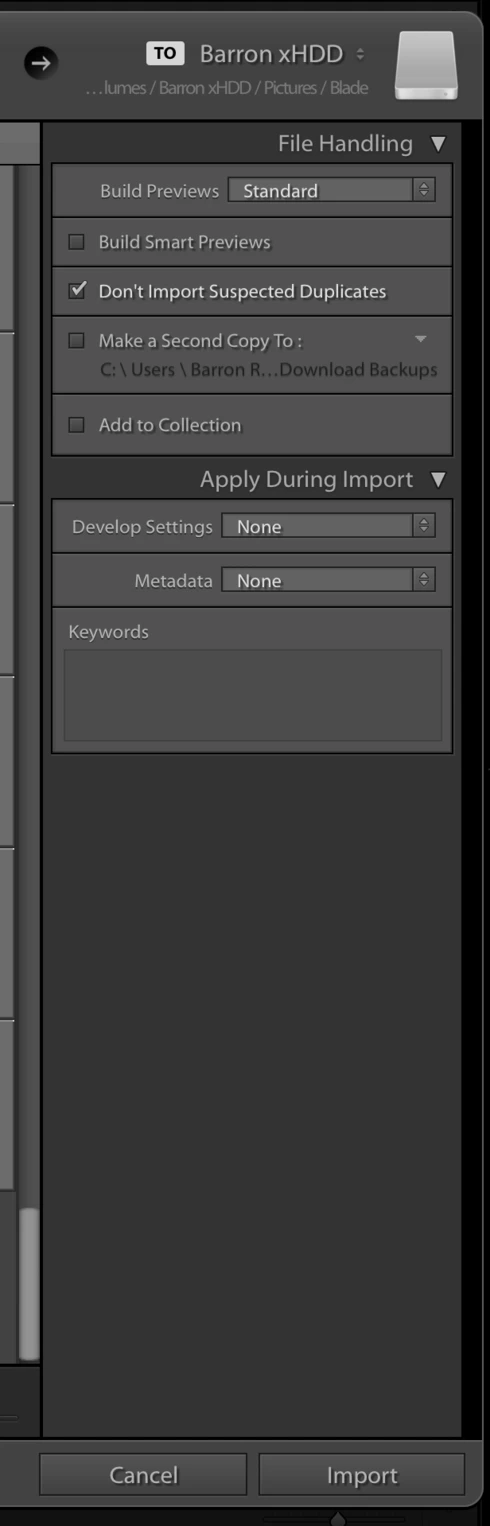
During import, most import settings have disappeared save for a couple. Strangely, import presets still apply the settings that are missing. This happens during Copy & Copy as DNG (my default choice).

I'm running MacOS Sierra Beta and the latest LR available on CC.
This topic has been closed for replies.

14 replies

Legend
September 24, 2016
Sierra is supported and this issue is fixed in the current version. If you installed the supported version (Lightroom 6.1/2015.7) after updating to Sierra, you need to right click and show the missing dialogs as noted below and in the Sierra compatibility doc: https://helpx.adobe.com/lightroom/kb/lightroom-and-mac-os-sierra.html
Participating Frequently
September 24, 2016
Well, considering, that Sierra was available as a Beta for a very long time, I wonder how long it will take Adobe to finally support it officially? From what I understand, the latest Beta was identical to the golden master, so...
Legend
September 24, 2016
Addressed in the 6.7 update.

Note: This issue persists if you update to Lightroom CC 2015.7/Lightroom 6.7 from the previous version already running on macOS Sierra. Right-click the Apply During Imports panel and select the Apply During Import and Destination options to make them visible in Lightroom CC 2015.7/Lightroom 6.7. 
Sunil_Bhaskaran
Inspiring
July 31, 2016
Thanks of the heads up.
This is one of the issues in Mac OS Sierra Beta we are aware of.
We are looking into it. Lightroom is not officially supported on Sierra yet.

Thanks,
Sunil
Rikk Flohr_Photography
Community Manager
July 30, 2016
Then, the next prudent step would be to reset your Lightroom preference file. Close Lightroom. Hold down [Opt]+[Shift] and relaunch Lightroom. Overwrite the preferences when requested.  Does that restore the two missing items?
Rikk Flohr: Adobe Photography Org
Inspiring
July 29, 2016
Yep, only the two options are there.
Victoria Bampton LR Queen
Community Expert
Community Expert
July 29, 2016
Have you tried as Jim suggested? Right-click next to the Apply During Import text and make sure the other panels are checked in the context sensitive menu. They may simply be hidden.
Victoria - The Lightroom Queen
Inspiring
July 29, 2016
Likely a Sierra issue. Annoying bug, but not the end of the world.
Inspiring
July 29, 2016
Well, it's important to bring this issue to Adobe's attention regardless as Sierra will become a non-beta OS sooner than later.
Inspiring
July 29, 2016
Nope. Copy as DNG and Copy both have this issue.