
Known Participant
September 23, 2018

P: Multiple dng files from conversion

  • September 23, 2018
  • 57 replies
  • 1796 views

After conversion of tiffs to dngs, I have multiple dngs!!!

Here's the details...

After importing a series of tiff images, I converted the tiffs into Adobe dngs files.  After restasrting LR 7.5, I find that I have multiple dngs!?!   At least three (3)!
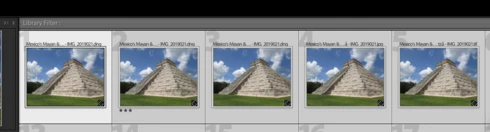


Really?  Seriously?

My Finder does not show these duplicates as actually existing.  So where in the heck did they come from?

This topic has been closed for replies.

57 replies

TheDigitalDog
Inspiring
September 23, 2018
"The highest form of ignorance is when you reject something you don't know anything about". -Wayne Dyer
Author “Color Management for Photographers" & "Photoshop CC Color Management/pluralsight"
DMEEPhDAuthor
Known Participant
September 23, 2018
Troll alert!
TheDigitalDog
Inspiring
September 23, 2018
Ah but with ZIP or LZW compression? 
Why do you need a full sized embedded preview when the entire image is rendered and can be previewed? Or the embedded thumbnail we see in the Finder? 
Author “Color Management for Photographers" & "Photoshop CC Color Management/pluralsight"
TheDigitalDog
Inspiring
September 23, 2018
Of course, you didn't answer the question. 
Seems she's not so super after all. 
Author “Color Management for Photographers" & "Photoshop CC Color Management/pluralsight"
Todd Shaner
Legend
September 23, 2018
1) DNG file compression is better than TIFF ZIP compression (smaller file size)
2) DNG has a full-size Embedded Preview (speeds Import using Embedded & Sidecar Preview Building setting)
I'm not saying these are overwhelming reason to convert TIFFs to DNGs, but to some users it may be a benefit. Downside is DNG files don't support layers (layered TIFFs are flattened).
TheDigitalDog
Inspiring
September 23, 2018
What part of 'ignore' do you not understand?  
What part of an open forum community do you not understand? 
What part about converting from raw vs. TIFF to DNG do you not (yet) understand? 
Author “Color Management for Photographers" & "Photoshop CC Color Management/pluralsight"
DMEEPhDAuthor
Known Participant
September 23, 2018
What part of 'ignore' do you not understand?  (My apologies if English is not your native language.)  Please refrain from replying to ANY of my posts going forward.  There are enough trolls out there...we don't need another.
DMEEPhDAuthor
Known Participant
September 23, 2018
Didn't work super guru.
TheDigitalDog
Inspiring
September 23, 2018
IF it's got a TIFF extension, I suspect it's indeed a TIFF and not raw and I'd ask you to upload a file to examine but expect it will fall on deaf ears. If it isn't raw, then the two of us were indeed absolutely correct in pointing out, there's zero reason to convert a TIFF to DNG. But heck, it's your workflow and you've got the super guru who apparently wasn't super enough to help you on basic LR workflow. 
Author “Color Management for Photographers" & "Photoshop CC Color Management/pluralsight"
DMEEPhDAuthor
Known Participant
September 23, 2018
How about we just agree to ignore each other?  I've been ready to stop for quite some time, but clearly you have no life beyond the keyboard.  The day I need help from someone as pompous as you will be when Hell freezes over.