
Known Participant
September 23, 2018

P: Multiple dng files from conversion

  • September 23, 2018
  • 57 replies
  • 1797 views

After conversion of tiffs to dngs, I have multiple dngs!!!

Here's the details...

After importing a series of tiff images, I converted the tiffs into Adobe dngs files.  After restasrting LR 7.5, I find that I have multiple dngs!?!   At least three (3)!
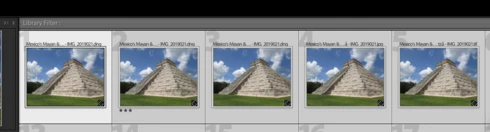


Really?  Seriously?

My Finder does not show these duplicates as actually existing.  So where in the heck did they come from?

This topic has been closed for replies.

57 replies

DMEEPhDAuthor
Known Participant
September 23, 2018
The raw file format has the extension .tif.  One does not require a post-processor to open it.  You can see it in Mac OS Finder and of course, Lightroom.  However, if one opens the file in a text editor, one will see that the header is somewhat different and there is present some included data information, including handles which a DICOM reader can see.

Do you know what a DICOM image file is, sir?

And please do not insult my Photoshop guru; she knows Photoshop but she is not an engineer and does not pretend to know anything about the internal data structures of image files (as you pretend to do so).

My writing was prefectly clear.  Except to you, because you made an assumption based upon your imperfect knowledge.  (Remember the old adage, when one makes an assumption he makes an ass out of u and me.   In this case, more u than me.)
TheDigitalDog
Inspiring
September 23, 2018
Show me with equations and data structures how a tifand a raw file, both derived from an ISO standard.
No equations necessary. Just double click on an actual rendered TIFF and the raw it was rendered from and tell us they behave identically IF you can. 

Convert that rendered TIFF to DNG. Convert the raw to DNG. Tell us you really believe they are identical. Then we can see it's time to ignore you request for any help here....
Author “Color Management for Photographers" & "Photoshop CC Color Management/pluralsight"
TheDigitalDog
Inspiring
September 23, 2018
Sweet Jesus take the wheel!  Do you deliberately misunderstand everything or are you simply simple?  The Hasselblad has a custom back on it made by Olympus Medical.  The 'blad body is actually a 500C film camera with the film back removed.

Then you failed to answer the question:  WHAT raw format does the Olympus Medical back output? 

No, not all raw files are based on TIFF. And basing a raw on TIFF doesn’t make it a TIFF or it would behave like a TIFF which it will not assuming you actually try. 

You don't need equations, you need to understand how to define data being used in correct language. You didn't, hence you were asked by two people WTF you mean and why you are converting a TIFF to DNG. 

Now we know you're not doing that. You're just writing in a less then clear fashion even after being told is the correct terminology. Maybe your super guru can explain that to you and maybe you'll accept it. 


Author “Color Management for Photographers" & "Photoshop CC Color Management/pluralsight"
DMEEPhDAuthor
Known Participant
September 23, 2018
Sweet Jesus take the wheel!  Do you deliberately misunderstand everything or are you simply simple?  The Hasselblad has a custom back on it made by Olympus Medical.  The 'blad body is actually a 500C film camera with the film back removed.

The raw files listed above are all based upon the tif standard.  These files may deviate from the TIFF standard in a number of ways, including the use of a non-standard file header, the inclusion of additional image tags and the encryption of some of the tagged data.  However, that does not mean they are tifs, but they are rendered using Immel and Kajiya's equation in the IC.  Clearly, you do not have an engineering degree—at least not from an accredited university.

Show me with equations and data structures how a tifand a raw file, both derived from an ISO standard.  Do not send me your opinions or layman articles.  Speak engineering or don't speak at all.

TheDigitalDog
Inspiring
September 23, 2018
Please show me where Hasselblad states their raw file (.3FR) is a TIFF or why it doesn't have a .TIF extension if as you incorrectly assume, it's a TIFF? 

Please tell me that when you double click on a rendered TIFF vs. the 3FR, if Photoshop proper opens with a rendered image OR ACR opens with that 3FR? 

Please tell me why raw file formats, including IIQ (Phase One), 3FR (Hasselblad), DCR, K25, KDC (Kodak), CRW CR2 CR3 (Canon), ERF (Epson), MEF (Mamiya), MOS (Leaf), NEF (Nikon), ORF (Olympus), PEF (Pentax), RW2 (Panasonic) and ARW, SRF, SR2 (Sony), have unique extensions and again NEVER open rendered in Photoshop or similar but MUST be opened in a raw converter BECAUSE they are NOT TIFFs! 

You seem to believe that bread crumbs and a BLT sandwich are the same because both use bread. If I came onto a forum on cooking and asking about making a BLT with bread crumbs instead of bread, I suspect some who understand the differences would ask for clarity, and warn that using bread crumbs to build a sandwich isn't a good idea. Just like converting a TIFF to DNG is pointless. Two of us pointed this out to you due to your somewhat sloppy description of your workflow. No sir, you are not converting TIFFs to DNG. You are converting raw files, specifically a proprietary Hasselblad file to DNG. It may be based on TIFF but it ain't a TIFF and if you try treating it the same, the differences pointed out to should be obvious. Assuming you're here to learn or assistance which is questionable after so many posts trying to get you to clearly define what you're actually doing before we even get into the Lightroom 'issue' if it even exists. 

Now you came here for help despite your super guru who charges so much money which is a bit odd. You've asked a question in a way that is incorrect and confusing. OK, we understand now you're trying to convert a proprietary raw to DNG. It isn't a TIFF. No more than a BLT sandwich is the same as breadcrumbs. 

You wrote:  
I am sure you are aware that many raw file formats, are based on the TIFF file format.  
Yes as I told you this before you made that statement. Read then reply. 
DNG is based on TIFF too. So you converted from TIFF to TIFF using your not so well defined language of what's based on what? No, you converted from raw to DNG. Why confuse the issue and just form a question in a way we can attempt to aid you (for free unlike your guru). 

Had you as much experience with Hasselblad (Imacon) cameras as I sir, you'd recall the time their native raw format, written to disk WAS A DNG! Which isn't a TIFF. Nor is it today. 
Author “Color Management for Photographers" & "Photoshop CC Color Management/pluralsight"
DMEEPhDAuthor
Known Participant
September 23, 2018
I am using a Hassalblad with a custom back made by Olympus Medical.  Actually, there are (or were) several camera manufacturers who produced digital cameras with their raw files having the .tif extension.  In the early days, Olympus was one of these.  Understood, as they are usually credited with developing the first mass market digital camara (though as an engineer and not a historian, I cannot state this for a certainty).

I am sure you are aware that many raw file formats, including IIQ (Phase One), 3FR (Hasselblad), DCR, K25, KDC (Kodak), CRW CR2 CR3 (Canon), ERF (Epson), MEF (Mamiya), MOS (Leaf), NEF (Nikon), ORF (Olympus), PEF (Pentax), RW2 (Panasonic) and ARW, SRF, SR2 (Sony), are based on the TIFF file format.  These files may deviate from the TIFF standard in a number of ways, including the use of a non-standard file header, the inclusion of additional image tags and the encryption of some of the tagged data.

So, I did not say I was converting 'rendered' tiffs.  I said I was converting raw files into Adobe dngs.  I did not use the term 'rendered' because it was superfluous if one understands the process of rendering.   I did not use the term 'raw' because that would also have been superfluous as that camera back produces tiff as its raw file.  You jumped all over this because you do not understand the definition or mathematical basis for render.

TheDigitalDog
Inspiring
September 23, 2018
Maybe you'll inform us of the actual camera you're using to produce the raw.
Or maybe you can't?
BTW, this is raw and I'd hope you would agree, it's nothing like a rendered TIFF:
Or maybe you can't? 


Author “Color Management for Photographers" & "Photoshop CC Color Management/pluralsight"
TheDigitalDog
Inspiring
September 23, 2018
All the articles speak of taking raw data, something you specifically did not mention, and rendering a TIFF. I don’t know if you are purposely trying not to understand this, or if you are really struggling with it.

EVERYTHING your computer does is math! It's all 1's and zero's. Your issue is language in defining what you're doing with what data. Which is why two of us asked you why you're converting TIFFS to DNG which we wouldn’t' have asked has you phrased your language ideally as I pointed out above ( to repeat: What you really wanted to say was  "I converted the raws into Adobe DNGs files". But you didn't so we had to read your writings as provided).

As the Chinese proverb says: The first step towards genius is calling things by their proper name.
Author “Color Management for Photographers" & "Photoshop CC Color Management/pluralsight"
DMEEPhDAuthor
Known Participant
September 23, 2018
The article fails to point out that despite calling a tiff rendered and a raw file not rendered, the underlying mathematics of creating the file is based upon the very same equation introduced into computer graphics by David Immel and James Kajiya in 1986.  The various realistic rendering techniques in computer graphics attempt to solve this equation.

In short, all image files are rendered using this equation or a variant.  Therefore, they are all renedered from the data in the file.  What they look like to the naked eye is another matter, and I think that is where you are attemtping to draw the distinction.  However, from an engineering standpoint, it makes no difference.

I am not saying you are completely wrong; however you are playing a bit fast and loose with the underlying engineering whilst skipping the mathematics.  I see it as similiar to a book of popular science versus an article in a peer-reviewed science journal.  Both are essentially correct, but one is far more correct than the other.

TheDigitalDog
Inspiring
September 23, 2018
Andrew, despite you having a blog and publishing articles, you seem to not really understand what 'render', 'rendered', or 'rendering' is.
I'm not sure you really understand the difference between a rendered TIFF and a raw despite my efforts to show you (again, I'm not making this stuff up):

Raw vs. rendered 
https://www.dpbestflow.org/camera/raw-vs-rendered

https://www.strollswithmydog.com/raw-file-conversion-steps/
HOW DOES A RAW IMAGE GET RENDERED?

https://www.lynda.com/Maya-tutorials/Rendering-raw-files/370603/384936-4.html
Rendering raw files

Need more outside references? 
Author “Color Management for Photographers" & "Photoshop CC Color Management/pluralsight"