
Known Participant
September 23, 2018

P: Multiple dng files from conversion

  • September 23, 2018
  • 57 replies
  • 1797 views

After conversion of tiffs to dngs, I have multiple dngs!!!

Here's the details...

After importing a series of tiff images, I converted the tiffs into Adobe dngs files.  After restasrting LR 7.5, I find that I have multiple dngs!?!   At least three (3)!
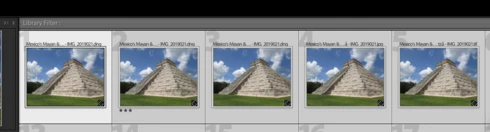


Really?  Seriously?

My Finder does not show these duplicates as actually existing.  So where in the heck did they come from?

This topic has been closed for replies.

57 replies

TheDigitalDog
Inspiring
September 23, 2018
Your Photoshop guru is confused (or you are if indeed the original is a TIFF) and you really need to check up on what is rather silly “advice” IF so.
Verify THEN trust.
Ask him exactly what good it does you and report back. Raw, TIFF and DNG are all based on the same Adobe owned and controlled format.
A raw converted to DNG is not the same as a TIFF converted to DNG! One is rendered and the other is not.
Author “Color Management for Photographers" & "Photoshop CC Color Management/pluralsight"
DMEEPhDAuthor
Known Participant
September 23, 2018
Nope.  Please see response above.  I think it is a catalog corruption too, and the catalog is currently being checked for integrity and then optimization.
DMEEPhDAuthor
Known Participant
September 23, 2018
All five (5) files in LR have exactly the same file name.  However, the two (2) extra dngs do not actually exist in any folder on any of my drives.  This is confirmed.

The tiff file is a raw file from an old camera which produces a tiff and a jpeg.  My Photoshop guru prefers working with dngs, hence the GOOD reason for creating one (1) from the tiff.    Only the tiff was selected when the dng creation was executed, and the fact that the others do not really exist except in LR is proof.
JohanElzenga
Community Expert
Community Expert
September 23, 2018
I see a tiff and a jpeg with the same name too. It could well be that you also have a raw file with that name. If all three were selected when you converted to DNG (and they were not in the same folder) then you could end up with three DNG files with the same name (in three different folders, you can't get that in the same folder).

There is a problem though that has been reported a few times, where people have multiple copies of one and the same image showing in their catalog. It seems to be some kind of catalog corruption, but it is unclear what causes it. That is what Victoria is referring to.
-- Johan W. Elzenga
TheDigitalDog
Inspiring
September 23, 2018
My question too; why convert a TIFF to what is basically another TIFF?
Author “Color Management for Photographers" & "Photoshop CC Color Management/pluralsight"
Just Shoot Me
Legend
September 23, 2018
What is the Exact File Name of those 3 DNG files? Just because it ends with 2019021.dng doesn't mean they were created from the same TIF file. I see you have a JPG file that ends with that 2019021 group of characters. Could be one of the DNG files that were created was made from that JPG file.

Now the question I have to ask.
Why are you creating DNG files from TIF files? In my mind there is NO GOOD reason to do that.
TIFF is a multi platform/program recognized image format. The file can be read and displayed by many many different computer OS's and programs. DNG is not.
When I send an image over to Photoshop for further editing I save it as a TIF file. I would not then convert it back to a Digital NeGative (DNG) for any reason.
Victoria Bampton LR Queen
Community Expert
Community Expert
September 23, 2018
Oooooooh, you might have just found a clue in a bug I've been tracking. Can you take us through the steps you took leading up to that state please?
Victoria - The Lightroom Queen