
Inspiring
September 21, 2013

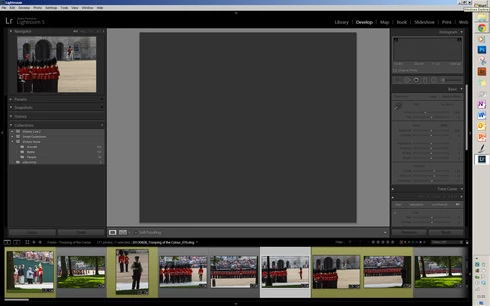
P: No Image displays in Develop Module after Deletion of Other Images

  • September 21, 2013
  • 38 replies
  • 734 views

[A number of people are now reporting this for 2015.8 -- see below.  -- John Ellis]

Hi, In Lightroom 5 and 5.2, when using the X key, then Delete Rejected Photos, the central display box no longer displays an image. If I switch back to Library mode an image will appear but if I go back to the Develop module, again it's blank where an image should appear! Is this a known issue? ThanksJohn
This topic has been closed for replies.

38 replies

Hpucker
Participant
December 25, 2016
I have the same problem in OS X 10.11.6. My workaround is to collect all the flagged rejected photos and right click to delete them from disk. The key combination of CMD-DELETE seems to trigger the freeze.
Inspiring
December 25, 2016
I've just run into the same problem after updating Lightroom CC to 2015.8.  Exiting and restarting Lightroom fixes the problem until next time I delete an image.
alexanderz31217685
Participant
December 14, 2016

Same problem after update


Version von Lightroom: CC 2015.8 [ 1099473 ]
Lizenz: Creative Cloud
Betriebssystem: Windows 7
Version: 6.1
Anwendungsarchitektur: x64
Systemarchitektur: x64
Anzahl logischer Prozessoren: 8
Prozessorgeschwindigkeit: 1,9 GHz
Integrierter Speicher: 8106,1 MB
Für Lightroom verfügbarer phys. Speicher: 8106,1 MB
Von Lightroom verwendeter phys. Speicher: 446,9 MB (5,5%)
Von Lightroom verwendeter virtueller Speicher: 417,3 MB
Cache-Speichergröße: 0,0 MB
Maximale Anzahl Threads, die Camera Raw verwendet: 8
Camera Raw SIMD-Optimierung: SSE2,AVX
DPI-Einstellung des Systems: 96 DPI
Desktop-Komposition aktiviert: Nein
Monitore/Anzeigegeräte: 1) 1920x1080, 2) 1920x1080
Eingabetypen: Multitouch: Nein, integrierte Toucheingabe: Nein, integrierter Stift: Nein, externe Toucheingabe: Nein, externer Stift: Nein, Tastatur: Nein

Informationen zum Grafikprozessor:
GeForce GT 540M/PCIe/SSE2

Check OpenGL support: Passed
Vendor: NVIDIA Corporation
Version: 3.3.0 NVIDIA 355.82
Renderer: GeForce GT 540M/PCIe/SSE2
LanguageVersion: 3.30 NVIDIA via Cg compiler


Anwendungsordner: C:\Program Files\Adobe\Adobe Lightroom
Bibliothekspfad: C:\Users\Main\Pictures\Lightroom\Urlaub Spanien 2016\Urlaub Spanien 2016.lrcat
Einstellungen-Ordner: C:\Users\Main\AppData\Roaming\Adobe\Lightroom

Inspiring
December 14, 2016
It's happening to me. I'm running the latest update of Lightroom CC with an iMac and El Capitan.
Inspiring
December 13, 2016
We have got the same problem like you on Mac OS SIerra with graphic card NVidia GeForce 320M  (support failed) this card is not supported!!!
Inspiring
December 13, 2016
We have got the same problem than Li, on 1 of two Mac OSSierra
Inspiring
December 12, 2016
This issue showed up again in 2015.8 of Lightroom CC release right after the update. See my video showing the exact same problem. No fix yet...

https://www.youtube.com/watch?v=iPClpUU7gsk
Inspiring
July 8, 2015
Hi all -

I too had this problem show up, and reverting (roll back) the monitor driver worked for me.

See here: https://forums.adobe.com/thread/1448963

Dave
Participant
April 22, 2014
I don't use filters.

Bill
Participating Frequently
April 22, 2014
Hi Cali, to be clear, I'm not talking about image filters (i.e., Develop Presets), I'm talking about Library filters (i.e., settings which control which photos are shown).

-Ben