
Inspiring
September 21, 2013

P: No Image displays in Develop Module after Deletion of Other Images

  • September 21, 2013
  • 38 replies
  • 734 views

[A number of people are now reporting this for 2015.8 -- see below.  -- John Ellis]

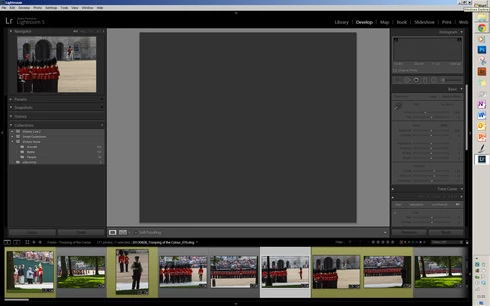
Hi, In Lightroom 5 and 5.2, when using the X key, then Delete Rejected Photos, the central display box no longer displays an image. If I switch back to Library mode an image will appear but if I go back to the Develop module, again it's blank where an image should appear! Is this a known issue? ThanksJohn
This topic has been closed for replies.

38 replies

Inspiring
April 22, 2014
sad
Inspiring
April 22, 2014
same problem
Inspiring
April 3, 2014
When I go through all of my images on my local C drive, I do not apply filters to the pictures I intend to delete. I select a non-rejected image before I delete. I just deleted over 100 images in Library mode and only hit CTRL+Backspace key to delete the JPGs from disk into recycle bin - and I do this to avoid the issue. But I will try and duplicate the issue and post how I caused the image area to go blank. Thanks for looking into this Ben!
Participating Frequently
April 3, 2014
Hi William and Bobby, thanks for the info. I still have not managed to figure this out, but I'm wondering if it has something to do with Filters. In Bobby's screenshot, I see that a filter is applied. The pop-up says "Custom Filter" and the "Unlabeled" label swatch is highlighted (in the "Filter" area at the bottom right, above the filmstrip).

In the screenshot that John included in his original post, the filter area says "Filters Off" but the "Red" label swatch is highlighted (which, I think, should not be possible...).

So, for folks who are having this problem, does using filters have anything to do with it? If you don't user the filters, can you still reproduce the problem?

Thanks,
Ben
Participating Frequently
March 28, 2014
OK, I just had the problem happen to me. I have been working in LR5 and PSCS5 all day marking and processing. I had marked about 113 images as I went through a folder doing edits. So when I finish editing in a folder I get rid of all the excess, and I made sure I was in the Library module, clicked ctrl backspace, chose delete from disc (Actual hard drive of the computer). Then when it finished there were no images showing in either library or develop module. I went trough several motions trying to get them to show again like checking which folder was in was checked in the folder view panel, and could not get them back. Turned off Lightroom turned back on and they are back. I went to another folder that had 14 ready to delete and clicked ctrl backspace in grid view, it came right back up OK. I went to another folder that had 194 marked to delete, clicked ctrl backspace in Develop module and ON pics showed until rebooting Lightroom. So I beleive it is somehow connected with large quantities of deletion. Screen shots attached.
Hope this help and thank you for working on this.
Bobby
Participant
March 28, 2014
I only do things one way, so hopefully if you compare my responses with others you might be able to narrow things down. I think there might be a correlation between the number of pictures deleted (more pictures more likely the error) but that is just anecdotal. Bill

1. When you're deleting the rejects, does it make a difference if you use the keyboard shortcut or the menu item?

I us the x key to mark rejected then use the menu combination Photo -> Delete Rejected Photos.

2. Does it make a difference if you delete the photos off of disk, or simply remove them from the Lightroom catalog?

I never select the option to remove from catalog without deleting.

3. Does it make a difference if you have a rejected or non-rejected photo selected before invoking the delete-rejects command?

Not sure, but I have tried switching from Develop to Library before deleting and got the same error.

4. Are these raw files or JPEGs?

Raw

5. Any video files in the mix anywhere?

No

6. Where are these photos stored (a local drive, a NAS, etc.)?

External USB hard drive with catalog on same drive.

7. Can you get the bug to occur if you just go through photos in the Develop module, marking them as rejects? Or do you have to actually be doing doing develop work as well (moving sliders, etc.) before the problem will occur?

Yes. The first thing I do is reject a bunch of pictures that aren't any good. (typically most of them)
Participating Frequently
March 28, 2014
Hi All,

Sorry for the trouble. These intermittent issues can be tricky, and so far I have not been able to reproduce the problem. I'm grasping at straws here, but let me ask a few questions, and maybe we can figure something out.

1. When you're deleting the rejects, does it make a difference if you use the keyboard shortcut or the menu item?
2. Does it make a difference if you delete the photos off of disk, or simply remove them from the Lightroom catalog?
3. Does it make a difference if you have a rejected or non-rejected photo selected before invoking the delete-rejects command?
4. Are these raw files or JPEGs?
5. Any video files in the mix anywhere?
6. Where are these photos stored (a local drive, a NAS, etc.)?
7. Can you get the bug to occur if you just go through photos in the Develop module, marking them as rejects? Or do you have to actually be doing doing develop work as well (moving sliders, etc.) before the problem will occur?

(Cali: I have earlier versions of Lightroom installed on my system as well, and I find it highly unlikely that that would cause a problem such as this.)

-Ben
Inspiring
March 25, 2014
You can close and restart the software and the develop mode works again as designed.

I have also discovered I can switch to Library Mode before I do a CTRL+backspace and delete the X'd images and switch back to Develop mode and it works as designed with no problems. Try this and see.

Also, I have Lightroom 3.5 STILL installed on my computer, separate from the brand new 5.3 install. A friend was saying they use same files and why I have some issues like this one? I never opened 3.5 since 5.3 installed, wanted it as security blanket in case 5.3 was problematic.

So try switching to Library mode before the delete - does that work for you?
Inspiring
March 24, 2014
Same here any solutions?
Inspiring
March 14, 2014
I have the same issue and searching for an answer online brought me here. I'm using LR 5.3, Windows 7 64 bit. I view and edit my photos in Develop module, X the ones I want to delete, and continue editing through the entire set. I click CTRL+backspace which selects all the X'd images and it asks if I want to remove them from disk or Lightroom and I select Remove from disk. To my surprise, no images remaining show up in Develop module. It's a dark grey blank box. I even did a Build Previews 1:1 to attempt to fix it and it didn't do anything. And no zooming (fit, fill, 1:1, 3:1) changes that it's blank. I can go to Library mode and click an image and see them in the larger area, but go back to Develop module and the image doesn't display in the larger area.

I have just restarted Lightroom and the remaining photos can now be seen again in Develop module. This is DEFINITELY a bug. Please report this if you are having this problem too so it can be resolved in the next software update. This is very disruptive to my workflow as a pro photog editing thousands of images a week. thank you

I also want to add that I am editing JPGs at the moment. Will see if this happens when I am editing RAW images in the next batch of images.