
Inspiring
September 21, 2013

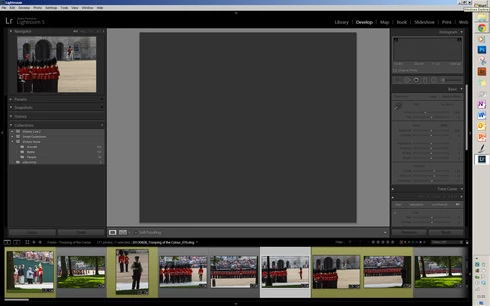
P: No Image displays in Develop Module after Deletion of Other Images

  • September 21, 2013
  • 38 replies
  • 734 views

[A number of people are now reporting this for 2015.8 -- see below.  -- John Ellis]

Hi, In Lightroom 5 and 5.2, when using the X key, then Delete Rejected Photos, the central display box no longer displays an image. If I switch back to Library mode an image will appear but if I go back to the Develop module, again it's blank where an image should appear! Is this a known issue? ThanksJohn
This topic has been closed for replies.

38 replies

Inspiring
February 21, 2014
Exact same thing as described above by Larry and John happened to me tonight after deleting a large number of images this way. The remaining ones will _not_ appear in the Develop Module now.
Inspiring
February 20, 2014
Hi Bobby, I will try this, although I'm usually quite good at doing backups frequently so I don't think it will solve the problem permanently. The odd thing about this issue is that it does not occur every time I delete images. Thanks for bringing this to my attention.
Participating Frequently
February 20, 2014
Same issue as above after making deletions a by x and then backspace. Tested again same issue, can only show picture in develop by restarting LR. But the 3rd time I tired it I did the backup and optimization as suggested and the above problem disappears. So I think maybe is is connected to ignoring the backup notice?
Inspiring
October 11, 2013
Hi William, thank you for your input. Yesterday I deleted 81 images and the problem re-surfaced. So today I re-imported those images, marked them for deletion in the Library module, deleted them from the drive without problem. Repeated the same but marked them for deletion in the Develop module, deleted them from the drive, again without problem! As you say, it is frequent but intermittent which makes it so difficult to track down why and when the problem occurs. I did wonder if it was my video card but I notice that we have different brands etc. so I can now discount that,
So the search for an answer still continues! .
Participant
October 11, 2013
Version 5.2, Windows 8, new Lenovo y510p: 8gb, Intel i7-4700mq, NVIDIA GT 750m, catalog and photos on external drive.

Same problem. Frequent but intermittent. In the Develop module "delete rejected photos" results in a "file not found" message. The files are deleted but I then can't view another photo in Develop. Switching to Library will display images, but on returning to Develop the image area is still blank and unresponsive. The film strip is responsive and the file names change appropriately. Restarting will recover. I have been successful deleting from the library, but as the problem is intermittent I am not sure about this. There seems to be some correlation with the number of files deleted: the more files, the more likely the problem seems to be.
Inspiring
September 22, 2013
My system is Windows 7 64bit, Intel i7-3770, 8GB Ram, AMD HD7570 Graphics.

I tested it from the Library module as well, but found no difference to this issue. The problem I'm having with this issue is that it is inconsistent. Sometimes it works as expected and other times it fails, as my attachment above clearly demonstrates, despite the fact that I work in a consistent fashion. As time permits, I will try to establish if a pattern emerges where the issue arises.
Bob Somrak
Legend
September 22, 2013
I can confirm this EXACT behavior in Lr 5.2final using OSX 10.8.5. It also gave me an "Error Changing Modules" when I switched to Library and then back to Develop.

LR works as expected with no error if you switch to the Library before doing the "Select Photo/Delete Rejected Photos/Delete from disk" command and then switch to the Develop module.
M4 Pro Mac Mini. 48GB
Inspiring
September 22, 2013
I have the same problem in 5.2 (Win 7 32-bit). Mark photos with 'X' in develop panel. Select Photo/Delete Rejected Photos/Delete from disk. After they are deleted, I can not get a photo to come back up in the Develop module. Select any one in the filmstrip, and it does not show up. Where the photo should be is gray. Go to Library module, and all is fine. Back to Develop, problem remains. I also noticed the Develop panel was not active. Close LR and reopen, and it works until I try the same process.