
Inspiring
June 25, 2018

P: Presets - 'Update with Current Settings Option' replaced with only 'Apply on Import

  • June 25, 2018
  • 29 replies
  • 608 views

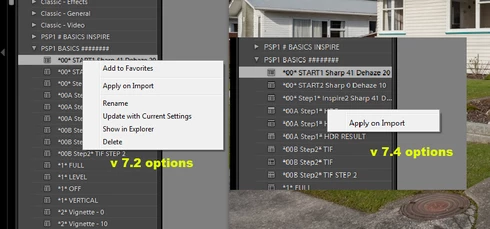
After upgrading from 7.2 to 7.4, all of a sudden the option to update any pre existing personalised presets with 'Update with Current Settings' has been removed and replaced with only 'Apply on Import'. I'd like to know why and if this is a bug can it be repaired please as I use this function on every Lightroom session. Thanks,
This topic has been closed for replies.

29 replies

johnrellis
Legend
September 22, 2018
We solved Markus's problem:
https://feedback.photoshop.com/photoshop_family/topics/lightroom-classic-7-5-presets-update-with-cur...

Turns out his presets were stored in a subfolder of /Library rather than the standard location under /Users/user/Library, causing LR to think they were "built-in".
Participating Frequently
September 22, 2018
Still have this issue on 7.5 (see screenshot) any advice on how to solve this?
Adobe Employee
August 23, 2018
Thanks a lot for the confirmation Keith.
Inspiring
August 23, 2018
fabulous it does indeed appear to have been solved.. many thanks!
Inspiring
August 22, 2018
fabulous will do thanks for the heads up Rikk
Rikk Flohr_Photography
Community Manager
August 22, 2018
Lightroom Classic CC 7.5 was released today and should address this issue.  If you don’t see the update in your Creative Cloud App, hit the [Ctrl/Cmd]+ [Alt/Opt]+[R] to force a refresh. 

Give the new version a try and let us know if it solves the issue. 
Rikk Flohr: Adobe Photography Org
Participating Frequently
July 7, 2018
same issue here, context menu when I try to update presets just shows "apply on import" and "add to favourites"
Adobe Employee
June 30, 2018
One more workaround you can try is, just hover over the preset you want to update. Wait for the preview to be updated in Navigator/Loupe view and then right-click. You should get the full list of options. Let me know if that works for you.

Thanks,
Chinoy
Inspiring
June 30, 2018
you are absolutely right... ok so I just reset them and still the same issue sadly.. are you still experiencing the same issue John
johnrellis
Legend
June 30, 2018
Note that installing a new version of LR uses the existing preferences -- it doesn't create them anew.