
Inspiring
June 25, 2018

P: Presets - 'Update with Current Settings Option' replaced with only 'Apply on Import

  • June 25, 2018
  • 29 replies
  • 608 views

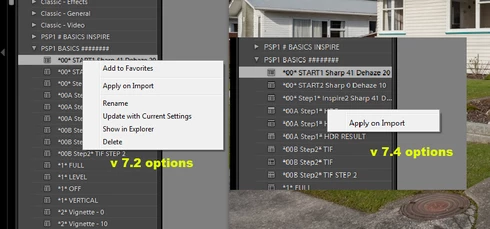
After upgrading from 7.2 to 7.4, all of a sudden the option to update any pre existing personalised presets with 'Update with Current Settings' has been removed and replaced with only 'Apply on Import'. I'd like to know why and if this is a bug can it be repaired please as I use this function on every Lightroom session. Thanks,
This topic has been closed for replies.

29 replies

Inspiring
June 30, 2018
thanks for the ideas John.. my Graphics Processor option was already disabled so I tried it enabled as well.. same problem both configurations.. also v7.4 did this out the box so I would hopefully assume the preferences file was not corrupted.. I will try that though and I know what you mean about the preferences file messing itself up on occasion
johnrellis
Legend
June 29, 2018
Keith, a couple of hypotheses to test:

- The problem appears that the context menu isn't fully displaying. Try disabling Preferences > Performance > Use Graphics Processor. That option now controls not only the Loupe window but other display painting operations as well.

- Try resetting LR's preferences: 
https://www.lightroomqueen.com/articles-page/how-do-i-reset-lightrooms-preferences/
LR stores previous window sizes and positions in the preferences. LR not infrequently soils its preferences, which can sometimes cause window positioning to get screwed up.
johnrellis
Legend
June 29, 2018
"How in the world am I supposed to update my user created presets?"

Did you try Keith's workaround?  Edit an image in Develop, apply the preset you want to change to the image, change the settings in the Develop panels, then right-click the preset and do Update With Current Settings.
johnrellis
Legend
June 29, 2018
Keith, in my LR 7.4 the context menu properly displays regardless of the setting of Enable Hover Preview.  So I agree, that setting doesn't seem to be related to the problem.
Participating Frequently
June 29, 2018
How in the world am I supposed to update my user created presets?
Participating Frequently
June 29, 2018
I have the same problem
Inspiring
June 25, 2018
Hi, thanks for the update. I also have tested again after your reply just to make sure I wasn't wrong and I have also tested with brand new personal presets created in version 7.4 just in case there is an upgrade issue using presets created in a previous version. I have found no difference to my earlier findings. The same behaviour is exhibited with the hover function enabled or disabled. Can you confirm the number of personal presets you are testing against and that they are not all copies of the same personal preset. I am a very experienced Lightroom user and find it hard to believe the problem is with the preset hover enable/disable feature, sorry
Inspiring
June 25, 2018
I just tested, if "Enable preview of the preset on hovering is disabled", only an applied preset can be modified, if this function is activated, the behavior is normal,
Yves Crausaz, Suisse, retraité actif dans le monde de la photo et des arts graphiques.
Inspiring
June 25, 2018
thanks!.. the problem appears to be the alt menu popup is being cropped top and bottom, if you look closely above the  'apply on import' text, you can see the line above it which is the bottom of the next option Add to Favourites.. by design that would be messy visual programming you wouldnt be showing a line like that, hope you follow what I mean
Adobe Employee
June 25, 2018
Ok. Thanks for clarifying that. We will investigate it further.