
Inspiring
June 25, 2018

P: Presets - 'Update with Current Settings Option' replaced with only 'Apply on Import

  • June 25, 2018
  • 29 replies
  • 608 views

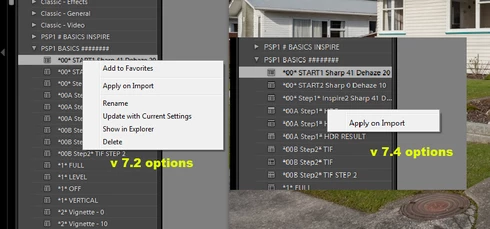
After upgrading from 7.2 to 7.4, all of a sudden the option to update any pre existing personalised presets with 'Update with Current Settings' has been removed and replaced with only 'Apply on Import'. I'd like to know why and if this is a bug can it be repaired please as I use this function on every Lightroom session. Thanks,
This topic has been closed for replies.

29 replies

Inspiring
June 25, 2018
ok you caught me out, nicely observed.. instead of reverting to 7.2 and going through the same process just for a simple screenshot, I replicated the essential problem which is that in 7.2 you can apply any updates to any personal presets at any time.. in 7.4 (and maybe even 7.3 Im not sure) you cant, only to the preset you have selected to apply to an image.. all other personal presets the only alt menu option is 'apply on import'. I trust that clarifies my screenshot validity
Adobe Employee
June 25, 2018
Thanks for additional info. Also looking at the screenshot you shared, the first one does not look like 7.2. As "Add to Favorites" was added in 7.3. Can you reconfirm the Lr version where it was working.
Inspiring
June 25, 2018
I will add one more thing to the fault description; If I apply one of my personal presets to an image, then and only then is just that selected preset able to  'Update with Current Settings'. No other one of my personal presets is able to be updated, only 'apply on import'. 
Inspiring
June 25, 2018
thanks Chinoy, the same experience is with that setting on or off. And I like most choose to run with that workflow disorienting function disabled
Inspiring
June 25, 2018
not sure how.. there has never been an issue before this version
Adobe Employee
June 25, 2018
Hi Keith,

Have you unchecked the "Enable hover preview of presets in Loupe" option in Preferences->Performance tab? If yes, can you try enabling it and then trying.

Thanks,
Chinoy
Inspiring
June 25, 2018
This may be a problem with file access OS permissions.
Yves Crausaz, Suisse, retraité actif dans le monde de la photo et des arts graphiques.
Inspiring
June 25, 2018
thanks Yves, but like I said in my description "pre existing personalised presets" meaning created by myself. I never use presets provided by Adobe, thanks for your thoughts anyway
Inspiring
June 25, 2018
Only custom presets display the full options, presets provided by Adobe can not be modified.
Yves Crausaz, Suisse, retraité actif dans le monde de la photo et des arts graphiques.