
Participant
October 7, 2015

P: Preview Thumbnails are Black

  • October 7, 2015
  • 42 replies
  • 1976 views

Hello
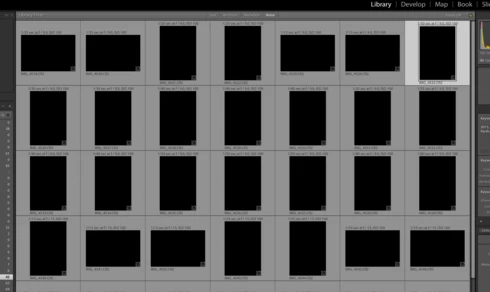
Just did my first import....but after import finish in Library all previews/thumbnails show BLACK, see imagine. I have ReSync'd even Exit out then come back and Previews not showing. All other folders are OK, just not the NEW import. Checked with Actual folder on MAC Finder and these ok. Any ideas?
This topic has been closed for replies.

42 replies

Legend
November 17, 2015
This issue should be corrected by the Lightroom CC 2015.3/6.3 which is available today.

Details here: http://blogs.adobe.com/lightroomjourn...

Fix for images that are already black:

https://helpx.adobe.com/lightroom/kb/...
Participant
November 3, 2015
Perfect advice!

Thank you so much.
Participant
November 3, 2015


I am using LR CC(LR ver.6)
Whenever I import the photo files, after thumbnails are appeared, thumbnails are quickly changed black. After that, I cann't do any work with LR CC. I had remove & Re-install LR CC several times, the symptom is always the same. If anyone knows the solution, please let me know the solution.

My e-mail address : danbyo@hanmail.net

Thank you.
Participant
November 3, 2015


I am using LR CC(LR ver.6)
Whenever I import the photo files, after thumbnails are appeared, thumbnails are quickly changed black. After that, I cann't do any work with LR CC. I had LR CC several times, the symptom is always the same. If anyone knows the solution, please let me know the solution.

My e-mail address : danbyo@hanmail.net

Thank you.
johnrellis
Legend
November 2, 2015
Visit this thread in your Web browser and read the previous reply and comments.
Participant
October 31, 2015


When I load the raw files lightroom program automatically turning what could have caused it to black
Inspiring
October 29, 2015
Thanks so much. You have solved the problem for me!
johnrellis
Legend
October 29, 2015
Uncheck the option Preferences > Presets > Apply Auto Tone Adustments and restart LR. Now import some more pics -- do they have this problem? See this help article: https://helpx.adobe.com/lightroom/kb/...
Inspiring
October 29, 2015


I just started working with Lightroom. At first all went well. But now I have a problem with importing pictures. At first I can select the imported pictures but after that all the pictures turn into black. When I open the photo with photoshop I see it again. When I save the photo and go back to lightroom the photo is ok. What is going wrong when I import the pictures in Lightroom??
ssprengel
Inspiring
October 26, 2015
This is a known issue is xx.2 and xx.2.1 when using Auto Tone during Import.

Revert to xx.1.1 unless you have some new-camera dependency on xx.2+, and if you do then just Select All and click Auto after importing:

http://www.lightroomqueen.com/how-do-...