
Inspiring
January 19, 2020

P: Ratings buttons invisible in Survey mode

  • January 19, 2020
  • 13 replies
  • 803 views

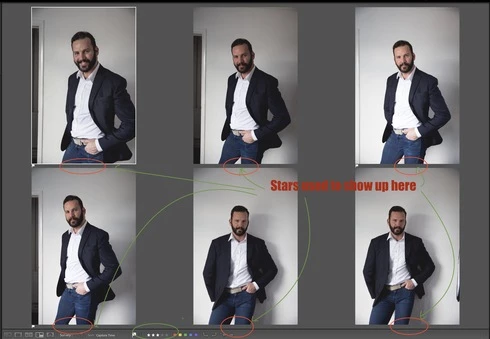
I think this might be a software issue (a bug) but if it isn't can someone help me how to fix it? When I pick X number of images to be viewed in Survey mode (N), those thumbnails have always shown under the image a star rating (or 5 dots if not rated). This has been a very easy and quick way to review images and quickly rate favourites with a cursor.

Recently I noticed that now those dots or ratings do no longer show up under the image. But the weird thing is that the rating buttons still are there even though they aren't visible. If I bring a cursor where they used to be, I can still rate images by clicking with a mouse "blinded" even though I don't see those dots/stars. I know this because on the bottom bar I can see star ratings change for that particular image if I do so. So why is the rating bit no longer appear there?

Is this a bug or some view setting issue? I have tried everything but I can't fix this. This issue is happening on iMac 5K with the latest version of Mojave. And obviously I'm running the latest version of LR Classic too. Anyone?


This topic has been closed for replies.

13 replies

johnrellis
Legend
October 9, 2020

Please post a screenshot of what you do see?


Note that if the photos displayed in Survey view don't currently have a star rating, nothing will appear under the photo until you hover the mouse over the photo or the tiny strip just under the photo.

Inspiring
October 9, 2020

I am using Lightroom Classic 9.4 on a 2020 iMac 5K. I don't see any ratings in Survey view.

Rikk Flohr_Photography
Community Manager
July 10, 2020
The border does not have any user-facing options to adjust.
Rikk Flohr: Adobe Photography Org
Inspiring
July 7, 2020
Can the new Border/Outline around the selected image in Survey View be turned off? It's thick and distracting, especially on white background. The old way was much better. Cheers
Rikk Flohr_Photography
Community Manager
June 16, 2020
Version 9.3, an update to Lightroom Classic, went live on June 15, 2020 and contains a fix for this issue. Please install the update and respond back if it does not cure the issue for you. Thank you for your patience!
Rikk Flohr: Adobe Photography Org
Bob Somrak
Legend
January 30, 2020
Smit

To be fair the Pick flag doesn't completely disappear if the background is white as the little flag pole faintly shows.
Also, if the background is black the Reject flag only shows the white X
And of course the Stars disappear with a dark gray background.

It makes for limited choices : )

If there was a narrow Medium Gray strip at the bottom of each photo that contains the flags, stars etc like in Compare mode (but only thinner) it would solve the issue.

M4 Pro Mac Mini. 48GB
Smit K
Participating Frequently
January 30, 2020
Robert, thanks for bringing up the Pick-Flag issue. We will look into this.
Smit | Lightroom Team
Bob Somrak
Legend
January 29, 2020
The stars disappear when the background color is Dark Gray.  The pick flag disappears when the background color is White.  
M4 Pro Mac Mini. 48GB
KarelU
Known Participant
January 29, 2020


A bug that's been around in since 2 years. Can be longer but didn't notice it until I purchased a iMac with 5K screen.

When having a (manual) selection of pictures in Survey view then the star rating is not visible on my iMac.

When making a selection on the MacBook Pro (2019 version) the Star rating is correctly displayed.


Karel.

iMac:


MacBook Pro:
Smit K
Participating Frequently
January 20, 2020
Hi,

We have been able to reproduce this issue and logged a bug for the same.

Thanks,
Smit
Lightroom Classic Team
Adobe
Smit | Lightroom Team