
P: Ratings buttons invisible in Survey mode
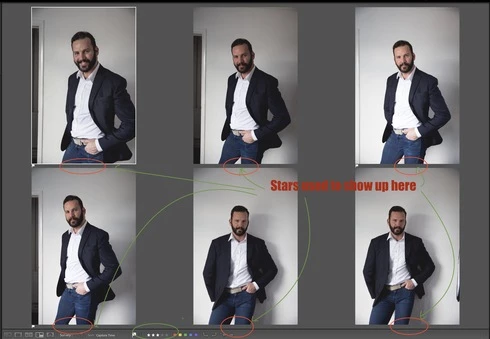
I think this might be a software issue (a bug) but if it isn't can someone help me how to fix it? When I pick X number of images to be viewed in Survey mode (N), those thumbnails have always shown under the image a star rating (or 5 dots if not rated). This has been a very easy and quick way to review images and quickly rate favourites with a cursor.
Recently I noticed that now those dots or ratings do no longer show up under the image. But the weird thing is that the rating buttons still are there even though they aren't visible. If I bring a cursor where they used to be, I can still rate images by clicking with a mouse "blinded" even though I don't see those dots/stars. I know this because on the bottom bar I can see star ratings change for that particular image if I do so. So why is the rating bit no longer appear there?
Is this a bug or some view setting issue? I have tried everything but I can't fix this. This issue is happening on iMac 5K with the latest version of Mojave. And obviously I'm running the latest version of LR Classic too. Anyone?


 AdChoices