
Known Participant
March 24, 2020

P: Rectangle appears on images after editing in Photoshop and returning to Lightroom Classic

  • March 24, 2020
  • 27 replies
  • 836 views

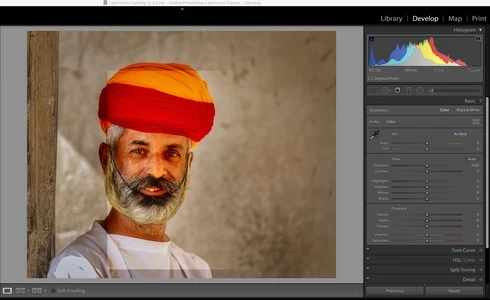
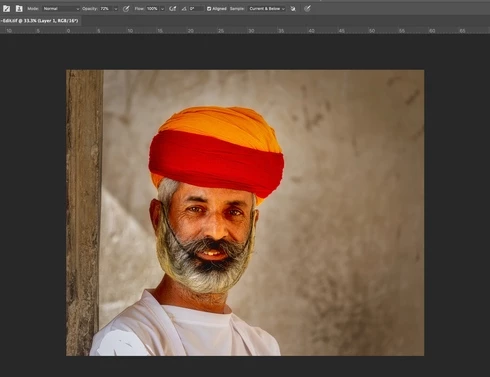
Whenever I export from Lightroom Classic and do some editing in Photoshop and return to Lightroom Classic on saving, there is always a rectangle at a different light level than the rest of the image.  This is corruption, I don't see this rectangle at all in Photoshop and if I reopen the file in photoshop it is not there, just in Lightroom.

It is sooooooooo annoying.

You can see it in this attached image, it happens almost every time I edit in Photoshop and return to Lightroom.  I have more examples.

Iain

Mac OS 10.15.3, iMac 27" 2018, Benq SW321C Photographer Monitor. Adobe Photoshop 21.1.1 Lightroom Classic 9.2

Same image in Photoshop:
27 replies

johnrellis
Legend
March 25, 2020
If you upload a sample raw that triggers the problem, then Adobe will be able to reproduce it and determine the precise cause. As it stands now, the only known way to reproduce the problem is to leave Preferences > Performance > Legacy Compositing off.
Known Participant
March 25, 2020
So, why is that when Legacy Compositing is ON I still have the bug?
johnrellis
Legend
March 25, 2020
Correction: It only occurs when you open a raw within LR PS, add a feathered layer, and then save it as a PSD or TIFF.
johnrellis
Legend
March 25, 2020
As I said above and in the original thread, Photoshop "incorrectly renders the final image as seen by LR and other apps (PS displays the image correctly)". 

When PS saves a multi-layer image in a PSD or TIFF, it creates a hidden compatibility layer that's the composite of all the layers, equivalent to the result of Layer > Flatten Image.  LR and other apps (such as Mac Preview) read the compatibility layer to display the image. PS itself doesn't display the compatibility layer -- it just creates it for use by other apps.

When the option Preferences > Performance > Legacy Compositing is off, the bug causes the feathered layer to be incorrectly rendered in the compatibility layer. Thus, the TIFF or PSD looks correct in PS but incorrect in LR and other apps.

When you save the image from PS to a JPEG (or any format that flattens the layers in the image), the bug doesn't occur. Similarly, if you reopen the PSD or TIFF and force it to be resaved, the bug doesn't occur.  It only occurs when you open a raw within PS, add a feathered layer, and then save it as a PSD or TIFF.
Known Participant
March 24, 2020
The problem never occurs in Photoshop. If I export from Photoshop or save as jpg then it does not show. It only ever shows in Lightroom.
johnrellis
Legend
March 24, 2020
"My problem is Import Raw into Lightroom. Do a minor edit in Lightroom. Right click image and Edit in Photoshop. Do some edits. save and close file. Return to Lightroom and the image has a rectangle overlay at a different opacity than the rest of the image."

Right, all the evidence indicates you're tripping over the Photoshop 21 bug with feathered layer masks. It's a Photoshop bug, not a Lightroom bug. If you upload a raw file exhibiting the problem, rather than the edited TIFF, we can confirm that.
Legend
March 24, 2020
Thanks for the file. Seems like a variation on the bug that John describes which is triggered with feathered masks. I've asked engineering to take a look.
Known Participant
March 24, 2020
Nah, I have some composite images that are 2-3GB and they don’t have an issue. These are RAW images from Canon full frame imported to Lightroom and then edited from Lightroom in Photoshop and saved back into Lightroom. I don’t have the issue with PSB files.
Known Participant
March 24, 2020
"The file 350MB" - I had a similar problem with Lightroom a couple years ago when importing 4x5 high resolution scanned JPEG images, no involvement of Photoshop. They were about 250MB. Could the sheer size of the file be causing the problem? At the time, Windows 7 64 bit with 64GB of RAM. 
  
Known Participant
March 24, 2020
That might be well and fine but it’s not the bug I am reporting.

This thread was started because of what I find in my workflow, I wasn’t trying to report another bug.

My problem is Import Raw into Lightroom. Do a minor edit in Lightroom. Right click image and Edit in Photoshop. Do some edits. save and close file. Return to Lightroom and the image has a rectangle overlay at a different opacity than the rest of the image.

That is what I reported.

If this thread is now to fix a different issue for a different workflow then I’ll leave you all to it.

Iain