
Known Participant
March 24, 2020

P: Rectangle appears on images after editing in Photoshop and returning to Lightroom Classic

  • March 24, 2020
  • 27 replies
  • 836 views

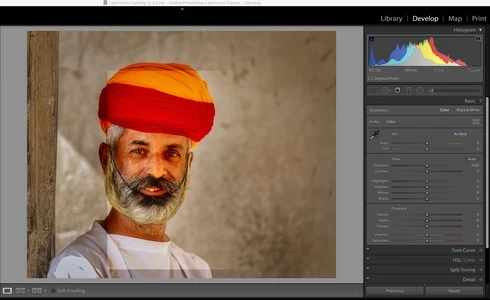
Whenever I export from Lightroom Classic and do some editing in Photoshop and return to Lightroom Classic on saving, there is always a rectangle at a different light level than the rest of the image.  This is corruption, I don't see this rectangle at all in Photoshop and if I reopen the file in photoshop it is not there, just in Lightroom.

It is sooooooooo annoying.

You can see it in this attached image, it happens almost every time I edit in Photoshop and return to Lightroom.  I have more examples.

Iain

Mac OS 10.15.3, iMac 27" 2018, Benq SW321C Photographer Monitor. Adobe Photoshop 21.1.1 Lightroom Classic 9.2

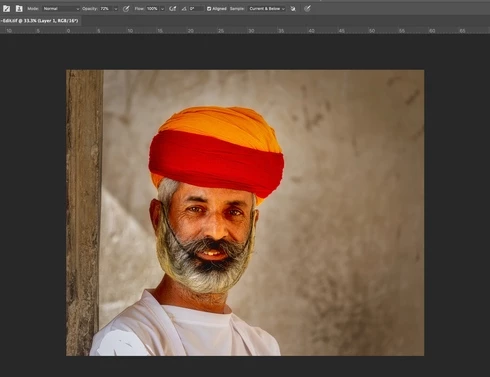
Same image in Photoshop:
27 replies

Known Participant
March 24, 2020
The file 350MB
Known Participant
March 24, 2020
Still the same if I put on Legacy, edit a layer and save, same rectangle in Lightroom.
Known Participant
March 24, 2020
Yes, it is still there even after export, this is why this is so bad, I can't do any work.
Legend
March 24, 2020
Can you provide a copy of the file? 

If you open the file in Photoshop, go to Preferences > Performance... and click "legacy compositing" and resave the file, does it appear correctly in Lightroom?
Rikk Flohr_Photography
Community Manager
March 24, 2020
If you Export to a JPG and then view that JPEG file in Mac Preview is it still there?
Rikk Flohr: Adobe Photography Org
Known Participant
March 24, 2020
Still there.
Rikk Flohr_Photography
Community Manager
March 24, 2020
If you disable GPU in Preferences > Performance and restart Lightroom do you still see the artifact?
Rikk Flohr: Adobe Photography Org