

johnrellis
Legend
June 12, 2024

P: Remove brush strokes appear in the wrong place on rotated images

  • June 12, 2024
  • 23 replies
  • 3817 views

Brush strokes made with the Remove tool appear in the wrong place on a portrait image, rotated 90 degrees counter-clockwise. This occurs in LR 13.4 / Windows 11, but it doesn't occur on Mac OS 14.5.


To reproduce:


1. Download and import this photo:

https://www.dropbox.com/s/ko89pejpmicyqie/rotated-remove-brush-bug.2024.07.01.CR3?dl=0


 Observe that it hasn't been rotated to portrait mode :
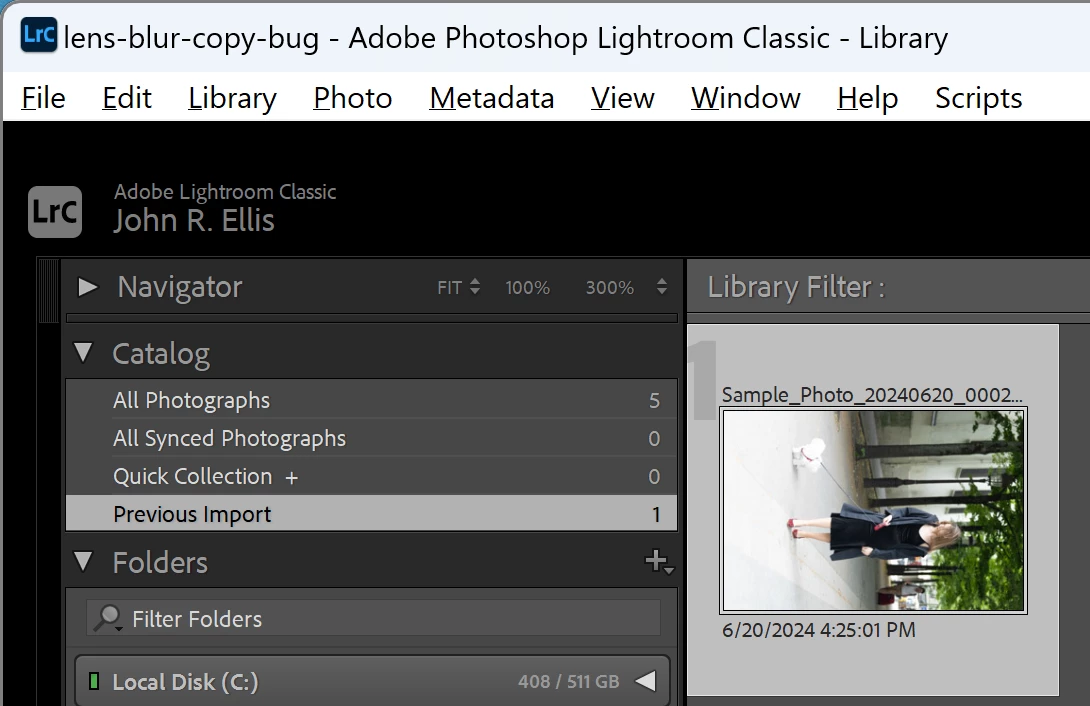
 

2. With Exiftool, observe that the camera has recorded landscape orientation:


[EXIF] Orientation : Horizontal (normal)


3. Do Photo > Rotate Left.


4. In Develop, open the Remove tool and select Remove mode.


5. Brush anywhere on the photo and observe that the brush strokes appear on the wrong place on the iamge, rotated 90 degrees counter-clockwise.  See the attached screen recording.


6. Select the other modes (Heal, Clone) and observe similar misbehavior.

23 replies

Participating Frequently
July 14, 2024

@TwistedRealm 


I have an old graphics card. "Intel HD Graphics Family" on Dell Inspiron 7537. I have the following message when I try to open in CameraRaw. Is there still a way  to try your fix?


big-e-mr-g
Participating Frequently
July 13, 2024

Thank you!


I'm using Lightroom Classic v13.4 on an Intel based iMac with a Radeon Pro 580X 8GB graphics card running on Sonoma 14.5.


I can confirm that switching on GPU processing fixes the problem.


Regards,


Ian

Known Participant
July 12, 2024

@Madhu Sundar

Try my fix?

Participating Frequently
July 12, 2024

I first noticed this issue in Lightroom Classic v13.3.1. I have the issue in v13.4 as well.


I am using Windows 10 version 22H2.

Known Participant
July 12, 2024

I found a way to fix on my PC:


This is related to intel integrated GPU's - if you use Nvidia or AMD > It may never be an issue for you?


On this particular PC I don't use a discreet GPU because of heat and noise, and LR runs perfectly fine doing all tasks on the 10core i5-12600k CPU.


YESTERDAY > With LR v13.2
Lighroom was working fine.

All GPU support disalbed (BECAUSE this CPU performs better than the iGPU by a long mile for certain tasks - that is a tradeoff I've lived with for a while with no issues).


TODAY > With LR 13.4
I get this orientation issue with healing tools.


Fix: ??
Enable GPU support

Now I get the correct behaivour.

IF you are using a discreet GPU and still getting the issue, try disable/re-enable?
You don't need to restart LR to do this, as per my video below.


Video is shard on drive here:
"FIX FOR LR BUG - HEAL TOOL - GPU SUPPORT.mp4"

https://1drv.ms/f/c/4c0bd790e8901ab5/Eiymgt8-_cRLqLlL9ylpCJIBXdc_xmjBxuGA2KjuSRSj8g?e=hDm8De

Hope this helps!


Known Participant
July 12, 2024


EDIT > See my fix (post below) if you have this issue:


Known Participant
July 12, 2024


EDIT >>  See my fix (post below) if you have this issue:

Known Participant
July 12, 2024

I can confirm that I'm experiencing the same issue, since I updated to 13.4 yesterday....


Flip/rotate an image from its as-shot orientation, use the heal tool,. the healing takes place in another part of the image...


Windows 11 latest build.


See my fix (post below) if you have this issue:


big-e-mr-g
Participating Frequently
July 12, 2024

Hi, just found this thread after experiencing issues with Lightroom Classic v13.4 on Mac, so I don't think it's Windows specific!


If I rotate an image inside Lightroom by 90 degrees, the Remove tool places the spot / brush in the wrong place, by 90 degrees. 


If I rotate an image outside of Lightroom, then import it, the remove tool places the spot / brush in the wrong place even when not rotated within Lightroom.


Hope this helps someone track down the bug...


--

Ian

Participating Frequently
July 4, 2024

I can confirm that the issue happens when I rotate the photos within the Lightroom.