
Inspiring
June 12, 2021

P: Scaling issue in Photoshop but only when exporting from Lightroom Classic

  • June 12, 2021
  • 20 replies
  • 1543 views

Basically when I use Edit in Photoshop 2021 I get scaling issues like this - i.e. the mouse pointer appears in one place but affects the image in another.
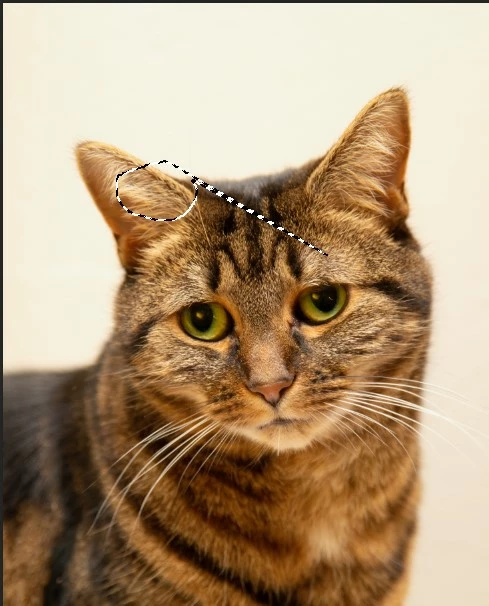
So when I try and draw around the eye on the right the effect is as above.

If I export the image to the desktop and open manually in Photoshop this doesn't happen - only when exporting from Lightroon Classic.

Both Lightroom and Photoshop individually work fine on different monitors at different resolution, but like most people, I like to use the Edit in Photoshop function as it is a fundamental part of my workflow.

I thought to start with this was a Photoshop problem but now I am not sure.

I have tried uninstalling and reinstalling without plugins but nothing has changed. I've even tried reinstalling the OS.

You can read the full thread here under the Photoshop section.

https://community.adobe.com/t5/photoshop-ecosystem-discussions/scaling-issue-in-photoshop-2021-v22-5-1-but-only-when-editing-from-lightroom-classic/m-p/12459284 

Many Thanks

Ian

This topic has been closed for replies.

20 replies

Rikk Flohr_Photography
Community Manager
Community Manager
October 21, 2021

"It's whatever they are on a clean install."

Unfortunately that doesn't help.  


I need to know the scaling on both Lightroom Classic: Preferences>Interface

I also need to know the scaling setings on the Windows OS for each monitor


These should all be percentage values. When you get that information, I should be able to make some recommendations. 

Rikk Flohr: Adobe Photography Org
iwattsAuthor
Inspiring
October 21, 2021

It's whatever they are on a clean install. Sorry I can't check at the moment but I've done a complete clean install of everything - photoshop and Lightroom, including deleting preferences in app data to ensure that everything was reset. The problem still persists. 

Rikk Flohr_Photography
Community Manager
Community Manager
October 21, 2021

Can you confirm your scaling setting in Lightroom?

Rikk Flohr: Adobe Photography Org
iwattsAuthor
Inspiring
October 21, 2021

No - I think I said that above - if I Export from lightroom to the hard drive, using the same settings as Edit In Photoshop from Lightroom, it works perfectly. That is why it is so odd.

Rikk Flohr_Photography
Community Manager
Community Manager
October 21, 2021

As a test, export the file from Lightroom to your hard drive using the settings in your Preferences>External Editor Preferences.

Open that photo from your hard drive in Photoshop. Does the file still misbehave?

Rikk Flohr: Adobe Photography Org
iwattsAuthor
Inspiring
October 21, 2021

Hi

No - I have tried that to see if that worked but no, I'm not, and if I put Photoshop onto the monitor that is 1920x1080 at 100% scaling then everything works fine, but it is my understanding that the scaling of the monitor shouldn't affect the image in this way.

I've just done (another) complete uninstall of everything photography related, including Photoshop and Lightroom, and I have also removed the relevant folders in appdata to make sure that nothing is lingering and everything is clean. I'm not hooked up to any other monitors and just using the laptop in its default state (15inch monitor, 1920x1080 and 125% scaling, which is all default settings).

As stated, it isn't a scaling issue in Photoshop as if I open a file manually in Photoshop it works (even if it is the same file that I just export to the desktop with exactly the same settings that Edit in Photoshop 2021 uses). But try and use Edit in Photoshop and the above occurs. I have tried different images etc but nothing seems to fix this issue. It is so frustrating.

Rikk Flohr_Photography
Community Manager
Community Manager
October 21, 2021

Are you by chance sending a Cropped Virtual Copy from Lightroom to Photoshop?

Rikk Flohr: Adobe Photography Org
iwattsAuthor
Inspiring
October 20, 2021

No - nothing to do with the NAS - I copied some photographs onto my desktop and imported into lightroom, and still have the same issue

iwattsAuthor
Inspiring
October 20, 2021

I have had a thought that maybe it could be down to storing the photographs on a NAS - I am going to try a test and see if that works

Participating Frequently
June 12, 2021

I have been using Lightroom on a 30" 2560x1600 monitor for the past 12 years. It was time to replace my monitor, so after doing some research, I got a 43" 4K monitor. (I have a desk deep enough to push the monitor back so it’s comfortable). The ppi on the 43” is about the same as the 30” at around 100ppi.

The Windows 10 display scaling is set to custom scaling at 115% and the Ease of Access Display settings are set at default. This gives me a good size of interface and crisp fonts on nearly all apps.


Photoshop scaling is fine. In Preferences, Interface, the UI Font size is set to medium with ‘Scale UI to Font’ disabled. I can fit a lot onscreen at a sensible size, with sharp fonts.


I’m having issues with Lightroom however. Whatever I do, the interface size is either too large or small. In the screenshots below you can see Preferences, Interface, Font Size set to Auto, Medium and Large – 150%.


The best size is Medium, but it is rather small and tricky to work with, as clicks on the Develop panel need to be very precise. As you can see from the comparison, the Large – 150% interface size is just too large. I can’t fit enough panels onscreen and loose too much space. I’ve also tried adjusting the program size in Properties, Compatibility, Change high DPI settings in the ‘High DPI scaling override’ sections, but that doesn’t make any difference.


Would it be possible for Adobe to give us more front size options? At the very least, one extra option which would be Large - 125%, which is a standard Windows Display option. That would allow the interface to adjusted more precisely and give better results, regardless of monitor size.


Ian Lyons
Community Expert
Community Expert
June 12, 2021

You request won't be heard by Adobe on this forum. Best you submit your feture request at https://feedback.photoshop.com/topics/lightroom-classic/5f5f2093785c1f1e6cc40872


Participating Frequently
June 12, 2021

Cheers. Will do. I thought this was the official Adobe forum. I did tag the post with Feature Request.