johnrellis
Legend
November 21, 2023

P: SDK: catalog:triggerImportUI() doesn't open Import with the supplied path on Windows

  • November 21, 2023
  • 11 replies
  • 1324 views

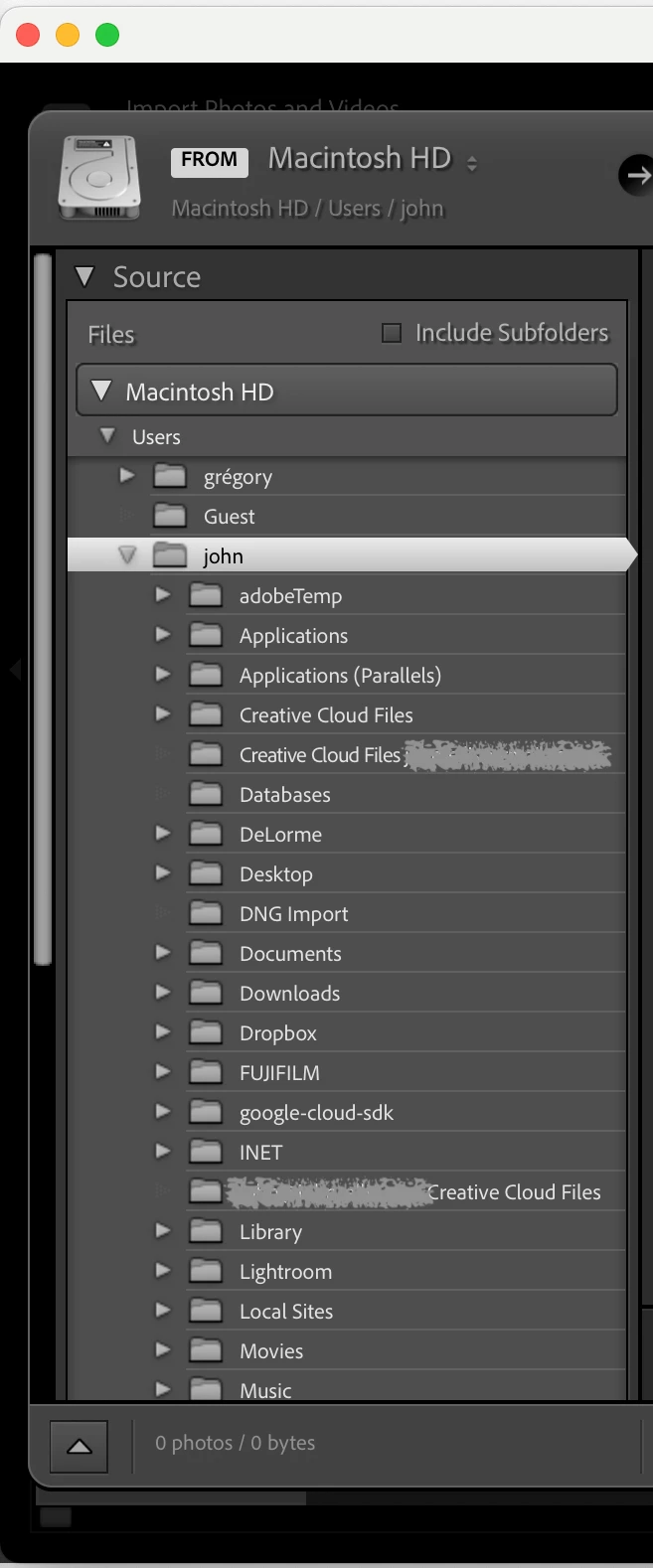
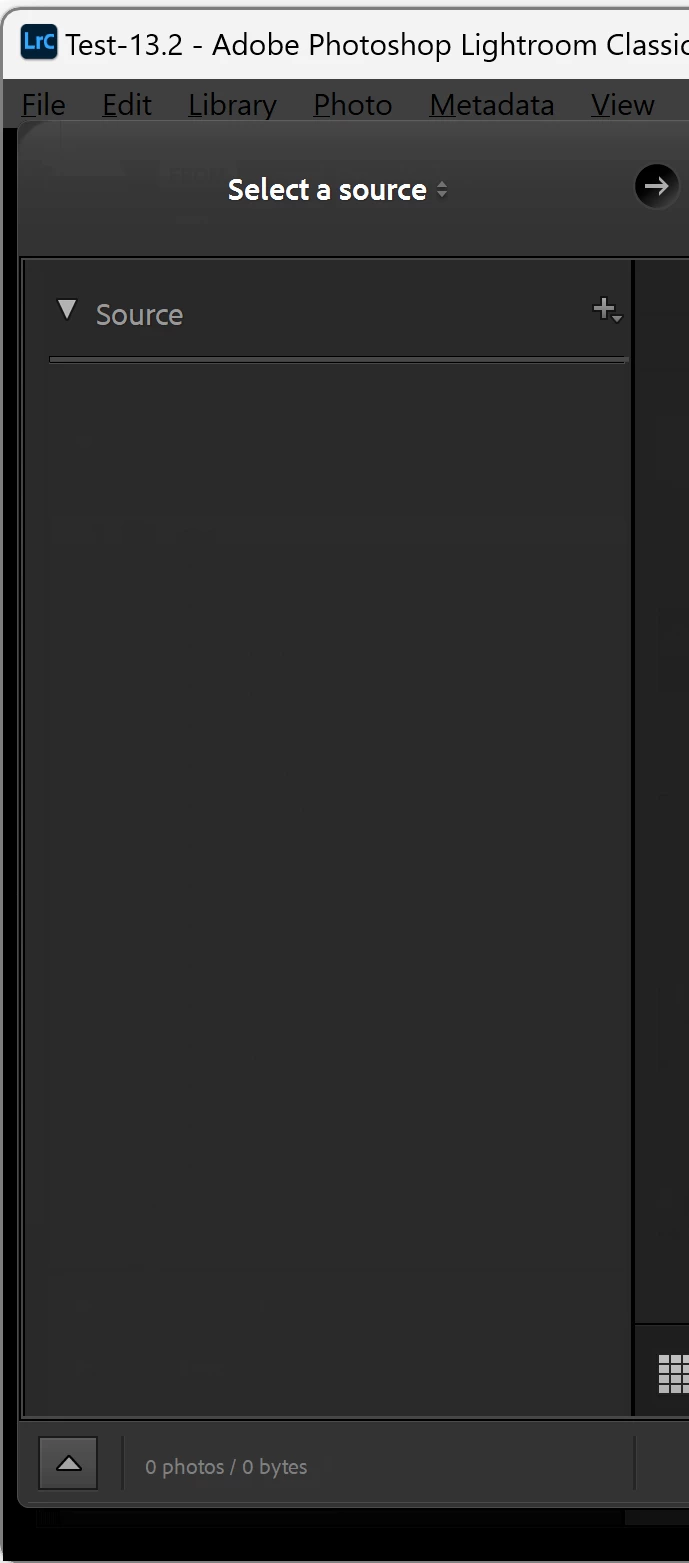
On Windows, the method catalog:triggerImportUI (path) opens the Import window but doesn't set the initial source to "path". It works correctly on Mac.


To reproduce on LR 13.0.1 / Windows 11:


1. Save this script to the file "test-import.lua":


local path = import "LrPathUtils".getStandardFilePath ("home")
import "LrDialogs".message (path)
local catalog = import "LrApplication".activeCatalog()
catalog:triggerImportUI (path)


2. In LR, do Scripts > Open User Scripts Folder and place "test-import.lua" in that folder.


3. Restart LR.


4. Do Scripts > test-import and observe that the Import window opens but no source is selected in the Source panel.  The Windows 11 result is on the left, Mac OS 14.1 on the right:


This topic has been closed for replies.

11 replies

johnrellis
Legend
January 4, 2024

"About case sensitivity,  the paths where the same CS. (But it shouldn't be needed imo)"


LR has always treated paths as case-sensitive, even though by default the file systems of volumes on Mac and Windows are case-insensitive. However, both Mac and Windows support case-sensitive volumes, and Adobe decided long ago that LR supports such volumes. But LR's implementation doesn't check the volume of paths when comparing them to decide whether to use case, and I highly doubt Adobe will ever correct LR to do so.

Participating Frequently
January 4, 2024

@johnrellis Thanks for your extensive reaction. 

In a way funny that my url handling script, was not executed at all in my circumstance (not a running LR process), but close enough to have some expectation that it was. That part I can fix by starting a LR process myself.


About case sensitivity,  the paths where the same CS. (But it shouldn't be needed imo)


So the bug provoking circumstance of a mounted memory card remains. 


Hope that will be solved somedays..

johnrellis
Legend
January 4, 2024

@Martijn26765361ihg7, in my testing, both forward slashes and backslashes are accepted by triggerImportUI(). Many but not all parts of LR accept forward slashes on Windows. But backslashes always work.


However, I did notice that case is significant in the path provided to catalog:triggerImportUI().  If the case doesn't match exactly the case of the path stored in the file system, LR won't recognize it.  For example, if Windows File Explorer shows the case as "D:\DNG Import", then LR won't recognize the path "D:\DNG import".


I also noticed that URL handlers don't work correctly when LR isn't running. My Any Filter plugin generates CSV files with "lightroom:" hyperlinks that select particular photos in LR. But when LR isn't started, clicking the link in Excel causes LR to start and go to the Import window with no source selected (even though the handler doesn't call triggerImportUI()).  This may be the same misbehavior striking you, and if so, the bug is unrelated to triggerImportUI().


I recommend you post a new bug-report thread with a complete standalone plugin with the minimal source code needed to demonstrate the possible URL handler bug (everything else stripped out), with precise step-by-steps for reproducing the URL handler problem. Upload the plugin to Dropbox, Google Drive, or similar and post the sharing link here.  The simpler the test plugin (i.e. no extraneous code), the more likely Adobe will be able to reproduce the bug and prioritize a fix.


Participating Frequently
January 4, 2024

As said, for me it still doesn't function correctly. After a bit of testing I found out that under the following circumstances it doesn't select a directory: 

  • A memory card is plugged in, or
  • The url handler is activated and Lightroom wasn't running already
Rikk Flohr_Photography
Community Manager
January 4, 2024

Per @johnrellis  comment - marking as fixed (can no longer reproduce)

Rikk Flohr: Adobe Photography Org
Participating Frequently
January 4, 2024

The mentioned script is my default workflow script, but it still doesn't function with version 3.1.


That could be, because my path parameter isn't formatted properly:

path = 'D:\\DNG Import';

Before posting the issue I did tried many ways of supplying a static path, but for testing I would like to know the correct way for sure.


It might be that this one has at least worked in the past:

path = 'D:/DNG Import';


Thanks in advance!

johnrellis
Legend
January 4, 2024

The issue doesn't occur in my LR 13.1 / Windows 11 (though it does with LR 13.0.1).  So I guess we can close this issue.

Adobe Employee
January 3, 2024

John,

We couldn't repro this issue on a Win 10 or a Win 11 machine.
The Import window opens the correct folder after running the script.
Are we missing something?


Thanks,

Sunil

Participating Frequently
November 22, 2023

Thanks!

Rikk Flohr_Photography
Community Manager
November 22, 2023

I've opened a ticket for this issue, John. Thanks for your report. 

Rikk Flohr: Adobe Photography Org