

johnrellis
Legend
March 2, 2023

P: SDK: photo:getDevelopSettings() sometimes returns nil for Temperature and Tint

  • March 2, 2023
  • 20 replies
  • 1953 views

photo:getDevelopSettings() sometimes returns nil for Temperature and Tint.   Tested in LR 12.2 and 10.4 on Mac OS 12.6.1.


To reproduce:


1. Download and unzip this catalog folder ("Temperature"):

https://www.dropbox.com/s/z527z9to4ie46vx/Temperature.2023.03.02.zip?dl=0


2. Copy the file "get-temperature.lua" from the catalog folder to the User Scripts folder.


3. Open the Temperature catalog.


4. Select the one photo and go to Develop.


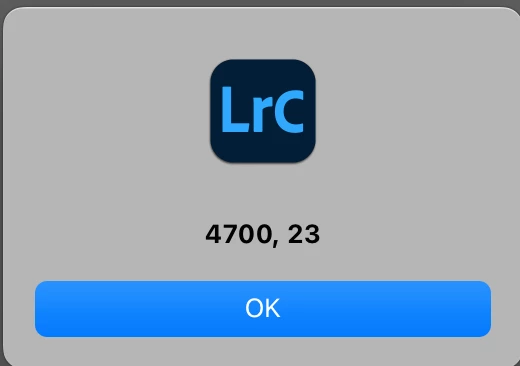
5. Go to Library and do Scripts > get-temperature. Observe the temperature and tint are correctly displayed:
 

6. Do Quick Develop > Reset All.


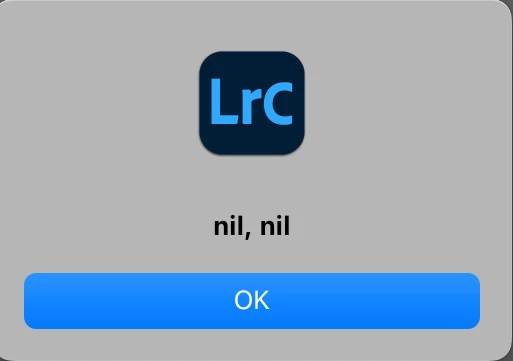
7. Do Scripts > get-temperature and observe that temperature and tint are incorrectly nil:


This topic has been closed for replies.

20 replies

Rikk Flohr_Photography
Community Manager
September 26, 2024

@johnrellis 

Let's do a fresh report for this one. I will watch for it. 

Rikk Flohr: Adobe Photography Org
Rikk Flohr_Photography
Community Manager
September 23, 2024

I am checking with the team to see if they want to reopen the bug fixed in 13.1 or have a new bug. 

Rikk Flohr: Adobe Photography Org
Known Participant
September 20, 2024

Seeing your post @johnrellis, I ran tests in my code and can confirm I'm also seeing this issue in Lightroom Classic 13.5.1.

johnrellis
Legend
September 20, 2024

@Rikk Flohr: Photography, this bug was originally reported with LR 12.2 and 10.4, but I could no longer reproduce it in LR 13.0.1, so I asked that the issue be closed. It can now be reliably reproduced in LR 13.5.1, as I determined responding to the developer of the Power Keys plugin.  Should this be posted as a new report or would you prefer it left here?

johnrellis
Legend
September 20, 2024

[This post contains formatting and embedded images that don't appear in email. View the post in your Web browser.]


This misbehavior has reappeared and can be reproduced again in LR 13.5.1 / Mac OS 14.6.1 -- photo:getDevelopSettings() sometimes returns nil for Temperature and Tint.


1. Download and unzip this small catalog:

https://www.dropbox.com/scl/fi/nmh89jdu83e34vyhdgcj9/Temperature.2024.09.20.zip?rlkey=iib53zohs7ugef23h7mckruqq&dl=0 


2. Copy the file "get-temperature.lua" from the catalog folder to the User Scripts folder.


3. Open the catalog.


4. In the Folders panel, right click the folder Temperature and do Synchronize Folder and import the one photo.


5. Select the one photo and do Scripts > get-temperature and observe the correct output:


6. Do Quick Develop > Reset All.


7. Do Scripts > get-temperature and observe the incorrect output:


8. In Quick Develop, click Exposure > Increase Exposure 1/3 Stop.


9. Do Scripts > get-temperature and observe the correct output:


* * *


I've successfully tested this workaround on about 500 photos that were originally reporting nil:


    if nil == photo:getDevelopSettings ().Temperature then
        photo:quickDevelopAdjustWhiteBalance ("Temperature", 0)
        end
    assert (nil ~= photo:getDevelopSettings ().Temperature)


Rikk Flohr_Photography
Community Manager
October 27, 2023

Marking fixed as requested in the thread. 

Rikk Flohr: Adobe Photography Org
johnrellis
Legend
October 27, 2023

This is all fairly new to me too. I hadn't really looked into DNGs much until Denoise and the recent use of JPEG XL compression instead of JPEG.

C.Cella
Inspiring
October 27, 2023

@johnrellis 


Apologies John.

I have now check the DNGs effected in my test catalog and they all originate form a JPEG or a non RAW file which explains the lack of Temperature and Tint.


So no actual RAW file is affected.

.

johnrellis
Legend
October 27, 2023

@C.Cella "In my test catalog, no matter the version of LrCC, I haveDNGss that appear with Temperature and Tint "nil".  I already shared one of those files (which is not mine) in one of my previous replies above: AWilliamsFam00400.dng (for some reason now I can't attach files when I reply)"


You provided two files above, AWilliams_Fam0041.JPG and Panorama.dng. The former is a JPEG, not a DNG. But Panorama.dng has no Temperature/Tint but does have IncrementalTemperature/Tint. When you open Panorama.dng in Develop, the Temp and Tint sliders go from -100 to 100, as expected for IncrementalTemperature/Tint.  Exiftool suggests the input files for Panorama.dng were JPEGs from a Samsung M-G998U1. 


I searched my catalogs and found a few DNGs with no Temperature/Tint but with IncrementalTemperature/Tint. They were either panoramas created from source JPEGs or created by Enhance > Super Resolution from JPEGs or HEICs. 


So it appears that if a DNG was constructed from raws by Convert Photo To DNG, Merge, or Enhance, it will have Temperature and Tint. If it was constructed from non-raws (e.g. JPEGs or HEICs), then it will have IncrementalTemperature/Tint. This makes sense, reflecting the underlying source pixel data.


I can't figure out with Exiftool how LR/CR can tell apart the two kinds of DNGs.  Both have their pixel data represented in 16-bit linear raw format. There might be a field that Exiftool isn't showing or something else I'm missing.


But all this seems reasonable and not indicative of a bug.

johnrellis
Legend
October 27, 2023

@Rikk Flohr: Photography, please mark this issue as fixed. Despite a couple hour of investigation, I cannot replicate the original bug recipe or variants in LR 13.0.1, though it reliably occurs in LR 12.