
EdwardJohnAllen
Inspiring
May 14, 2015

P: Set a default "Import Preset"

  • May 14, 2015
  • 33 replies
  • 674 views

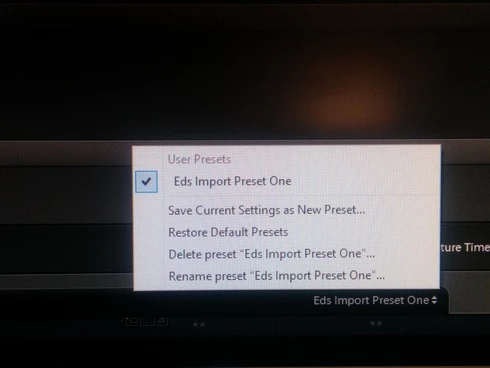
It would be handy to allow users to select an Import Preset as a default, instead of what appears to happen that none are selected when you open the Import dialogue pane.Even with only one configured (See screenshot) I still have to go in & select it each time.
This topic has been closed for replies.

33 replies

Inspiring
May 6, 2019
I ran into same issue.
Is there still not bugfix or at least a workaround available ?
I already tried to rename my preset to "None" but it didn't work as well
Participating Frequently
April 12, 2019
I have since discovered that the  import definitions are retained between sessions, even though the label says "None" for subsequent sessions. Kinda dumb implementation, but it achieves the desired result.
Inspiring
April 12, 2019
I know just what the OP means, and I also wish there was a way you could specify a custom import preset that would "stick" every time you go to import.  Surprised there isn't.
Inspiring
February 14, 2019
Inspiring
February 14, 2019
Problem still not resolved with version 8.2.The bottom "Import Preset" drop down menu automatically opens to "None" in Copy DNG and Copy regardless of what import preset was used when Lightroom classic cc was last in use. 
Rikk Flohr_Photography
Community Manager
February 12, 2019

Greetings

Updates to Lightroom Classic CC (8.2), Lightroom CC for desktop (2.2), Lightroom CC.Mobile (Android and iOS) were released on Monday, February 11, 2019. Please verify that your issue is fixed by the current update.

Thank you for your patience.
Rikk Flohr: Adobe Photography Org
Inspiring
December 27, 2018
IS it fixed yet

Adobe Employee
July 30, 2018
Thanks Jack and Bruce for the details. We are able to reproduce this issue on our end. We will work on this.

Regards,
Ganesh
Participating Frequently
July 29, 2018
I have only tried Copy and Copy As DNG. Same results with both settings - non-sticky.

Years ago I used Copy as DNG exclusively, only recently having changed my preference to Copy. As I recall, the non-sticky behaviour was always present in the Copy as DNG setting.
Legend
July 25, 2018
I ran some tests with the 'bottom' import preset and found the following using LR7.4 on Win7:
Using a preset that uses "Copy" then the preset choice was reset back to 'none' on the next import, however if I have the preset use either "Add", "Move" or "Copy as DNG" then LR is 'sticky' and remembers the previously used preset.

It seems the 'non-sticky' behaviour is limited to presets using "copy" for import??
Jack, this may explain the different behaviour with that infrequently used preset?

(All tests used files on local C drive to another folder on same drive or original folder for 'add')