
EdwardJohnAllen
Inspiring
May 14, 2015

P: Set a default "Import Preset"

  • May 14, 2015
  • 33 replies
  • 674 views

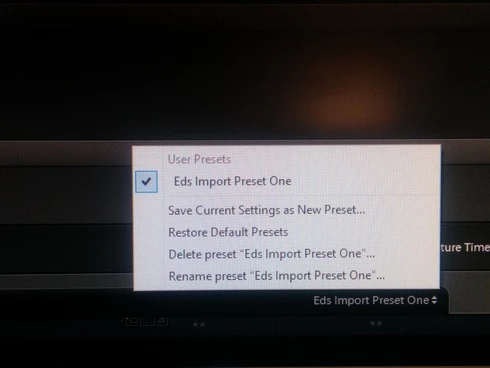
It would be handy to allow users to select an Import Preset as a default, instead of what appears to happen that none are selected when you open the Import dialogue pane.Even with only one configured (See screenshot) I still have to go in & select it each time.
This topic has been closed for replies.

33 replies

Adobe Employee
July 24, 2018
Hey Jack,

If I understand correctly, this is what James is suggesting.

http://blogs.adobe.com/jkost/2017/09/setting-custom-develop-defaults-in-lightroom-cc.html

Please go through the above link. 

Regarding your original concern we will investigate and update you.

Regards,
Ganesh
Adobe Employee
July 24, 2018
Thanks Jack for sharing the details and video. I can reproduce the behaviour you were reporting. We will investigate.

Regards,
Ganesh
JP Hess
Inspiring
July 24, 2018
You really missed the point of my comment. There was absolutely nothing about what I said that had anything to do with setting up defaults in camera. I was talking about setting up camera defaults in Lightroom. But that's okay. Nevermind, do it your way.
Participating Frequently
July 24, 2018
James
Thanks for the input, but there is more to it than meets the eye. The two sources are distinctly different and require different processing that is not feasible to set up in-camera. In particular, they are sent to different destinations, and one is RAW while the other is JPG. Adapting to different conditions is the whole point of using presets, isn't it?

Also, you miss the point that something causes one preset to be remembered between sessions, while the other is forgotten. What "magic" setting causes that to happen? 

So... no, it would not be easier to set up in camera.
JP Hess
Inspiring
July 24, 2018
Instead of worrying about a default preset that you have to choose, wouldn't it be easier to create and set up default camera settings that would automatically be applied? Then it wouldn't be necessary to worry about any preset. Although it would be necessary would be to import the images, the default settings will be applied that you established for the camera, and everything would be done. Then you could go to work to tweak the individual images as needed.
Participating Frequently
July 24, 2018
Have uploaded a video to Flickr at https://www.flickr.com/photos/jacksonmacd/42695939455/in/datetaken/ The video illustrates these steps, although they are not perfectly visible in the video:
- initiate Import
- Import Preset is at the default state of "None"
- choose an Import Preset - it's the one I use for 95% of my photos
- select three photos and complete the import
- delete the newly-imported files
- Initiate a second Import
- NOTICE: the Import Preset has reverted to the default state of "None", which is the source of frustration. I want it to stay on the previously-used Import Preset
- choose a different Import Preset. It's one that I use for about 5% of my imports.
- select the photos, complete the import, delete the photos, initiate another import
- NOW the Import Preset has remembered the last one that I used. 

Why does it recall the one that I use for 5% of the imports, and forget the one that I use for 95%. I cannot a setting to tell LR which Import Preset to use by default.
Adobe Employee
July 23, 2018
@7326661

Thanks for the prompt response. There could be some disconnect in understanding the problem. If possible can you share a small video recording of the issue.

Thanks,
Ganesh
Participating Frequently
July 23, 2018
Ganesh

Your reply deals with changing the definition of the preset, but it does not touch on the problem that was asked. When you save the preset, complete the Import, and then start another Import, the Preset reverts to "None". It does not stick on the preset that the user invoked for the last import. 

Again, many people have described this problem, but it never seems to get an answer.
Participating Frequently
July 23, 2018
"Import presets", at the bottom-centre of the main panel. (Almost) every time that I initiate an Import, the Import Preset is set to "None" and I must select the one that I want to use. However, ONE of the presets in the list is remembered as the default the next time I initiate an import. Unfortunately, I use that particular preset quite infrequently.

I have seen many people describe this problem over the years, and there never seems to be a solution. I hope you have one... 
Adobe Employee
July 23, 2018
Please let me know if above step does not solve your issue.

Thanks,
Ganesh