

EdwardJohnAllen
Inspiring
May 14, 2015

P: Set a default "Import Preset"

  • May 14, 2015
  • 33 replies
  • 674 views

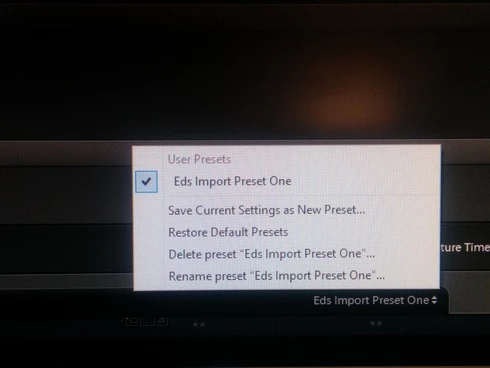
It would be handy to allow users to select an Import Preset as a default, instead of what appears to happen that none are selected when you open the Import dialogue pane.Even with only one configured (See screenshot) I still have to go in & select it each time.
This topic has been closed for replies.

33 replies

Adobe Employee
July 23, 2018
Hi Edward, thanks for raising your concern. 

As Lynn mentioned "Import Preset" is sticky unless you change some of the settings on the Right panel. In that case you see "(Edited)" next to your import preset. Before importing images with changed Import Preset, use "Update Preset xxxxxxxx" as shown in the screenshot to make it sticky again. 
Adobe Employee
July 23, 2018
@7326661 
1) Import Presets at the bottom.
2) Develop settings in the RIght panel.
3) Metadata  in the Right panel

which of the above Preset you are referring?

Thanks,
Ganesh
Participating Frequently
July 21, 2018
What I find most frustrating about this, is that the preset I use all the time is "not sticky" - I must choose it anew for every import session. However, I preset that I use infrequently **is** sticky, and I must remember to "unchoose" it for the following session. Dunno why that particular preset is sticky and none of the others are...
Inspiring
March 6, 2018
...3 years later, the problem still exists.  Nice 😛
Participating Frequently
September 26, 2017
Why would you bother to comment on a post from 2 years ago, and do a personal attack on any post?   


In my Lightroom CC, the Develop and Metadata presets default to whatever I used last and I assume Abobe set it up that way.  If you want a default preset just use it to import something (say 1 image) then import another image and see if the default stayed the same as the last import.
Inspiring
September 26, 2017


Import and metadata presets default to "none" and must be reset to a user preset every time one imports files. Setting presets to be actioned in the "apply during import" panel does nothing towards adding metadata but the import develop preset works. It seems that this problem has existed for many years and has only gone away because people are fed up with the lack of action.
I don't know if this is a bug or an oversight by the development team. Either way it is something that should be addressed as a matter of urgency given the number of queries and complaints to be found on the various forums.
Inspiring
September 25, 2017
Why is Lynn Oakleaf responding to something he/she knows nothing about. I too have Edwards problem and would like an informed answer.
Participant
March 11, 2016
Totally in agreement with the OP on this one.The time it takes to locate a preset on the Import screen may not seem a huge loss but when you're managing a high-volume operation with many operators it would be really useful to be able to specify a default preset - especially as there's often on one preset there!
Participating Frequently
May 14, 2015
that's a new one on me, I had no idea it existed or what it's for

Thanks for making me curious
EdwardJohnAllen
Inspiring
May 14, 2015
Hi Lynn
Its the one along the bottom I was referring to.