
Inspiring
June 15, 2013

P: Slideshow - Black screen

  • June 15, 2013
  • 49 replies
  • 879 views

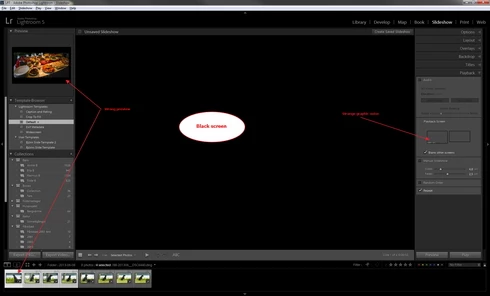
Entering Slideshow after selecting a few pictures gives me a black screen and a wrong preview, see atached picture. This happened after upgrade to LR5 earlier this week and was not a problem in any version of LR4. I have tried with both NEF and DNG files.The only thing working is Export to PDF.

I am running a Dell Studio XPS with Windows 7 64-bit and ATI 4850 graphic.
49 replies

Victoria Bampton LR Queen
Community Expert
Community Expert
May 13, 2014
Because if there's a large number of people (relatively), then there's a much larger outcry on the forums in general. I'm not talking about a small number of people as in 10 or 11 posting in this thread, but as a percentage of Lightroom users. Widespread problems create more noise.

That said, I know that's no consolation for those affected!
Victoria - The Lightroom Queen
Inspiring
May 13, 2014
It's been a year now Victoria. How do you know it's only a small number of people? Most people don't bother to find an appropriate forum and just remove the function from the menu (as I finally did).

I can repeat what I said a year ago, if Adobe wanted anymore information I assume they would have said so..

"I have tried with both NEF and DNG files.The only thing working is Export to PDF. I am running a Dell Studio XPS with Windows 7 64-bit and ATI 4850 graphic."
Victoria Bampton LR Queen
Community Expert
Community Expert
May 13, 2014
Bob, they need to be able to reproduce it in order to fix it. They've clearly managed to reproduce a case where accented characters in the username can cause it. Of course there may be other causes too, as in your case, and just because they've acknowledged one cause doesn't mean they're not still looking for other causes too.

The slideshow module back end was rebuilt for LR5 in order to include videos. That means that new bugs can happen in LR5 that didn't happen in LR4, even if nothing's changed on your system.

If a bug is only happening to a small number of people, which is true in this case, then that makes it all the more difficult to find and fix. There's something specific about your system and a small number of other systems that conflicts, but finding that is like looking for a needle in a haystack. Everyone with the problem (except those with accented characters in their username) listing their full system specs to look for a common theme would be as a good a place to start as any.
Victoria - The Lightroom Queen
Participating Frequently
May 13, 2014
It amazes me that this has been on going for a year and the only response we get is this:

Becky Sowada (Adobe Employee) 27 days ago
We have uncovered a bug where the slideshow acts this way when your username on the OS contains accented characters. We are working to fix this.

Becky
Lightroom team

My user name on my Mac is 4 simple characters. I paid $79 for the 5.0 upgrade and a key component of the product doesn't work. Fix it or refund my $79.

Why does this problem not affect everyone? It also seems to be across both PC and MAC platforms and OS.
Participating Frequently
May 12, 2014
Sounds like Adobe doesn't give a darn. Accented characters in the user name of the OS. Really?! Do they think we are morons out here?
Inspiring
May 11, 2014
I reported this problem, that started with version 5 of Lightroom, 11 months ago and the problem is the same today and not related to accented characters

Adobe does not seem interested and I have no hope that they will fix it. I consider the slideshow functionality in Lightroom as a non existing function and my trust in Adobe is not high.
Inspiring
May 11, 2014


I have a problem watching my images using the Impromptu Slideshow functionality. If I select a couple of images and press CTRL+, the screen turns black and no images are seen. However, I can see a progress dialog (i.e. "preparing images") before the screen turns black. And when the screen is black, the cursor is still visible (so this is not a problem of type, "switching to a screen resolution not supported by the monitor"). After some seconds, the application is visible again.

My system:
Lightroom version: 5.4 [955652]
Operating system: Windows 8.1 Business Edition
Version: 6.3 [9600]
Application architecture: x64
Renderer: Intel(R) HD Graphics 4600

And yes, I have the latest drivers for the graphics card in use. Any other ideas?
Inspiring
May 10, 2014
Does this problem exist in Adobe Creative Cloud version of Lightroom 5?

Would like to be kept updated on the progress, or lack of progress!
Thanks
Participating Frequently
May 10, 2014


This is a repeat question since it is impossible to get an answer from Adobe. Possibly THE worst technical support of any product I have ever purchased!! I upgraded to LR 5. The slide show does not work. I only get a black screen while the slides advance. This was not a problem with LR4. My saved slide shows do not work and new ones created in LR 5 don't work. Adobe gave some ridiculous answer about the name of the files with some sort of ID in them. The answer made no sense. I have changed nothing in my OS or my file structure. Some people are experiencing this problem since there were several people posting the same issue. Why can't we get a timely and credible answer from Adobe on this problem? Anybody have a solution? I went back to LR 4 and no issue with the saved slide shows. Help please!! LR 5.4 upgrade did not fix the problem either.

Come on Adobe fix your very expensive software product that I paid cash for!!

Thank you!

MAC OS 10.7.5
2 Views Tags (edit): lightroom_issueContent tagged with lightroom_issue
Participating Frequently
April 21, 2014
Still waiting for a reply, fix, something.