
Inspiring
Jun 15, 2013 2:41 PM UTC
Open for Voting

P: Slideshow - Black screen

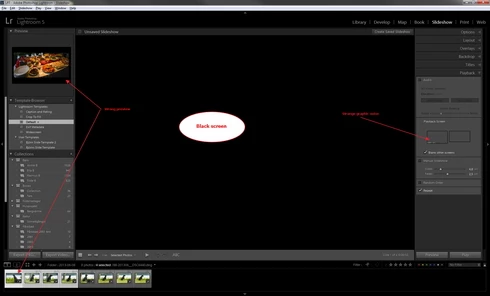
Entering Slideshow after selecting a few pictures gives me a black screen and a wrong preview, see atached picture. This happened after upgrade to LR5 earlier this week and was not a problem in any version of LR4. I have tried with both NEF and DNG files.The only thing working is Export to PDF.

I am running a Dell Studio XPS with Windows 7 64-bit and ATI 4850 graphic.
49 replies

Inspiring
Nov 26, 2013 9:01 AM UTC
Unfortunatelly the refresh didn't do anything (5.3 RC) .
Translate
Inspiring
Nov 26, 2013 9:00 AM UTC
Unfortunatelly the refresh didn't do anything (5.3 RC) .
Translate
Inspiring
Nov 25, 2013 4:31 PM UTC
I am having the same problem, when trying to export (NOT TO PDF) then en unexpeced error occurs.
I have been using Lightroom 4 before and did never have thees problems at the same PC (Windows 7 64bit) all updates and latest grafic drivers.
This problem have a lot of people if you look at the forums, but adobe does not seem to be interested to fix this issue or give any help, really poor support.
Translate
Participating Frequently
Sep 29, 2013 5:42 PM UTC
It seems to be hardware-dependent. I just got a new MacBook Pro and there's no problem on that machine. It's still there on my old MacPro.

They have different OS versions (10.7 on the Mac Pro, 10.8 on the MacBook Pro), but I don't think that matters. The problem shows up for some people on both Mac and Windows, and in several OS versions on each.
Translate
Inspiring
Sep 29, 2013 5:29 PM UTC
Unfortunatelly the refresh didn't do anything.
Translate
Inspiring
Sep 27, 2013 11:04 AM UTC
I have the same problem
Translate
Inspiring
Aug 10, 2013 7:36 PM UTC
Latest ATI 4850 graphic drivers installed. Same problem also in LR5 RC.
Translate
Inspiring
Jul 8, 2013 2:39 PM UTC
I have got same problem on win7 64bit. (ATI Radeon 6770 HD)
Translate
Inspiring
Jun 22, 2013 6:12 PM UTC
I have the same problem, on a Mac Pro, OSX 10.7.5, Radeon X1900 XT.

See this post in the Adobe forums:

http://forums.adobe.com/message/5438810#5438810
Translate