Known Participant
October 25, 2020

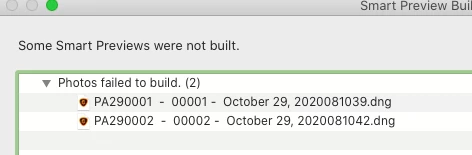
P: Some Smart Previews were not built
  • October 25, 2020
  • 34 replies
  • 2693 views

I have upgraded to Lightroom Classic v10 and have the latest version on my mac.  When I import photos I get the following window.

34 replies

Participant
March 23, 2025

I have this issue as well. How should I respond to this during import? Save As? Show in Library? Ok? What is the correct way to handle this error with Smart Previews failing to build for part of your import (98 of over 200 photos)? Thanks!

Participating Frequently
July 29, 2022

hmm okay, seems my main issue was that updating the catalog corrupted my whole folder structure and after hours of trying what's wrong updating folder location worked... but for some reason it didn't propagate everywhere... 😕😕 never mind, glad it's working and I hope future releases will work smoothly.

Participating Frequently
July 29, 2022

I still encounter the error message, all my software is up to date.. LR Classic 11.4.1, Camera raw 14.4.1 trying to convert ~200 images I'd like to edit while I don't have my main drive around... can't do anything 😞 the error message sucks... no explanation/reason just statement it couldn't be done... Please let me know if there's anything what can be done...

Participating Frequently
December 19, 2021

I'm in late December, 2021, latesa updates to LR (Dec. 19), and having the same problem. So weary of problems with LR. I have work to do!

Rikk Flohr_Photography
Community Manager
January 19, 2021

Can you show us a screen grab of the dialog that appears?

Rikk Flohr: Adobe Photography Org
Inspiring
January 19, 2021

I have the latest update of Lightroom Classic (10.1.1) and I'm experiencing this issue as well - I just tried to add a large number of photos to my catalogue and a lot of the smart previews didn't build. I'm adding them from an external hard drive to a catalogue on a MacBook Air. I really need these as I travel extensively - help!

Rick Spaulding -
Legend
December 8, 2020

Updates to the Adobe Photography Products were released yesterday and include a fix for this issue. Please install the December update, restart your system and verify you are no longer experiencing the issue. Thank you for your assistance in reporting, providing additional information and, most of all, for your patience.

Inspiring
November 28, 2020

I am having the same issue with importing (copy to new location) with import settings to generate Standard and Smart Previews.  I "imported' with Image Capture from an iPhone to a file folder on my MAC.  Then Imported to Lightroom from that folder ("Copy" import setting) to another folder on my hard drive. Seems so far to only be an issue with .HEIC file types and only some HEIC files.  I haven't seen any issues yet with JPG or RAW files.  Copy to DNG does not work on HEIC files so that work around doesn't work for me.  I'm running Mac Catalina v. 10.15.7 on late 2013 iMac with Lightroom Classic 10.0 release.  I also lost the ability to email photos from Lightroom with LrC v10 as well, very frustrating.

Participant
November 17, 2020

I've been having the same problem since Oct. 21/upgrading to V10. I convert to DNG upon import, and build smart previews. Smart Previews appear to be building since then, but actually are not building. 

I try to force a build by manually selecting the files and building, but that doesn't work either. I also have a smart collection that is mean to catch files where a smart preview is not built, and that doesn't catch it either. 

This is frustrating and very inconvenient. I now have thousands of photos with no smart previews.

V10 also crashes quite often. I'm not impressed with this update so far. 

Inspiring
November 13, 2020

Yup! I have the same issue as well.