Known Participant
October 25, 2020

P: Some Smart Previews were not built
  • October 25, 2020
  • 34 replies
  • 2693 views

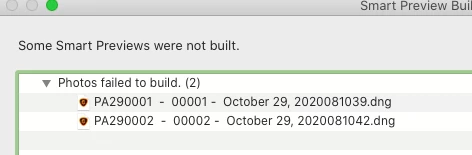
I have upgraded to Lightroom Classic v10 and have the latest version on my mac.  When I import photos I get the following window.

34 replies

Inspiring
November 12, 2020

Hola. I have the same problem. No smart preview at import from SD to external SSD. Before the new LR version, I did not any problem with that. At the moment, I use the alternative option.

Inspiring
November 9, 2020

Yesterday, I also came across this bug. Used the workaround suggested by mayuri jain.

osx 10.14.6

Inspiring
November 9, 2020

I am having the same issue here!

Inspiring
November 7, 2020

Same issue for me, just updated to V10 I'm on a MacBook Pro (up to date) and use an external drive for photos (lrcat. is on MacBook) and get same error as above for all imports... "some smart previews were not built" .... "Photos failed to build (no.)" when importing RAW as "Copy as DNG" into LrC... following thread for update thanks!

Inspiring
November 4, 2020

Yes, but you're not importing just to a drive, but to a folder inside that drive. See 2 screenshots. Notice "apply to enclosed items". Maybe the folder inside the drive doesn't have full read/write rights? Permissions can get whacked by an installation (like your upgrade to LRC V10).

Inspiring
November 4, 2020

After updating my catalog for LRC version 10, I'm now getting an error that smart previews will not build after import. Here's my process:

Mac version 10.15.7 (brand new iMac that replaced my old machine)

LRC version 10.0


I'm importing photos from my CF card via USB adapter to a folder on my Lacie Rugged external drive via Thunderbolt. The photos import without issue, however I do have the "create smart previews" box checked so they will build after import. I get the following error box: Some Smart Previews were not built. Then it lists all of the photos I imported stating "Photos failed to build".


After spending an hour on the phone with customer service. They told me that it was a permissions issue with my Lacie external drive. After navigating to it in finder, the drive shows read & write access for: Me, Staff & everyone.


Please help,

Ray

Inspiring
November 3, 2020

Same for me 😞 

Windows 10, Classic Ver 10.0

mayurij42806338
Adobe Employee
Adobe Employee
November 1, 2020

Hi,


Thanks for the details. We are able to replicate the issue. We will look into the fix on priority.


Meanwhile as an alternative, please do import - copy as dng and when all the images are converted to dng , Go to Library> Previews> Build Smart Previews.


That will help in generating smart previews for dng.


Thanks for your help.


-Mayuri

mayurij42806338
Adobe Employee
Adobe Employee
November 1, 2020

Hi,

Thanks for the details. We are able to replicate the issue. We will look into the fix on priority.

Meanwhile as an alternative, please do import - copy as dng and when all the images are converted to dng , Go to Library> Previews> Build Smart Previews.

That will help in generating smart previews for dng.

Thanks for your help.

-Mayuri

Inspiring
November 1, 2020

Same problem on Mac - Problem is only with Copy as DNG