Known Participant
October 25, 2020

P: Some Smart Previews were not built
  • October 25, 2020
  • 34 replies
  • 2693 views

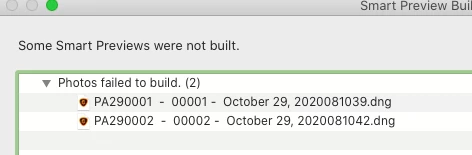
I have upgraded to Lightroom Classic v10 and have the latest version on my mac.  When I import photos I get the following window.

34 replies

Inspiring
October 31, 2020

I’ve just upgraded Lightroom Classic on my Windows 10 PC to Version 10.0. Now it fails to create Smart Previews when importing images. It does however successfully create Smart Previews if I select an imported image an request it to create one. I have tried removing the SmartPreviews.lrdata folder as suggested in earlier thread and same problem exists.

My workflow: I transfer images from camera to the computer using Nikon Transfer 2 and the import them to the library on the PC, converting them to DNG & building Smart Photos, using Lightroom.

Help Welcome..

Rick Spaulding -
Legend
October 30, 2020

@joon I merged you post to a similar thread

Participant
October 30, 2020

The same here... 😞

Inspiring
October 30, 2020

I'm having the same problem after upgrading as well.  Same settings as Mayuri_Jain

Richard

Inspiring
October 30, 2020

H, I am having the same issue about the Smart Preview not building. In addition, I am getting a warning which tells me that "some files could not be renamed" and I am left with a mishmash of files names, some in the correct sequence I have preset in LR but others still with the unchanged camera file name. I am left feeling very uneasy about what is going on in the background! EEEEEKKKKK!

Inspiring
October 30, 2020

I am having the same issue on windows 10. any ideas. 

Lightroom Classic version: 10.0 [ 202010011851-ef6045e0 ]
License: Creative Cloud
Language setting: en
Operating system: Windows 10 - Home Premium Edition
Version: 10.0.18363
Application architecture: x64
System architecture: x64
Logical processor count: 24
Processor speed: 3.0 GHz
SqLite Version: 3.30.1
Built-in memory: 16320.9 MB
Real memory available to Lightroom: 16320.9 MB
Real memory used by Lightroom: 713.4 MB (4.3%)
Virtual memory used by Lightroom: 886.4 MB
GDI objects count: 611
USER objects count: 1882
Process handles count: 1582
Memory cache size: 100.0MB
Internal Camera Raw version: 13.0 [ 610 ]
Maximum thread count used by Camera Raw: 5
Camera Raw SIMD optimization: SSE2,AVX,AVX2
Camera Raw virtual memory: 34MB / 8160MB (0%)
Camera Raw real memory: 35MB / 16320MB (0%)
System DPI setting: 96 DPI
Desktop composition enabled: Yes
Displays: 1) 2560x1440
Input types: Multitouch: No, Integrated touch: No, Integrated pen: Yes, External touch: No, External pen: No, Keyboard: No

Graphics Processor Info: 
DirectX: NVIDIA GeForce RTX 2060 (27.21.14.5148)

Application folder: C:\Program Files\Adobe\Adobe Lightroom Classic
Library Path: C:\Users\dave3\Pictures\Lightroom\Lightroom Catalog-v10.lrcat
Settings Folder: C:\Users\dave3\AppData\Roaming\Adobe\Lightroom

Installed Plugins: 
1) AdobeStock
2) Facebook
3) Flickr
4) Nikon Tether Plugin

Inspiring
October 30, 2020

Short summary on my problem:

I just upgraded my Lightroom Classic v6 to v10 (on Windows 10). When I'm importing now new photos, I get this error: "Some Smart Previews were not built. Photos failed to build."

On my import I use "Copy as DNG" with the options

  • Previews:  1:1
  • Build Smart Previews
  • Develop Settings:  <my own>
  • Metadata: <my own>

My system info can be found in this linked thread above

Inspiring
October 30, 2020

Hi, this seems to be the same problem I'm having on Windows:

https://community.adobe.com/t5/lightroom-classic/error-generating-smart-previews-on-import/m-p/11552258?page=1

(System Info in this thread)

Michael

Participant
October 29, 2020

1. Import source: SD card

2. Destination: internal SSD for Macbook Air, internal SSD for iMac.

3. Import panel settings: 1:1 preview, copy as DNG

I have used these settings years until I upgraded to LR Classic 2021 in both devices.