johnrellis
Legend
December 10, 2014

P: Still inconsistent capture date/time for photos and videos

  • December 10, 2014
  • 165 replies
  • 5837 views

Update 5/17/2018: Though LR 7.1 made improvements, LR 7.3.1 still has two closely related problems with a single underlying cause:

- With photos and videos missing metadata capture date/times (e.g. scans), there is still an inconsistency between the times shown under the thumbnails in grid view and in the Metadata panel and the hidden, internal times used for sorting in grid view.

- Changing IPTC Date Created in the Metadata panel, either by editing the field or using Metadata > Copy/Paste Metadata, similarly causes inconsistent values to be shown and sorting and searching to work inconsistently.  It also causes date metadata to be written back to the files that doesn't conform with the Metadata Working Group's standard.

The underlying cause is architectural: LR doesn't have a single internal catalog field representing "capture time".  Rather, it maintains capture time in several different fields, and the various parts of LR update those fields inconsistently.

See here for precise recipes to replicate these bugs:

https://feedback.photoshop.com/photoshop_family/topics/lightroom-still-inconsistent-capture-date-tim...

https://feedback.photoshop.com/photoshop_family/topics/lightroom-still-inconsistent-capture-date-tim...

See here for a workaround: 

https://feedback.photoshop.com/photoshop_family/topics/lightroom-still-inconsistent-capture-date-time-for-videos?topic-reply-list%5Bsettings%5D%5Bfilter_by%5D=all&topic-reply-list%5Bsettings%5D%5Breply_id%5D=15475521#reply_15475521.  

-------------

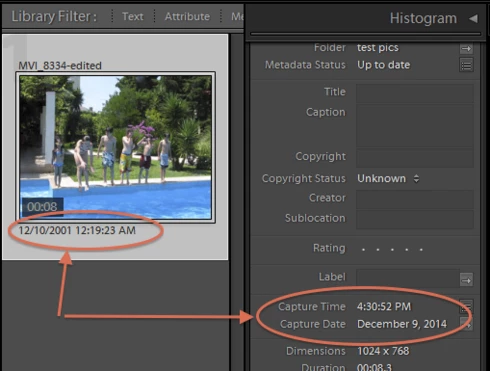
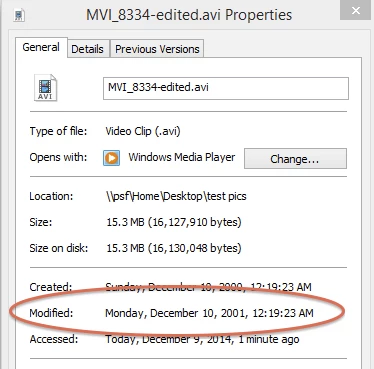
LR 5.7 still shows inconsistent capture date/times for videos. For a test .avi on Windows 8.1, the date in grid view appears to be the file system's last-modified time, while Capture Date/Time is set to the time of import.This problem was declared fixed in LR 5.5, and it appears to have been fixed for images, but not videos:http://feedback.photoshop.com/photoshop_family/topics/inconsistent_dates_for_files_missing_date_time...I'm opening a new topic, since the previous one has been marked "Solved".
This topic has been closed for replies.

165 replies

SteddyShots
Known Participant
December 31, 2019
5 years later and this issue persists. Imported images/videos from Apple Photos. Photos were fine, but discovered this date issue with the videos. When viewing the videos in lightroom in sidebar meta shows correct date, as well as in the grid view. But when doing rename file name by date is does the date they were imported. Thankfully the trick worked of doing edit capture time (not changing any settings) and clicking ok. After that the sidebar and grid still show correct date as before, but when doing rename it now names to the correct date. Hopefully it won't be another 5 years to fix this.
Participating Frequently
December 24, 2019
So I tried importing videos today and have had the same issue. Why hasn't this been sorted?? WE PAY A LOT OF MONEY FOR LIGHTROOM, and yet Adobe aren't listening. it seems rather than actually accepting bug reports they shove us all on a forum and ignore us!! This shouldn't be an issue but from what I've seen it's been going on for 4 or 5 years. What a waste of an afternoon trying to fix a problem that should NOT exist.
johnrellis
Legend
May 23, 2019
Merging with more specific topic.

Please reference the new conversation here: Lightroom: Still inconsistent capture date/time for photos and videos (merging)
Participating Frequently
May 23, 2019
Why isn't this fixed???  I thought I'd try importing again through Lightroom because I love that it doesn't import duplicates, but it's useless and creates such a mess of my files. 

2 issues exist due to the inconsistent capture date/time on all my .MOV files. : 
* Renaming video files on import using date & time in filenames
** Renaming video files using date OR date & time in filenames

Info: I'm using LR Classic CC (v. 8.3) and I have tested Canon 5D Mark II and IV, iphone 6s Plus and iphone X.  

*Renaming video files on import using DATE+TIME
Replicate Scenario: 
1. Import a video and rename upon import as: 
Date (YYYY)-Date (MM)-Date (DD)_Hour.Minute.Second.MOV

Results: 
1. Library shows inconsistent Date Digitized and Date Captured.
        *Date Digitized= correct capture date and time; and agrees with import screen's.
        *Capture time= import time for all video files.
2. Filename time is wrong for all video files.  
3. Filename date is wrong for all video files taken after 5:59 pm or 6:59 CST.
4. Files are sorted correctly 

Conclusion: **SOMEWHERE in LR there is another time that isn't shown and is off by 5-6 hours (at least in Central time zone), resulting in the file naming/re-naming problem. This is the time that is used for naming files.


** RENAMING existing video files with DATE+TIME:
Replicate Scenario:
1. Use any existing video file that has inconsistent date/time digitized and date/time values (such as the files imported above):

2. Rename them:
Date (YYYY)-Date (MM)-Date (DD)_Hour.Minute.Second...

3. They are renamed using the date/time value, which is the IMPORT date/time. Absolutely useless.

Conclusion: No idea.

I know the workaround. The workaround gets OLD. And there shouldn't BE one.  

Is there a way to change the date??  My luck I could have fixed my own issue.  I don't see anywhere to change the time zone...  But it's always consistently 5-6 hours off, which is just weird.


johnrellis
Legend
May 10, 2019
One of the symptoms of this architectural flaw is that editing IPTC Date Created doesn't update the catalog's capture date, as required by the Metadata Working Group standard.
Participant
May 10, 2019


Thank you for your time Tom and John.  I finally figured out my problem.  I was updating using the capture time adjustment on the right side panel in the Library module.  Then I would highlight a bunch more images and sync the metadata (with only the capture time selected).  This changed the capture time in the panel on the right under the default metadata dropdown, but it did not change the EXIF capture date on the files.  I now use the Change Capture Date under the Metadata dropdown menu at the top on a Mac.  This changes the EXIF capture date and is reflected in the export name.  Thanks again for your time everyone.

Participant
May 10, 2019


When exporting files that have an adjusted capture date, the capture date is not reflected in the custom file name (where capture date is selected), but the unmodified date of the original scan is used instead.  This is a problem when trying to export a chronological set of files by file name (using capture time in export), and the unmodified scan date is being used to create the export file name.
Known Participant
February 1, 2019
Has this not been fixed yet? I tried creating a new catalog and now there are hundreds of mts files (aka Sony's hd video format) all incorrectly having the capture time as the date I created the catalog not the actual capture time. See the post above.
Known Participant
December 24, 2018
Hi


I’m having a similar problem here. After updating to the new version of LR classic Lightroom is incorrectly reading MTS video file capture times. The capture times for the same file in Adobe Photoshop, Adobe Bridge and Mac finder are all correct. Only in Lightroom is there a problem. It’s most annoying when I’m trying to filter files based on what year the photos and videos were shot. LR shows me files from 2015 when i’m trying to view files from 2017. The incorrect files all have the same incorrect capture time also. Very strange. I have about 50,000 so i’m Worried about files getting completely lost in the mix.The screenshots show the file info in Lightroom being incorrectly seen and then the file info in Photoshop being CORRECTLY seen. Any help would be greatly appreciated.
Inspiring
December 6, 2018
I am running Lightroom Classic 8.0 on MacOS and noticed today that video files are still being wrongly renamed based on file Date/Time and not Creation Date/Time metadata, any idea how to fix it?

What is the exactly "field" that Lightroom uses as reference for renaming files?