johnrellis
Legend
December 10, 2014

P: Still inconsistent capture date/time for photos and videos

  • December 10, 2014
  • 165 replies
  • 5837 views

Update 5/17/2018: Though LR 7.1 made improvements, LR 7.3.1 still has two closely related problems with a single underlying cause:

- With photos and videos missing metadata capture date/times (e.g. scans), there is still an inconsistency between the times shown under the thumbnails in grid view and in the Metadata panel and the hidden, internal times used for sorting in grid view.

- Changing IPTC Date Created in the Metadata panel, either by editing the field or using Metadata > Copy/Paste Metadata, similarly causes inconsistent values to be shown and sorting and searching to work inconsistently.  It also causes date metadata to be written back to the files that doesn't conform with the Metadata Working Group's standard.

The underlying cause is architectural: LR doesn't have a single internal catalog field representing "capture time".  Rather, it maintains capture time in several different fields, and the various parts of LR update those fields inconsistently.

See here for precise recipes to replicate these bugs:

https://feedback.photoshop.com/photoshop_family/topics/lightroom-still-inconsistent-capture-date-tim...

https://feedback.photoshop.com/photoshop_family/topics/lightroom-still-inconsistent-capture-date-tim...

See here for a workaround: 

https://feedback.photoshop.com/photoshop_family/topics/lightroom-still-inconsistent-capture-date-time-for-videos?topic-reply-list%5Bsettings%5D%5Bfilter_by%5D=all&topic-reply-list%5Bsettings%5D%5Breply_id%5D=15475521#reply_15475521.  

-------------

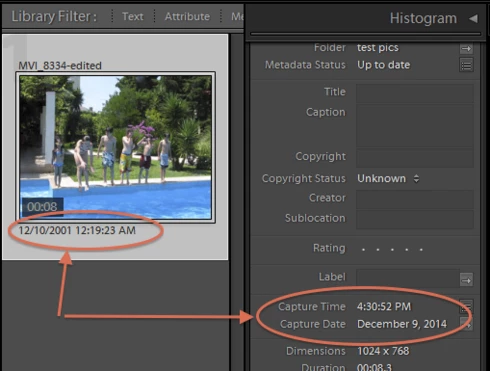
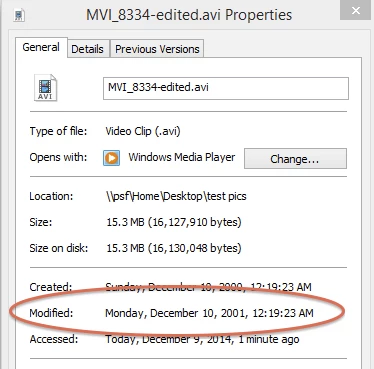
LR 5.7 still shows inconsistent capture date/times for videos. For a test .avi on Windows 8.1, the date in grid view appears to be the file system's last-modified time, while Capture Date/Time is set to the time of import.This problem was declared fixed in LR 5.5, and it appears to have been fixed for images, but not videos:http://feedback.photoshop.com/photoshop_family/topics/inconsistent_dates_for_files_missing_date_time...I'm opening a new topic, since the previous one has been marked "Solved".
This topic has been closed for replies.

165 replies

johnrellis
Legend
October 21, 2018
"Lightroom also locks up when importing the videos."

You might post this as separate topic with more details -- Adobe won't see it buried in this thread.
Known Participant
October 21, 2018
Using Lightroom 8 and the issue is not fixed. Videos taken on the 10/19 imported as they were taken 7 hours later, and imported as if taken the following day. Lightroom also locks up when importing the videos.

johnrellis
Legend
June 18, 2018
OK, there's a separate bug with putting photos into the wrong folder that's triggered by importing with a cable.
Participant
June 18, 2018
I use a card reader to import my files.
johnrellis
Legend
June 18, 2018
Are you importing using a USB cable or by using a card reader?
Participant
June 17, 2018
This error starting appearing for me for a few months. Shot stuff on 17 June 2018 and some got sorted into the not-yet-happened 18 June folder. Checked the camera and made sure my settings were right too.
Smit K
Community Manager
Community Manager
May 18, 2018
Steven,

I was able to reproduce your issue. We are looking into this.

Thanks,
Smit Keniya
Lightroom Classic CC Team
Smit | Lightroom Team
Smit K
Community Manager
Community Manager
May 18, 2018
My Apologies. I misread your step.

Based on your suggestion, when I changed the TimeZone to UTC -7, I was able to reproduce the issue. I will update this to our bug.

Also, if I just use the date-time values you have shared, I am still able to reproduce this when reset my Laptop to IST - UTC +5:30

Thanks again for following up on this for such a long time!

Thanks,
Smit
Lightroom Classic CC Team
Smit | Lightroom Team
johnrellis
Legend
May 18, 2018
Also, if you are located in a time zone whose offset is not a whole number of hours, it might be easiest to temporarily change your computer’s time zone to, say, UTC - 7:00.
johnrellis
Legend
May 18, 2018
To observe the bug, you need to run the ExifTool commands in step 3 before importing the files.