

johnrellis
Legend
October 22, 2017

P: Sync from iPhone sets inconsistent capture date, incorrect sorting

  • October 22, 2017
  • 26 replies
  • 659 views

When a photo is synced from LR iPhone, the capture date in LR Classic is set inconsistently, causing the photos in Library grid view to sort incorrectly.  

A workaround is to select all of the synced photos, do the menu command Metadata > Edit Capture Time, and click Change All. This appears to set the catalog's internal capture date fields consistently.

This is yet another instance of LR's internal architecture maintaining multiple fields for capture date in the catalog database and a programmer incorrectly setting some of them.  There are other bugs (outstanding for years) caused by this architectural defect: 
https://feedback.photoshop.com/photoshop_family/topics/lightroom-still-inconsistent-capture-date-tim...
I'm not merging this bug report with that one, though, because all the symptoms in that one are caused by importing photos missing EXIF capture dates. Whereas this bug occurs cloud-syncing photos with valid EXIF capture dates.

In this instance, one of the catalog database fields is getting set with a UTC value where it should be in the local time zone, or vice versa. 

To reproduce:

1. Create a new catalog.

2. Import a photo with a valid capture date and rename it A.jpg.

3. Empty your LR CC of all photos.

4. Sync this catalog with your LR CC account.

5. In LR iPhone, take a photo within the app.

6. Wait until that photo syncs to LR Classic and rename it to B.dng.

7. Use ExifTool to observe that B.dng has valid metadata date fields:

$ exiftool -a -G B.dng | grep -i date
[File]          File Modification Date/Time     : 2017:10:21 17:38:58-07:00
[File]          File Access Date/Time           : 2017:10:21 17:42:08-07:00
[File]          File Inode Change Date/Time     : 2017:10:21 17:38:58-07:00
[EXIF]          Modify Date                     : 2017:10:21 17:38:24
[EXIF]          Date/Time Original              : 2017:10:21 17:38:23
[EXIF]          Create Date                     : 2017:10:21 17:38:23
[EXIF]          GPS Date Stamp                  : 2017:10:22

8. Use Metadata > Edit Capture Time to set the date of A.jpg to be the date of B.dng + n hours - 1 second, where n is the negative of your computer's current time zone offset.

For example, my computer is set to PST (UTC - 7), so n is 7.  The date of B.dng is 10/21/17 5:38:23 PM, so the date of A.dng is set to that date + 7 hours - 1 second = 10/22/17 12:38:22 AM.

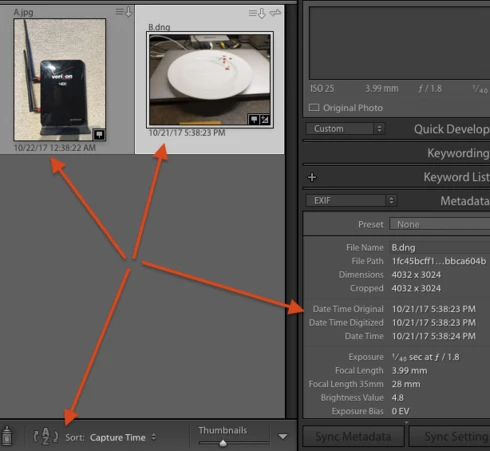
9. Do View > Sort > Capture Date and > Ascending.

10. Observe that A.jpg incorrectly sorts before B.dng, even though the date shown for A.jpg comes after the date shown for B.dng:


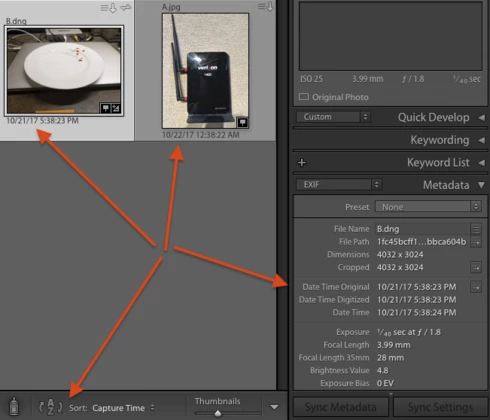
11. Select B.dng, do Metadata > Edit Capture Time, then click Change.  

12. Observe that B.dng now sorts before A.jpg, even though it displays the same capture date/time under its thumbnail and in the metadata panel.


Tested on LR Classic 7.0 / MacOS 10.12.6, LR CC iPhone (updated two days ago) / iOS 11.0.2 / iPhone 7.

This topic has been closed for replies.

26 replies

johnrellis
Legend
January 13, 2018
See the workaround in the top post.
dedreiix
Participating Frequently
January 13, 2018


I now was able to reproduce it:
The sorting issues are only when I imported the pictures with the camera-connection-kit on my ipad and then synced them to Lightroom. When I import the pictures directly on my notebook I have no issues. Somehow the import in Lightroom mobile (iOS) or even the import to the ipad seems to cause the issues.

dedreiix
Participating Frequently
January 13, 2018


At the moment it is not possible to sort photos by creation date OR last edit-creation date. For example when you create an HDR out of three photos at 9:00 and you have additional photos taken at 9:05 the HDR will be sorted behind the 9:05 photos. What is actually wrong.This is caused by lightrooms sorting after the „wrong creation date“ There are three fields for this, so it must be possible to select after wich of them the sorting should be done.
Known Participant
December 12, 2017
Not fixed in release 7.1...
Lee in CLE
Participant
December 11, 2017
I see the same problem with datetimes, except it doesn't necessarily have to be an image shot with the iOS Lightroom app, it can be an image that is imported from the iOS Camera Roll as well. The workaround of doing 0-hour timezone adjustment in LR Classic CC (LRCCC?) solves the problem. Would sure like it if Adobe actually bothered to maintain software I use rather than breaking everything I've ever done with a brand new app. Glad my $10/month goes to improving an app I don't use and don't care for.
Known Participant
December 4, 2017


Same here with Lightroom Classic CC. When I import images from my Nikon D750 and mix them with images synced through the Lightroom App on my iPhone, even though I tell Lightroom to order by capture time, it doesn't work correctly.
Stephen Leggett's tip to Edit Capture Time without adjustments does the trick, but it's a nuisance non the less...

Inspiring
November 27, 2017
Thanks All, for the notes on the issue.  We have a bug logged on this and our developers are looking into this.
Inspiring
November 21, 2017
I'm still seeing the same issue as reported in the original post here. I've updated to LR Classic CC 7.0.1

Lightroom Classic CC 7.0.1 / Windows 10, v1709 / iPhone 7+ / iOS 11.1.1 / LR CC Mobile v 3.0.1
Known Participant
October 28, 2017
Ditto this problem.

I can edit a program in LR mobile. Export it to Camera Roll then transfer it to the desktop MAC and import it. You would expect the original file and the exported file to sit alongside each other inside a sorted gallery - it does not it sits miles away.

What my investigation showed was that the exported file did not have a “Digitised Time” field whereas the master file does have. I was starting to thing that Lightroom CC was sorting on this field instead of the actual “Capture Time” field which is in fact indentical between my exported and original files.
Inspiring
October 25, 2017
My issue comes from a slightly different angle, but the symptom is the same. Sort By Capture Time does not work.
In my screen shot I have two versions of the same image. One was captured on location and imported into LR mobile on an iPad with an assigned image number different from the camera-assigned file name. Then later, I import the full size RAW images into LR Classic.
The capture date and time are exactly the same in the Metadata on both images according to the LR display. However, they do not sit side-by-side when sorting by Capture Time.
Your work around did the job perfectly, John. Thank you.