

P: Sync from iPhone sets inconsistent capture date, incorrect sorting
When a photo is synced from LR iPhone, the capture date in LR Classic is set inconsistently, causing the photos in Library grid view to sort incorrectly.
A workaround is to select all of the synced photos, do the menu command Metadata > Edit Capture Time, and click Change All. This appears to set the catalog's internal capture date fields consistently.
This is yet another instance of LR's internal architecture maintaining multiple fields for capture date in the catalog database and a programmer incorrectly setting some of them. There are other bugs (outstanding for years) caused by this architectural defect:
https://feedback.photoshop.com/photoshop_family/topics/lightroom-still-inconsistent-capture-date-tim...
I'm not merging this bug report with that one, though, because all the symptoms in that one are caused by importing photos missing EXIF capture dates. Whereas this bug occurs cloud-syncing photos with valid EXIF capture dates.
In this instance, one of the catalog database fields is getting set with a UTC value where it should be in the local time zone, or vice versa.
To reproduce:
1. Create a new catalog.
2. Import a photo with a valid capture date and rename it A.jpg.
3. Empty your LR CC of all photos.
4. Sync this catalog with your LR CC account.
5. In LR iPhone, take a photo within the app.
6. Wait until that photo syncs to LR Classic and rename it to B.dng.
7. Use ExifTool to observe that B.dng has valid metadata date fields:
$ exiftool -a -G B.dng | grep -i date
[File]          File Modification Date/Time     : 2017:10:21 17:38:58-07:00
[File]          File Access Date/Time           : 2017:10:21 17:42:08-07:00
[File]          File Inode Change Date/Time     : 2017:10:21 17:38:58-07:00
[EXIF]          Modify Date                     : 2017:10:21 17:38:24
[EXIF]          Date/Time Original              : 2017:10:21 17:38:23
[EXIF]          Create Date                     : 2017:10:21 17:38:23
[EXIF]          GPS Date Stamp                  : 2017:10:22
8. Use Metadata > Edit Capture Time to set the date of A.jpg to be the date of B.dng + n hours - 1 second, where n is the negative of your computer's current time zone offset.
For example, my computer is set to PST (UTC - 7), so n is 7. The date of B.dng is 10/21/17 5:38:23 PM, so the date of A.dng is set to that date + 7 hours - 1 second = 10/22/17 12:38:22 AM.
9. Do View > Sort > Capture Date and > Ascending.
10. Observe that A.jpg incorrectly sorts before B.dng, even though the date shown for A.jpg comes after the date shown for B.dng: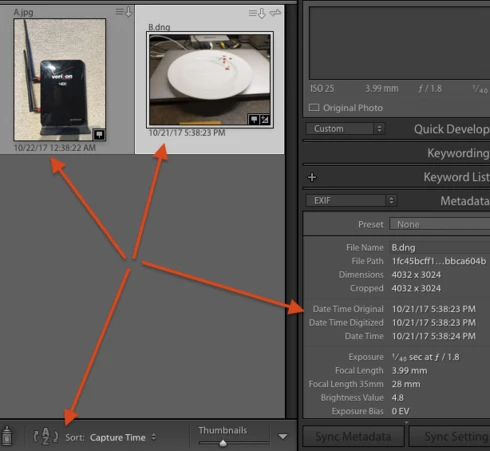
11. Select B.dng, do Metadata > Edit Capture Time, then click Change.
12. Observe that B.dng now sorts before A.jpg, even though it displays the same capture date/time under its thumbnail and in the metadata panel.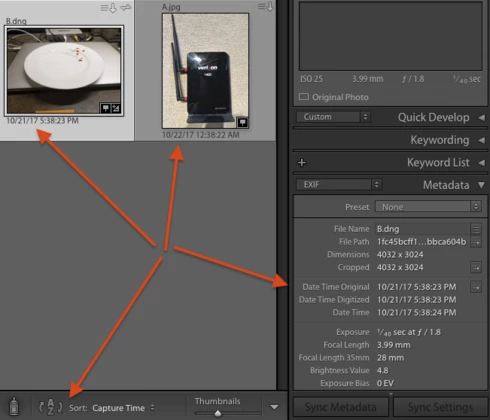
Tested on LR Classic 7.0 / MacOS 10.12.6, LR CC iPhone (updated two days ago) / iOS 11.0.2 / iPhone 7.


 AdChoices