
harrybarnettw
Inspiring
Aug 21, 2019 1:18 AM UTC
Released

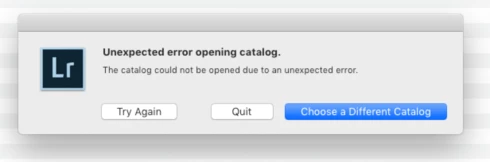
P: Unexpected error opening catalog on macOS

I am running Lr Classic. "8.4 Release". My catalog that has all of my pictures, and that I have always used on a daily basis, will not open. What is the issue?!

This topic is closed to new replies. Start a new post to keep the conversation going.

28 replies

Victoria Bampton LR Queen
Community Expert
Community Expert
Dec 9, 2021 10:56 AM UTC

@Danica22144838tv4b Why are the filenames changing? That looks like the source of the problem. I suspect you have some kind of sync problems going on. That's not a LR problem.

Translate
Victoria - The Lightroom Queen
Participant
Dec 9, 2021 6:57 AM UTC

@Victoria Bampton LR Queen 

I have another question, when I downloaded a catalog file with smart previous on my windows PC it will automatically show this (a smart previous-v11)


But when I downloaded the same catalog file with the smart previous on my MAC. Only the catalog upgraded to v-11 and not the smart previews which I'm thinking that's the reason why when I tried to open the catalog, it shows file not found. Do you have any idea how it works with MAC?


Translate
Participant
Dec 9, 2021 6:55 AM UTC

I have another question, when I downloaded a catalog file with smart previous on my windows PC it will automatically show this (a smart previous-v11)


But when I downloaded the same catalog file with the smart previous on my MAC. Only the catalog upgraded to v-11 and not the smart previews which I'm thinking that's the reason why when I tried to open the catalog, it shows file not found. Do you have any idea how it works with MAC?


Translate
Victoria Bampton LR Queen
Community Expert
Community Expert
Dec 8, 2021 12:54 PM UTC

@Danica22144838tv4b Check they've actually download, sometimes Dropbox Smart Sync doesn't actually download the files. You could also try copying them to another folder to see if they work.

Translate
Victoria - The Lightroom Queen
Participant
Dec 8, 2021 4:26 AM UTC

@Victoria Bampton LR Queen I have the same error when I tried to open the catalog through the Dropbox sync but when I tried to open the catalogs that I downloaded (not from the dropbox) i'm not getting the error. Do you know what should I do?

Translate
Rikk Flohr-Retired
Adobe Employee
Nov 26, 2021 6:49 PM UTC

Updating Status

Translate
Rikk Flohr: Adobe Photography Org
Participant
Nov 20, 2020 7:43 PM UTC

Sorry - this is a problem with the new LR 10

Translate
Participant
Nov 20, 2020 7:42 PM UTC

Is this not a known and acknowledged problem by Adobe? Any clue why they are not racing to fix this?

Translate
Rikk Flohr-Retired
Adobe Employee
Jun 16, 2020 1:13 PM UTC
Version 9.3, an update to Lightroom Classic, went live on June 15, 2020 and contains a fix for this issue. Please install the update and respond back if it does not cure the issue for you. Thank you for your patience!
Translate
Rikk Flohr: Adobe Photography Org
Victoria Bampton LR Queen
Community Expert
Community Expert
Aug 25, 2019 1:17 PM UTC
Yes, you can. It's purely a location set in that backup dialog, and once created, LR no longer tracks the backups.
Translate
Victoria - The Lightroom Queen