


Participant
November 27, 2022

P: Updated to 12.1 & seeing "Failed to initialize pixel-mask storage' error after relaunch (Win)

  • November 27, 2022
  • 32 replies
  • 7476 views

Based on posted recommendations here, I updated my LR C to 12.1., however, I still do get the error message and am not able to open LR at all. 
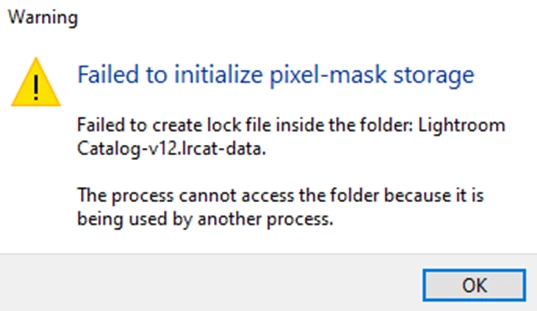
 

What shall I do?

Views


32 replies

gradyphoto
Participant
January 18, 2023

I followed the recommendation to open the lrdata file.  Renamed CURRENT to "former CURRENT".  Tried restarting Lightroom Classic 3 times, no success.  I also deleted "former CURRENT" and restarted 3 times, no success.

Running on Windows 11 (recent install), LR Classic version 12.1.0.8.   

There is no .lock file to be found anywhere.

What else?

Thanks,  Grady

Rikk Flohr_Photography
Community Manager
Community Manager
January 11, 2023

Adding bug number

Rikk Flohr: Adobe Photography Org
Known Participant
January 10, 2023

@thomasm41488594 did you open the lightroom catalog-v12.lrcat-data file? It's not in the lightroom catalog.lrcat-data file. It should be in the one with a version number in the name. This is the way it shows on my library anyways, ill post some pictures to

show

Participating Frequently
January 10, 2023

I just followed this for my Mac and it has not resolved the error.   There is no longer a file called CURRENT.  Any other suggestions.  

Known Participant
January 6, 2023

@johnrellis I happened to have this issue happen to me on 12.1, but was due to lightroom crashing while closing the library (this happened because my MacBook keeps disconnecting and reconnecting my external drives when I close my lid, can't disable hdd sleep due to apple removing it in settings, which would cause the next time I open lightroom to throw me an error of not finding library and having to close)


Now for the person you were replying to (main reason for comment) @Ahsan27733981kfwl :


Now to fix on Mac at least, you need to go to the folder containing the lightroom catalog file and right click on the lightroom catalog file and select show package contents and then follow the steps here:

quote

No, this has nothing to do with improper closing of Lightroom and a .lock file that needs to be deleted. Quite the opposite. The error says that Lightroom needs to create a lock file, but can't. This was a known issue with Lightroom Classic 12.0.1 and was supposed to be fixed in Lightroom Classic 12.1. Apparently it was not fixed completely. The discussion about the problem in 12.0.1 mentioned the following work-around, which is worth trying now as well:


For Windows:


Go to the catalog location > Open the .lrdata folder.

Delete or move the file named 'Current.'

Relaunch Lightroom Classic - twice. (The first relaunch returns the error, the following relaunch works)


-- Johan W. Elzenga


Participant
January 5, 2023

*SAME ISSUE*  This happened to me WITHOUT updating. It just started one day.
Windows 11. I've uninstalled and reinstalled the latest version a couple times. Folders are set to read and write. Permissions are in order. 
Where is Adobe?

johnrellis
Legend
December 30, 2022

"I still don't understand how to fix the situation on a Mac."


Adobe announced that LR 12.0.1 fixed this issue on Mac, and I can't find other reports here of that error on 12.0.1 or 12.1 (there might be some but I can't find them).  


Do the menu command Help > System Info and verify you have LR 12.1 (the latest version) installed.  If not, do Help > Updates.

Participant
December 30, 2022

Hi, I still don't understand how to fix the situation on a Mac. Please can someone help, thank you! 

Participant
December 29, 2022

This is a Windows solution, is there a Mac solution? 

JohanElzenga
Community Expert
Community Expert
December 29, 2022

A fix is in this thread.


-- Johan W. Elzenga