


Participant
November 27, 2022

P: Updated to 12.1 & seeing "Failed to initialize pixel-mask storage' error after relaunch (Win)

  • November 27, 2022
  • 32 replies
  • 7476 views

Based on posted recommendations here, I updated my LR C to 12.1., however, I still do get the error message and am not able to open LR at all. 
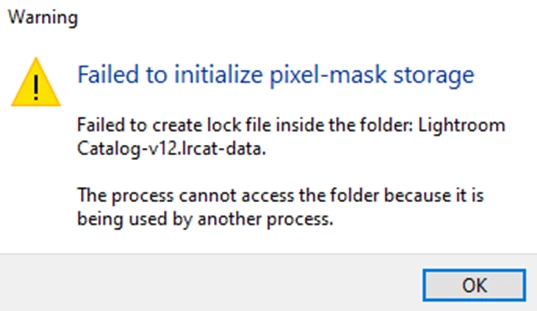
 

What shall I do?

Views


32 replies

Participant
December 28, 2022

Issue/error message" 

Failed to initialize pixel-mask storage

'Failed to create lock file inside the folder: Images Catalogue-2020-v12.lrcat-data.

The process cannot access the folder because it is being used by another process.'


This started happening today and I can't work out how to fix it, can someone please help! Thank you

TheDigitalDog
Inspiring
December 29, 2022

In System Preferences ((System Settings in Ventura), >Security & Privacy, >Full Disk Access, do you see Lightroom listed? If not, do add it and try again.


See: https://community.adobe.com/t5/lightroom-classic-discussions/quick-tips-how-to-give-full-disk-access-to-lightroom-classic-on-macos/td-p/12913413

Author “Color Management for Photographers" & "Photoshop CC Color Management/pluralsight"
Participant
December 29, 2022

Yes I have given added it/ given it full access but it is still coming up with the error

ann marieh84599219
Participant
December 27, 2022


Received the following error. I installed LRC 12.1 and restarted the computer but still experiencing this issue. 


Ian Lyons
Community Expert
Community Expert
December 27, 2022
Known Participant
December 23, 2022

also to get to that view you may have to right click and select show package contents if on a mac

JohanElzenga
Community Expert
Community Expert
December 21, 2022

The problem is not a .lock file in the catalog folder that needs to be removed. The problem is that Lightroom Classic needs to create a lock file inside the catalog.lrcat-data folder but can't. I gave the solution earlier in this thread, so just scroll back to the previous answers.


-- Johan W. Elzenga
Inspiring
December 21, 2022

There is no lock file

Inspiring
December 21, 2022

This morning when trying to launch Lightroom Classic I get the following error message:

Failed to initalize pixel-mask storage
Failed to create lock file inside the folder: Lightroom Catalog.Ircat-data.

The process cannot access the folder because it is being used by another process.


As mentioned, this just started happening today.  Lightroom Classic is up to date.  My OS is Windows 11 which is also up to date.

Any suggestions on what is causing this and how to fix?

Thanks


Ian Lyons
Community Expert
Community Expert
December 21, 2022

Check that the folder conating the LrC catalog doesn't already have a lock file. If it does, then delete same and retry launching the application.

JohanElzenga
Community Expert
Community Expert
December 16, 2022

No, this has nothing to do with improper closing of Lightroom and a .lock file that needs to be deleted. Quite the opposite. The error says that Lightroom needs to create a lock file, but can't. This was a known issue with Lightroom Classic 12.0.1 and was supposed to be fixed in Lightroom Classic 12.1. Apparently it was not fixed completely. The discussion about the problem in 12.0.1 mentioned the following work-around, which is worth trying now as well:


For Windows:

  • Go to the catalog location > Open the .lrdata folder.
  • Delete or move the file named 'Current.'
  • Relaunch Lightroom Classic - twice. (The first relaunch returns the error, the following relaunch works)


-- Johan W. Elzenga
Participating Frequently
December 16, 2022

Thank You.....this worked. I found the Current folder in the Lightroom Catalog-2-2-v12.lrcat-data. 


Thank you agian for your help. 

Participating Frequently
December 16, 2022

I can not open Lightroom CC due to error Error Message: Failed to initialize pixel-mask storage (Windows 11)

I have read a lot of posts. I have deleted lock files, I have restarted PC numerous times. I have shut down and started PC numerous times. I did a search for lock files and found none. 

Participating Frequently
December 16, 2022

I have tired the above and still can not open. 

Participating Frequently
December 16, 2022

No Lock files


Participant
December 16, 2022

Thank you for the reply. I tried to follow these steps, however, I cannot find any .lrcat.lock file in my Catalog...

AxelMatt
Community Expert
Community Expert
December 16, 2022

Do you has rebooted your computer?

Please do a cold boot!!

My System: Intel i7-8700K - 64GB RAM - NVidia Geforce RTX 3060 - Windows 11 Pro 25H2 -- LR-Classic 15 - Photoshop 27 - Nik Collection 8 - PureRAW 5 - Topaz Photo
Participant
December 16, 2022

Yes, I've rebooted and it did not help.


Any other idea how to fix it?


Participating Frequently
December 16, 2022

Hi, I am trying to open a catalog in Lightroom 12.1 on windows 11 22h2. The catalog has been moved and than moved back to original position. Now a get an error : lightroom kan pixelmaskeropslag niet initialiseren. 

Please help.

Thx